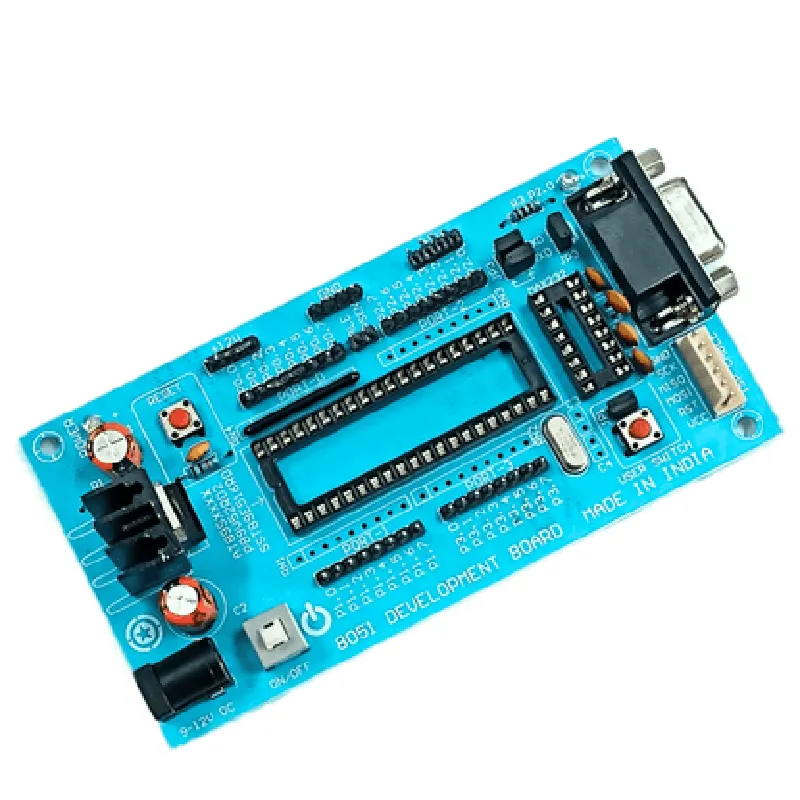
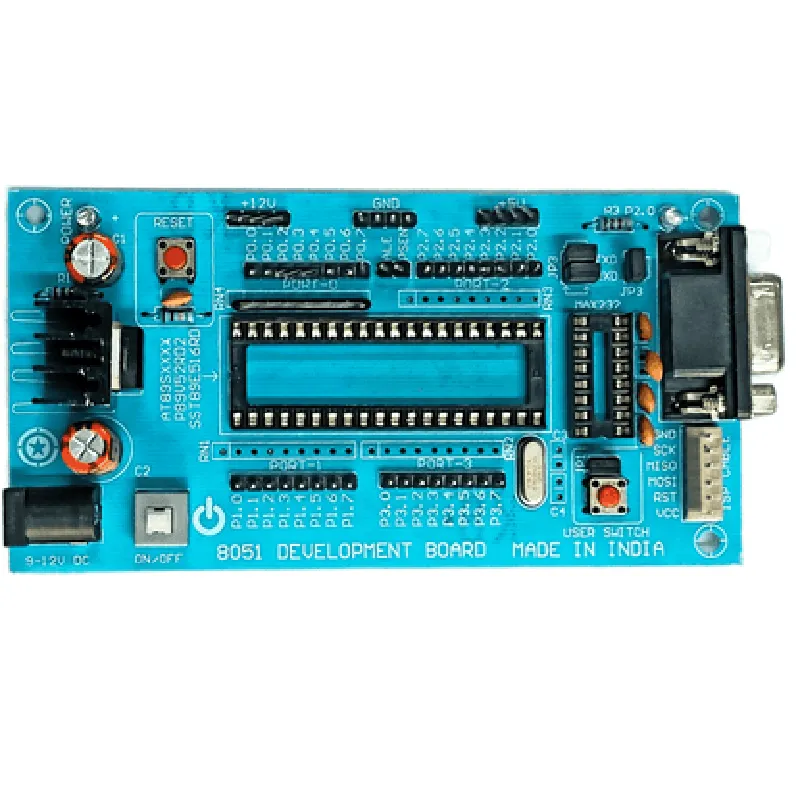
8051 Development Board (Made in India) Documentation
The 8051 Development Board is a microcontroller-based board designed for prototyping and development of IoT projects. It is based on the 8051 microcontroller, a popular and widely used 8-bit processor. This board is made in India and is designed to provide an easy-to-use platform for developers, students, and hobbyists to create innovative IoT projects.
8051 microcontroller with 8KB flash memory and 256 bytes of RAM
 12 digital input/output pins
 6 analog input pins
 1 UART (serial communication) port
 1 I2C (inter-integrated circuit) port
 1 SPI (serial peripheral interface) port
 Power supply: 5V DC (regulated)
 Onboard LED indicators for power, reset, and RX/TX
 Breadboard-friendly layout for easy prototyping
### Example 1: Blinking an LED using the 8051 Development Board
This example demonstrates how to use the 8051 Development Board to blink an LED connected to digital pin 10.
Code:
```c
#include <8051.h>
void main() {
    // Initialize the LED pin as an output
    P1 = 0xFF; // Set all pins as outputs
    P1 &= ~(1 << LED_PIN); // Set LED pin as output
while(1) {
        // Blink the LED
        P1 |= (1 << LED_PIN); // Set the LED pin high
        delay(500); // Wait for 500ms
        P1 &= ~(1 << LED_PIN); // Set the LED pin low
        delay(500); // Wait for 500ms
    }
}
void delay(unsigned int time) {
    unsigned int i;
    for(i=0; i<time; i++);
}
```
Explanation:
The code includes the `8051.h` header file, which provides functions and definitions for the 8051 microcontroller.
 The `LED_PIN` macro is defined as digital pin 10, which is connected to the LED.
 In the `main()` function, the LED pin is initialized as an output using the `P1` register.
 The LED is then blinked on and off using a simple toggle mechanism, with a delay of 500ms between each toggle.
### Example 2: Reading Analog Input using the 8051 Development Board
This example demonstrates how to use the 8051 Development Board to read an analog input from pin A0 and display the value on the serial console.
Code:
```c
#include <8051.h>
void main() {
    // Initialize the analog pin as an input
    P0 = 0xFF; // Set all pins as inputs
    P0 |= (1 << ANALOG_PIN); // Set analog pin as input
// Initialize the serial communication
    SCON = 0x50; // Mode 1: UART mode
    TMOD = 0x20; // Timer 1: baud rate generator
    TH1 = 0xFD; // Baud rate: 9600
    TI = 1; // Transmit enable
while(1) {
        // Read the analog input
        int analog_value = read_analog(ANALOG_PIN);
// Send the value to the serial console
        printf("Analog value: %d
", analog_value);
// Wait for 1 second
        delay(1000);
    }
}
int read_analog(int pin) {
    // Start the ADC conversion
    ADCCON = 0x80; // Start conversion
    while(!(ADCCON & 0x80)); // Wait for conversion to complete
// Read the ADC value
    return ADCRH;
}
void delay(unsigned int time) {
    unsigned int i;
    for(i=0; i<time; i++);
}
```
Explanation:
The code includes the `8051.h` header file, which provides functions and definitions for the 8051 microcontroller.
 The `ANALOG_PIN` macro is defined as analog pin A0.
 In the `main()` function, the analog pin is initialized as an input using the `P0` register.
 The serial communication is initialized using the `SCON`, `TMOD`, and `TH1` registers.
 The `read_analog()` function is used to read the analog input from pin A0, which returns the ADC value.
 The ADC value is then sent to the serial console using the `printf()` function.
 The code waits for 1 second using the `delay()` function before taking the next reading.
Note: These examples are just a starting point, and you may need to modify them to suit your specific project requirements. Additionally, the code examples assume that the 8051 Development Board is connected to a serial console or a PC with a terminal emulator for output.