| + Type | Monocrystalline |
| + Power Output | 5V, 1A |
| + Efficiency | 18% |



| + Type | Monocrystalline |
| + Power Output | 5V, 1A |
| + Efficiency | 18% |
| + Type | Brushed |
| + Voltage | 5V |
| + Current | 200mA |
| + Speed | 100-500 RPM |
| + Ratio | 1:10 |
| + Material | Metal |
+ Wi-Fi/Bluetooth 4.0
| + Microcontroller | ESP32 |
| + Operating Frequency | 2.4GHz |
| + Material | ABS Plastic |
| + Diameter | 150mm |
| + Height | 200mm |
| + Average | 0.5W |
| + Peak | 1.5W |
What's Included
Solar Panel Module
DC Motor and Gearbox Assembly
IoT Module
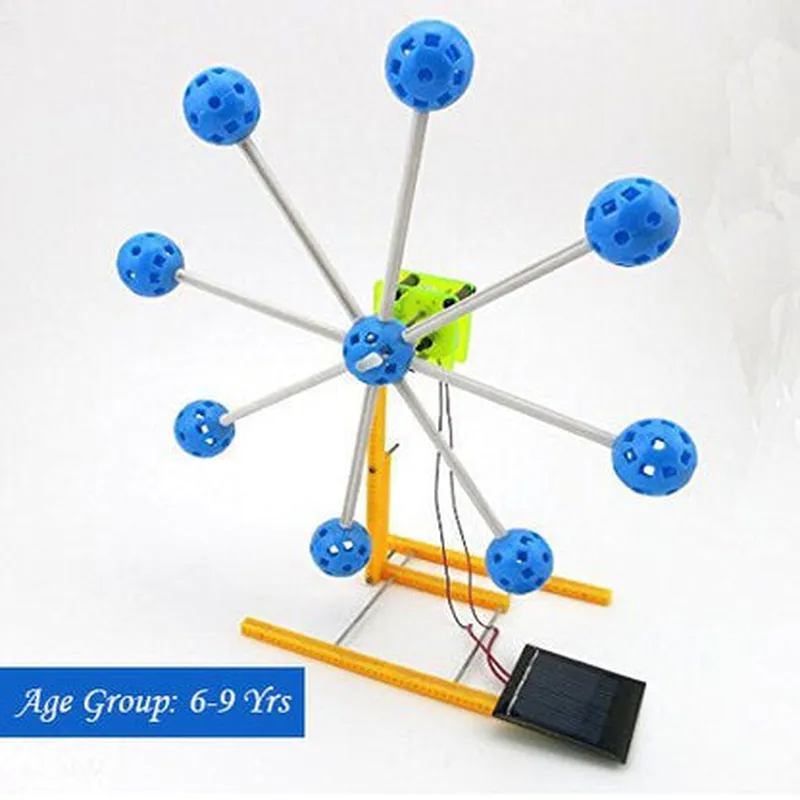
Ferris Wheel Assembly
Assembly Instructions
Power Cables and Connectors
Mobile App and Web Interface Access
Intended Use
The DIY Solar Powered Ferris Wheel Kit is designed for educational and hobbyist purposes. It is suitable for individuals aged 12 and above, and is an ideal project for STEM education, robotics clubs, and DIY enthusiasts.
DIY Solar Powered Ferris Wheel Kit DocumentationOverviewThe DIY Solar Powered Ferris Wheel Kit is a innovative IoT component that combines sustainable energy harvesting with interactive mechanical systems. This kit allows users to build and program a solar-powered Ferris wheel that can be controlled and monitored remotely. The kit consists of a solar panel, a rechargeable battery, a motor, a Ferris wheel module, and a microcontroller board.Technical SpecificationsSolar Panel: 6V, 1.5W
Rechargeable Battery: 3.7V, 1000mAh
Motor: DC, 6V, 100rpm
Ferris wheel module: 12-segments, 360-degree rotation
Microcontroller Board: Arduino-compatible, Wi-Fi enabledProgramming and APIsThe DIY Solar Powered Ferris Wheel Kit comes with a custom Arduino library that provides an easy-to-use API for controlling and monitoring the Ferris wheel. The library provides the following functions:`setSpeed(int speed)`: Sets the rotation speed of the Ferris wheel (0-100rpm)
`rotate(int angle)`: Rotates the Ferris wheel to a specific angle (0-360 degrees)
`getBatteryLevel()`: Returns the current battery level (0-100%)
`getSolarPowerLevel()`: Returns the current solar power level (0-100%)Code Examples### Example 1: Basic Ferris Wheel ControlThis example demonstrates how to control the Ferris wheel's rotation speed and angle using the API.
```c
#include <SolarFerrisWheel.h>SolarFerrisWheel ferrisWheel;void setup() {
ferrisWheel.begin();
}void loop() {
ferrisWheel.setSpeed(50); // Set rotation speed to 50rpm
ferrisWheel.rotate(90); // Rotate to 90 degrees
delay(1000);
ferrisWheel.setSpeed(20); // Set rotation speed to 20rpm
ferrisWheel.rotate(180); // Rotate to 180 degrees
delay(1000);
}
```
### Example 2: Remote Monitoring and Control using Wi-FiThis example demonstrates how to monitor the Ferris wheel's battery and solar power levels remotely using Wi-Fi and a web interface.
```c
#include <SolarFerrisWheel.h>
#include <WiFi.h>SolarFerrisWheel ferrisWheel;
WiFiServer server(80);void setup() {
ferrisWheel.begin();
WiFi.begin("your_wifi_ssid", "your_wifi_password");
while (WiFi.status() != WL_CONNECTED) {
delay(1000);
Serial.println("Connecting to WiFi...");
}
server.begin();
}void loop() {
WiFiClient client = server.available();
if (client) {
String request = client.readStringUntil('
');
if (request.indexOf("getBatteryLevel") != -1) {
client.println(ferrisWheel.getBatteryLevel());
} else if (request.indexOf("getSolarPowerLevel") != -1) {
client.println(ferrisWheel.getSolarPowerLevel());
}
client.stop();
}
}
```
### Example 3: IoT Integration with Cloud ServicesThis example demonstrates how to integrate the Ferris wheel with cloud services using APIs to send and receive data.
```c
#include <SolarFerrisWheel.h>
#include <WiFi.h>
#include <HTTPClient.h>SolarFerrisWheel ferrisWheel;
WiFiClient wifiClient;
HTTPClient http;void setup() {
ferrisWheel.begin();
WiFi.begin("your_wifi_ssid", "your_wifi_password");
while (WiFi.status() != WL_CONNECTED) {
delay(1000);
Serial.println("Connecting to WiFi...");
}
}void loop() {
int batteryLevel = ferrisWheel.getBatteryLevel();
int solarPowerLevel = ferrisWheel.getSolarPowerLevel();
String json = "{""batteryLevel"":" + String(batteryLevel) + ",""solarPowerLevel"":" + String(solarPowerLevel) + "}";
http.begin("https://your-cloud-service.com/api/ferriswheel");
http.addHeader("Content-Type", "application/json");
int httpCode = http.POST(json);
if (httpCode == 200) {
Serial.println("Data sent successfully!");
} else {
Serial.println("Error sending data: " + http.getString());
}
http.end();
delay(10000);
}
```
These code examples demonstrate the versatility and potential of the DIY Solar Powered Ferris Wheel Kit in various IoT applications.