

Stufin
Home Quick Cart Profile

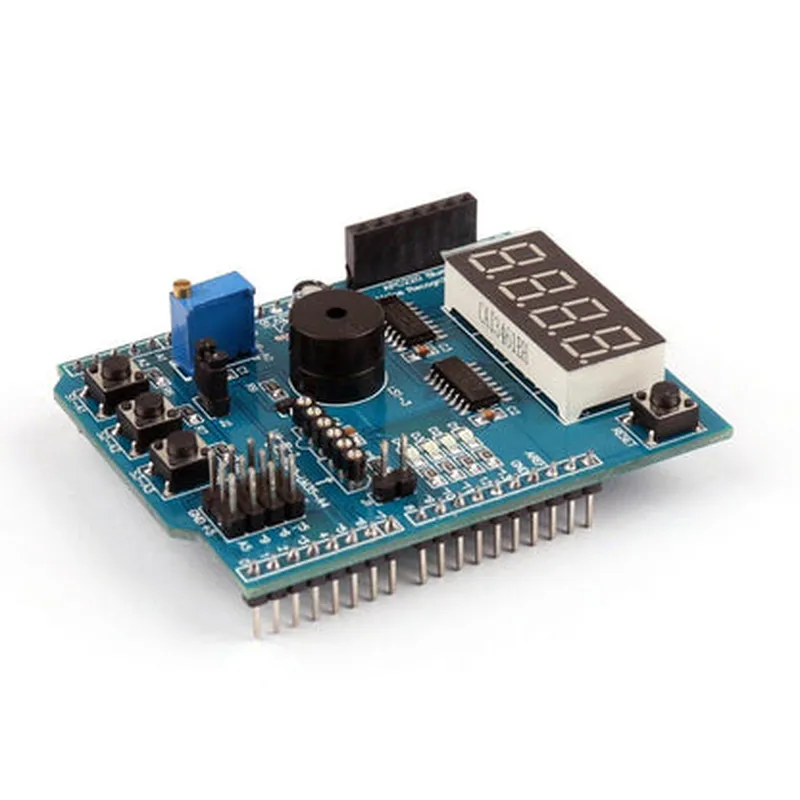
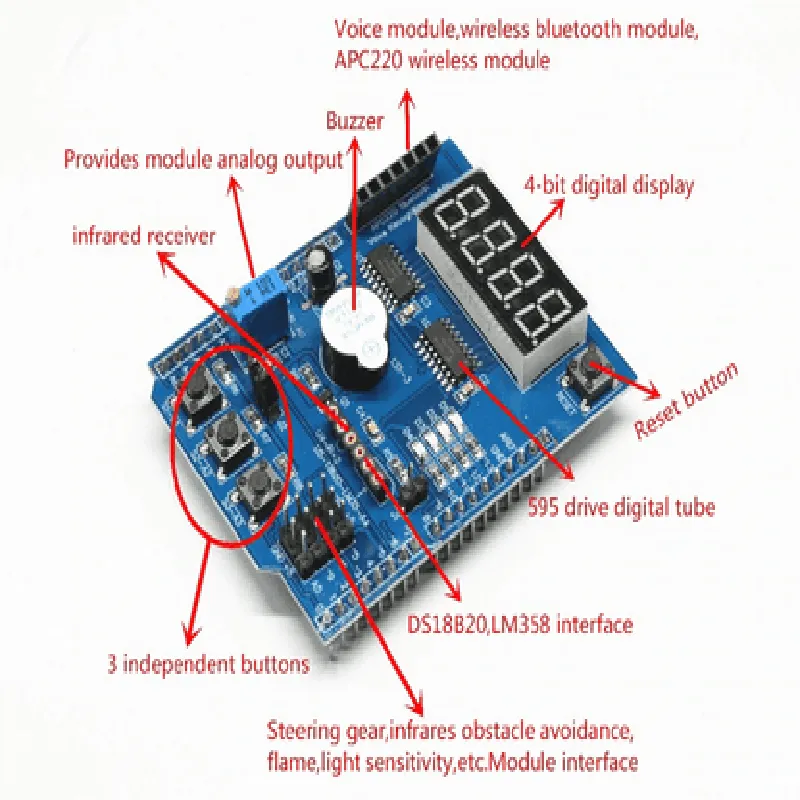
Arduino UNO R3, Leonardo Multifunctional Expansion Board

Buy Now on Stufin

Microcontroller

ATmega32U4

Clock Speed

16 MHz

Flash Memory

32KB

SRAM

2.5KB

EEPROM

1KB

Digital I/O Pins14

Analog Input Pins

6

I2C Pins2

Power Input

7-12V DC

Operating Temperature

-20C to 70C

Dimensions

68.58 mm x 53.34 mm

Applications

  • Robotics and automation
  • Home automation and control systems
  • Industrial control and monitoring
  • Wearable devices and IoT-based wearables
  • Prototyping and proof-of-concept development
The Arduino UNO R3, Leonardo Multifunctional Expansion Board is an ideal choice for various IoT projects, including

Conclusion

The Arduino UNO R3, Leonardo Multifunctional Expansion Board is a powerful and feature-rich add-on board designed to enhance the capabilities of the Arduino UNO R3 microcontroller board. With its versatile functionalities, key features, and technical specifications, this board is an ideal choice for a wide range of IoT applications.

Pin Configuration

  • Arduino UNO R3, Leonardo Multifunctional Expansion Board Pinout Guide
  • The Arduino UNO R3, Leonardo Multifunctional Expansion Board is a versatile board that combines the functionality of the Arduino UNO R3 and Leonardo boards. This guide provides a detailed explanation of each pin on the board, including their functions, types, and connection examples.
  • Digital Pins (0-13)
  • 1. Digital Pin 0 (RX0):
  • Function: Receive (RX) pin for serial communication (UART)
  • Type: Input
  • Connection Example: Connect to the transmit (TX) pin of a serial device, such as a GPS module or a serial LCD display
  • 2. Digital Pin 1 (TX0):
  • Function: Transmit (TX) pin for serial communication (UART)
  • Type: Output
  • Connection Example: Connect to the receive (RX) pin of a serial device, such as a GPS module or a serial LCD display
  • 3. Digital Pin 2:
  • Function: Digital input/output pin
  • Type: Input/Output
  • Connection Example: Connect to a push-button or a sensor, or use as an output to control an LED or a relay
  • 4. Digital Pin 3:
  • Function: Digital input/output pin, also used as the PWM output for Timer 0
  • Type: Input/Output
  • Connection Example: Connect to a servo motor or an LED strip, or use as an input to read a sensor value
  • 5. Digital Pin 4:
  • Function: Digital input/output pin
  • Type: Input/Output
  • Connection Example: Connect to a push-button or a sensor, or use as an output to control an LED or a relay
  • 6. Digital Pin 5:
  • Function: Digital input/output pin, also used as the PWM output for Timer 1
  • Type: Input/Output
  • Connection Example: Connect to a servo motor or an LED strip, or use as an input to read a sensor value
  • 7. Digital Pin 6:
  • Function: Digital input/output pin
  • Type: Input/Output
  • Connection Example: Connect to a push-button or a sensor, or use as an output to control an LED or a relay
  • 8. Digital Pin 7:
  • Function: Digital input/output pin
  • Type: Input/Output
  • Connection Example: Connect to a push-button or a sensor, or use as an output to control an LED or a relay
  • 9. Digital Pin 8:
  • Function: Digital input/output pin
  • Type: Input/Output
  • Connection Example: Connect to a push-button or a sensor, or use as an output to control an LED or a relay
  • 10. Digital Pin 9:
  • Function: Digital input/output pin, also used as the PWM output for Timer 2
  • Type: Input/Output
  • Connection Example: Connect to a servo motor or an LED strip, or use as an input to read a sensor value
  • 11. Digital Pin 10:
  • Function: Digital input/output pin, also used as the SS (Slave Select) pin for SPI communication
  • Type: Input/Output
  • Connection Example: Connect to a slave device's SS pin, such as an SD card reader or an Ethernet module
  • 12. Digital Pin 11:
  • Function: Digital input/output pin, also used as the MOSI (Master Out Slave In) pin for SPI communication
  • Type: Input/Output
  • Connection Example: Connect to a slave device's MOSI pin, such as an SD card reader or an Ethernet module
  • 13. Digital Pin 12:
  • Function: Digital input/output pin, also used as the MISO (Master In Slave Out) pin for SPI communication
  • Type: Input/Output
  • Connection Example: Connect to a slave device's MISO pin, such as an SD card reader or an Ethernet module
  • 14. Digital Pin 13:
  • Function: Digital input/output pin, also used as the SCK (Clock) pin for SPI communication
  • Type: Input/Output
  • Connection Example: Connect to a slave device's SCK pin, such as an SD card reader or an Ethernet module
  • Analog Pins (A0-A5)
  • 1. Analog Pin A0:
  • Function: Analog input pin
  • Type: Input
  • Connection Example: Connect to a potentiometer, a sensor, or a variable resistor
  • 2. Analog Pin A1:
  • Function: Analog input pin
  • Type: Input
  • Connection Example: Connect to a potentiometer, a sensor, or a variable resistor
  • 3. Analog Pin A2:
  • Function: Analog input pin
  • Type: Input
  • Connection Example: Connect to a potentiometer, a sensor, or a variable resistor
  • 4. Analog Pin A3:
  • Function: Analog input pin
  • Type: Input
  • Connection Example: Connect to a potentiometer, a sensor, or a variable resistor
  • 5. Analog Pin A4:
  • Function: Analog input pin, also used as the SDA (Serial Data) pin for I2C communication
  • Type: Input
  • Connection Example: Connect to an I2C device's SDA pin, such as an LCD display or a sensor module
  • 6. Analog Pin A5:
  • Function: Analog input pin, also used as the SCL (Serial Clock) pin for I2C communication
  • Type: Input
  • Connection Example: Connect to an I2C device's SCL pin, such as an LCD display or a sensor module
  • Power Pins
  • 1. VIN:
  • Function: Input voltage pin (7-12V)
  • Type: Input
  • Connection Example: Connect to a power source, such as a battery or a wall adapter
  • 2. 5V:
  • Function: Regulated 5V output pin
  • Type: Output
  • Connection Example: Connect to a 5V device, such as an LCD display or a sensor module
  • 3. 3.3V:
  • Function: Regulated 3.3V output pin
  • Type: Output
  • Connection Example: Connect to a 3.3V device, such as an RF module or a sensor module
  • 4. GND:
  • Function: Ground pin
  • Type: Input
  • Connection Example: Connect to a ground pin on a device or a breadboard
  • Other Pins
  • 1. RESET:
  • Function: Reset pin
  • Type: Input
  • Connection Example: Connect to a reset button or a reset circuit
  • 2. ICSP:
  • Function: In-Circuit Serial Programming (ICSP) header
  • Type: Programming interface
  • Connection Example: Connect to a programmer, such as an Arduino ISP or a USBtinyISP
  • When connecting pins, ensure that you are using the correct voltage and current ratings to avoid damaging the board or the connected devices. Always double-check the pinout diagram and the datasheet for the specific component you are connecting to ensure compatibility and proper usage.

Code Examples

Arduino UNO R3, Leonardo Multifunctional Expansion Board Documentation
Overview
The Arduino UNO R3, Leonardo Multifunctional Expansion Board is a versatile expansion board designed to work with Arduino UNO R3 and Leonardo boards. It provides a range of features and interfaces, including USB, UART, IIC, SPI, and GPIO, making it an ideal choice for IoT projects that require multiple interfaces and peripherals.
Key Features
Compatible with Arduino UNO R3 and Leonardo boards
 Onboard USB interface for programming and serial communication
 UART interface for serial communication with external devices
 IIC interface for connecting IIC devices such as sensors and displays
 SPI interface for connecting SPI devices such as SD cards and displays
 GPIO interface for connecting digital and analog sensors and actuators
 Power supply module with 3.3V and 5V output
 LEDs and buttons for user interaction and feedback
Connections and Pinouts
The expansion board has the following connections and pinouts:
USB: Connects to the host computer for programming and serial communication
 UART: TX (Digital Pin 1), RX (Digital Pin 0)
 IIC: SCL (Analog Pin 5), SDA (Analog Pin 4)
 SPI: SCK (Digital Pin 13), MOSI (Digital Pin 11), MISO (Digital Pin 12)
 GPIO: Digital Pins 0-13, Analog Pins 0-5
 Power: 3.3V and 5V output, Vin input
Code Examples
### Example 1: UART Serial Communication
This example demonstrates how to use the UART interface to communicate with an external serial device.
```c
#include <SoftwareSerial.h>
const int rxPin = 0;  // UART RX pin
const int txPin = 1;  // UART TX pin
SoftwareSerial mySerial(rxPin, txPin); // Create a SoftwareSerial object
void setup() {
  mySerial.begin(9600); // Set the baud rate
}
void loop() {
  if (mySerial.available() > 0) {
    char inChar = mySerial.read();
    Serial.print(inChar); // Print the received character to the serial monitor
  }
}
```
### Example 2: IIC LCD Display
This example demonstrates how to use the IIC interface to connect an LCD display and display a message.
```c
#include <Wire.h>
#include <LiquidCrystal_I2C.h>
// Define the IIC address of the LCD display
const int lcdAddr = 0x27;
LiquidCrystal_I2C lcd(lcdAddr, 20, 4); // Create an LCD object
void setup() {
  lcd.begin(); // Initialize the LCD display
  lcd.setCursor(0, 0); // Set the cursor to the top-left corner
  lcd.print("Hello, World!"); // Print a message to the LCD display
}
void loop() {
  // Do nothing in the loop
}
```
### Example 3: SPI SD Card Reader
This example demonstrates how to use the SPI interface to read data from an SD card.
```c
#include <SPI.h>
#include <SD.h>
const int csPin = 5; // SPI chip select pin
void setup() {
  SD.begin(csPin); // Initialize the SD card
  File dataFile = SD.open("data.txt"); // Open a file on the SD card
  if (dataFile) {
    while (dataFile.available()) {
      Serial.write(dataFile.read()); // Read and print the file contents to the serial monitor
    }
    dataFile.close();
  } else {
    Serial.println("Error opening file");
  }
}
void loop() {
  // Do nothing in the loop
}
```
These examples demonstrate the versatility and functionality of the Arduino UNO R3, Leonardo Multifunctional Expansion Board. By using the various interfaces and peripherals provided by the board, you can build a wide range of IoT projects and applications.