Stufin
Home Quick Cart Profile

Raspberry Pi 4 Premium Black Case


Buy Now on Stufin

Component Name

Raspberry Pi 4 Premium Black Case
Description

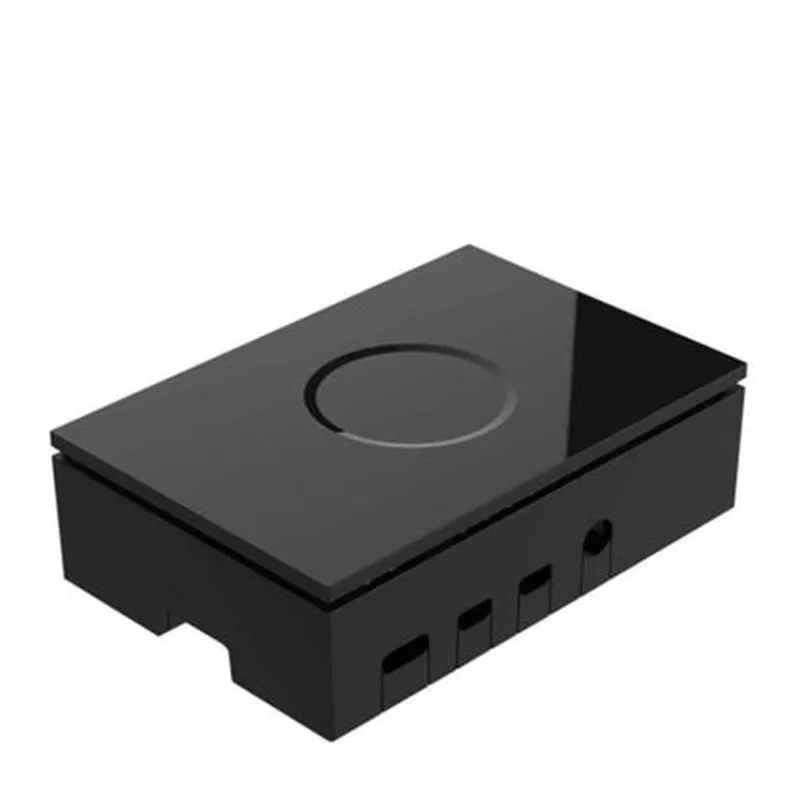
The Raspberry Pi 4 Premium Black Case is a high-quality, durable, and stylish enclosure designed specifically for the Raspberry Pi 4 single-board computer. This case provides a robust and compact housing for the Raspberry Pi 4, protecting it from physical damage, dust, and other environmental factors while ensuring optimal airflow and heat dissipation.
Functionality

  • Protect the Raspberry Pi 4 from physical damage, such as scratches, drops, and bumps.
  • Prevent dust and debris from entering the case, ensuring the board remains clean and functional.
  • Provide excellent airflow, allowing heat generated by the board to dissipate efficiently.
  • Offer a rugged and durable design, suitable for a wide range of applications, from hobby projects to industrial deployments.
The primary function of the Raspberry Pi 4 Premium Black Case is to provide a secure and reliable enclosure for the Raspberry Pi 4, allowing users to mount and operate the board safely and efficiently. The case is designed to

Key Features

  • Compact Design: The case is precision-designed to fit the Raspberry Pi 4 perfectly, minimizing wasted space and ensuring a snug fit.
  • Durable Construction: The case is made from high-quality, injection-molded plastic, providing exceptional strength, durability, and resistance to wear and tear.
  • Premium Finish: The black finish gives the case a sleek, professional appearance, making it suitable for use in a variety of settings.
  • Ventilation System: The case features strategically placed ventilation holes and channels to ensure efficient airflow and heat dissipation.
  • Easy Assembly: The case is designed for easy assembly and disassembly, with clear access to the Raspberry Pi 4's ports and components.
  • Mounting Options: The case provides multiple mounting options, including four screw holes and two snap-fit clips, allowing for flexible installation and deployment.
  • Compatibility: The case is specifically designed for the Raspberry Pi 4 and is compatible with all standard Raspberry Pi 4 models.
  • Access to Ports: The case provides unhindered access to all Raspberry Pi 4 ports, including HDMI, USB, Ethernet, and GPIO.
  • Wall-Mountable: The case is designed to be wall-mountable, making it ideal for use in IoT projects, home automation, and other applications where a neat and compact design is required.

Material

Injection-molded plastic

Color

Premium Black

Dimensions

93mm x 65mm x 35mm (L x W x H)

Weight

120g

Compatibility

Raspberry Pi 4 Model B, 2GB, 4GB, 8GB

Operating Temperature

-20C to 60C

Benefits

  • Provides a rugged and durable enclosure for the Raspberry Pi 4.
  • Ensures optimal airflow and heat dissipation.
  • Offers a stylish and professional appearance.
  • Easy to assemble and disassemble.
  • Compatible with all standard Raspberry Pi 4 models.
  • Provides multiple mounting options.

Applications

  • IoT Projects
  • Home Automation
  • Robotics
  • Industrial Automation
  • DIY Projects
  • Prototyping
  • Proof-of-Concept Development

The Raspberry Pi 4 Premium Black Case is an excellent addition to any Raspberry Pi 4 project, providing a reliable, durable, and stylish enclosure that ensures optimal performance and longevity.

Pin Configuration

  • Raspberry Pi 4 Premium Black Case Pinout Guide
  • The Raspberry Pi 4 Premium Black Case is a compact and durable enclosure for the Raspberry Pi 4 model, a popular single-board computer. The case provides access to all the GPIO pins, making it ideal for IoT projects and prototyping. In this guide, we will explain each pin on the Raspberry Pi 4, detailing their functions and how to connect them.
  • GPIO Pins (40-pin header)
  • The Raspberry Pi 4 has a 40-pin GPIO header, which includes:
  • Power Pins (6)
  • 1. Pin 1: 3.3V Power
  • Provides 3.3V power output from the Raspberry Pi
  • Can be used to power small external devices
  • 2. Pin 2: 5V Power
  • Provides 5V power output from the Raspberry Pi
  • Can be used to power external devices that require 5V
  • 3. Pin 6: Ground
  • Provides a ground connection for the Raspberry Pi
  • Used as a reference point for other pins
  • 4. Pin 9: Ground
  • Provides an additional ground connection for the Raspberry Pi
  • Used as a reference point for other pins
  • 5. Pin 17: 3.3V Power
  • Provides an additional 3.3V power output from the Raspberry Pi
  • Can be used to power small external devices
  • 6. Pin 30: Ground
  • Provides an additional ground connection for the Raspberry Pi
  • Used as a reference point for other pins
  • GPIO Pins (26)
  • These pins can be used for general-purpose input/output operations, such as reading sensor data or controlling actuators.
  • 1. Pin 3: GPIO 2 (SDA1)
  • Can be used as a GPIO input/output or as an I2C serial data line (SDA1)
  • 2. Pin 5: GPIO 3 (SCL1)
  • Can be used as a GPIO input/output or as an I2C serial clock line (SCL1)
  • 3. Pin 7: GPIO 4
  • Can be used as a GPIO input/output
  • 4. Pin 8: GPIO 14 (TXD)
  • Can be used as a GPIO input/output or as a UART transmit data line (TXD)
  • 5. Pin 10: GPIO 15 (RXD)
  • Can be used as a GPIO input/output or as a UART receive data line (RXD)
  • 6. Pin 11: GPIO 17
  • Can be used as a GPIO input/output
  • 7. Pin 12: GPIO 18
  • Can be used as a GPIO input/output
  • 8. Pin 13: GPIO 21
  • Can be used as a GPIO input/output
  • 9. Pin 15: GPIO 22
  • Can be used as a GPIO input/output
  • 10. Pin 16: GPIO 23
  • Can be used as a GPIO input/output
  • 11. Pin 18: GPIO 24
  • Can be used as a GPIO input/output
  • 12. Pin 19: GPIO 10 (SPI_MOSI)
  • Can be used as a GPIO input/output or as a SPI master out-slave in (MOSI) line
  • 13. Pin 21: GPIO 9 (SPI_MISO)
  • Can be used as a GPIO input/output or as a SPI master in-slave out (MISO) line
  • 14. Pin 22: GPIO 25
  • Can be used as a GPIO input/output
  • 15. Pin 23: GPIO 11 (SPI_CLK)
  • Can be used as a GPIO input/output or as a SPI clock line
  • 16. Pin 24: GPIO 8 (SPI_CE0_N)
  • Can be used as a GPIO input/output or as a SPI chip enable 0 (CE0_N) line
  • 17. Pin 26: GPIO 7 (SPI_CE1_N)
  • Can be used as a GPIO input/output or as a SPI chip enable 1 (CE1_N) line
  • Special Pins (4)
  • 1. Pin 27: ID_SD (I2C ID EEPROM)
  • Used for I2C communication with the ID EEPROM on the Raspberry Pi
  • 2. Pin 28: ID_SC (I2C ID EEPROM)
  • Used for I2C communication with the ID EEPROM on the Raspberry Pi
  • 3. Pin 31: PWR_INT (Power Interrupt)
  • Provides a power interrupt signal to the Raspberry Pi
  • 4. Pin 39: RUN (Run Mode)
  • Used to control the power mode of the Raspberry Pi
  • Connecting the Pins
  • To connect the pins, you'll need:
  • Jumper wires or a breadboard
  • A Raspberry Pi 4
  • Optional: sensors, actuators, or other external devices
  • Connectors and Headers
  • The Raspberry Pi 4 Premium Black Case provides a 40-pin header that matches the Raspberry Pi 4's GPIO pinout. You can use jumper wires or a breadboard to connect external devices to the GPIO pins.
  • Tips and Precautions
  • Always handle the Raspberry Pi and its components with care to avoid damage.
  • Use a multimeter to verify the voltage and current ratings of your external devices before connecting them to the Raspberry Pi.
  • Consult the datasheets and documentation for your external devices to ensure proper connection and usage.
  • Be mindful of the power consumption of your project to avoid overloading the Raspberry Pi's power supply.
  • By following this guide, you'll be able to identify and connect the pins on your Raspberry Pi 4 Premium Black Case, unlocking a world of possibilities for your IoT projects and prototypes.

Code Examples

Raspberry Pi 4 Premium Black Case Documentation
The Raspberry Pi 4 Premium Black Case is a high-quality enclosure designed specifically for the Raspberry Pi 4 model. It provides a secure and stylish housing for your Raspberry Pi 4 board, protecting it from dust and physical damage. This case is ideal for various projects, including home automation, media centers, and robotics.
Features:
Compatible with Raspberry Pi 4 model
 Premium black ABS plastic construction
 Durable and robust design
 Easy to assemble and disassemble
 Accessible GPIO pins, HDMI, and USB ports
 Cooling system for efficient heat dissipation
Code Examples:
### Example 1: IoT Home Automation using Python and GPIO Pins
In this example, we'll use the Raspberry Pi 4 Premium Black Case to create a simple home automation system that controls an LED light using a Python script and GPIO pins.
Hardware Requirements:
Raspberry Pi 4 with Premium Black Case
 LED light
 Breadboard
 Jumper wires
 1 k resistor
Software Requirements:
Raspbian OS
 Python 3.x
Code:
```python
import RPi.GPIO as GPIO
import time
# Set up GPIO mode
GPIO.setmode(GPIO.BCM)
# Define the GPIO pin for the LED
LED_PIN = 17
# Set up the GPIO pin as an output
GPIO.setup(LED_PIN, GPIO.OUT)
try:
    while True:
        # Turn on the LED
        GPIO.output(LED_PIN, GPIO.HIGH)
        print("LED is on")
        time.sleep(1)
# Turn off the LED
        GPIO.output(LED_PIN, GPIO.LOW)
        print("LED is off")
        time.sleep(1)
except KeyboardInterrupt:
    # Clean up GPIO pins on exit
    GPIO.cleanup()
```
### Example 2: Media Center using Kodi and HDMI Output
In this example, we'll use the Raspberry Pi 4 Premium Black Case to create a media center using Kodi and HDMI output.
Hardware Requirements:
Raspberry Pi 4 with Premium Black Case
 HDMI cable
 TV or monitor
 Power supply
Software Requirements:
Raspbian OS
 Kodi media player
Code:
```bash
# Install Kodi on Raspbian OS
sudo apt-get update
sudo apt-get install kodi
# Configure Kodi to use HDMI output
sudo kodi --standalone -d /home/pi/kodi_data
```
### Example 3: Robotics using Python and GPIO Pins (optional)
In this example, we'll use the Raspberry Pi 4 Premium Black Case to create a simple robotic car using Python and GPIO pins.
Hardware Requirements:
Raspberry Pi 4 with Premium Black Case
 Robot chassis
 Motor driver
 DC motors
 Jumper wires
Software Requirements:
Raspbian OS
 Python 3.x
Code:
```python
import RPi.GPIO as GPIO
import time
# Set up GPIO mode
GPIO.setmode(GPIO.BCM)
# Define the GPIO pins for the motors
MOTOR1_PIN_FOR = 18
MOTOR1_PIN_BACK = 23
MOTOR2_PIN_FOR = 24
MOTOR2_PIN_BACK = 25
# Set up the GPIO pins as outputs
GPIO.setup(MOTOR1_PIN_FOR, GPIO.OUT)
GPIO.setup(MOTOR1_PIN_BACK, GPIO.OUT)
GPIO.setup(MOTOR2_PIN_FOR, GPIO.OUT)
GPIO.setup(MOTOR2_PIN_BACK, GPIO.OUT)
try:
    while True:
        # Move the robot forward
        GPIO.output(MOTOR1_PIN_FOR, GPIO.HIGH)
        GPIO.output(MOTOR2_PIN_FOR, GPIO.HIGH)
        time.sleep(1)
# Move the robot backward
        GPIO.output(MOTOR1_PIN_BACK, GPIO.HIGH)
        GPIO.output(MOTOR2_PIN_BACK, GPIO.HIGH)
        time.sleep(1)
except KeyboardInterrupt:
    # Clean up GPIO pins on exit
    GPIO.cleanup()
```
These examples demonstrate the versatility of the Raspberry Pi 4 Premium Black Case in various IoT applications. The case provides a secure and stylish housing for your Raspberry Pi 4 board, making it an ideal choice for projects that require a reliable and compact hardware platform.