Stufin
Home Quick Cart Profile

DIY CX-002 Lark Quadcopter


Buy Now on Stufin

Component Name

DIY CX-002 Lark Quadcopter
Overview

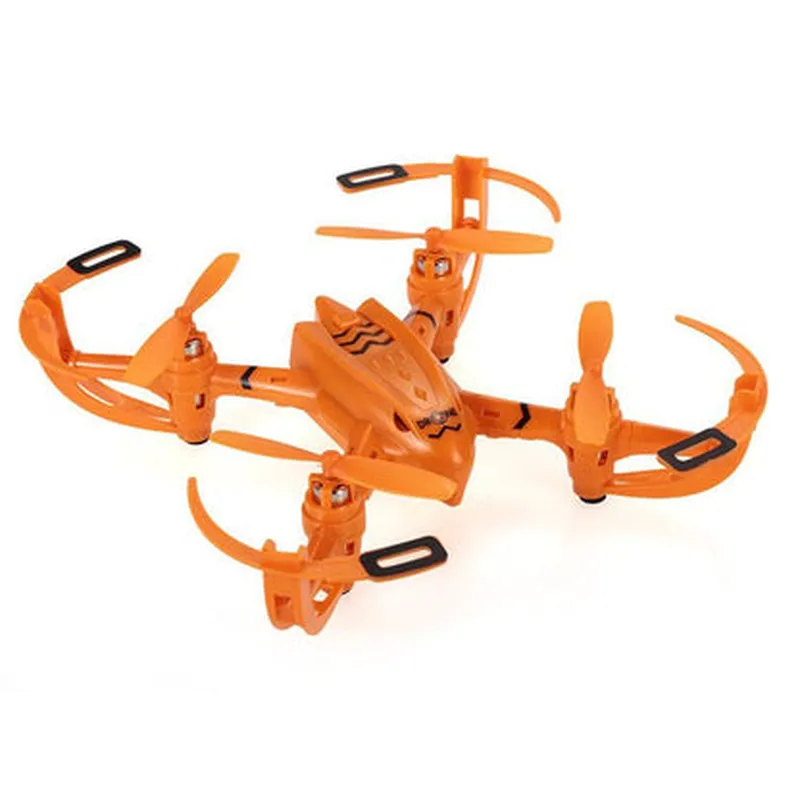
The DIY CX-002 Lark Quadcopter is a versatile and customizable flying robot platform designed for enthusiasts, hobbyists, and developers. This quadcopter offers a unique blend of performance, durability, and affordability, making it an ideal choice for various applications, including aerial photography, surveillance, and research.
Functionality

The DIY CX-002 Lark Quadcopter is a remote-controlled, four-rotor aircraft capable of vertical takeoff and landing (VTOL). It can be controlled using a radio transmitter or programmed to perform autonomous flights using its onboard flight controller and GPS module. The quadcopter's primary functionality includes

Flight Control

The quadcopter is equipped with a powerful flight controller that allows for stable and agile flight. The controller automatically adjusts motor speeds to maintain stability and respond to pilot inputs.

Autopilot Capability

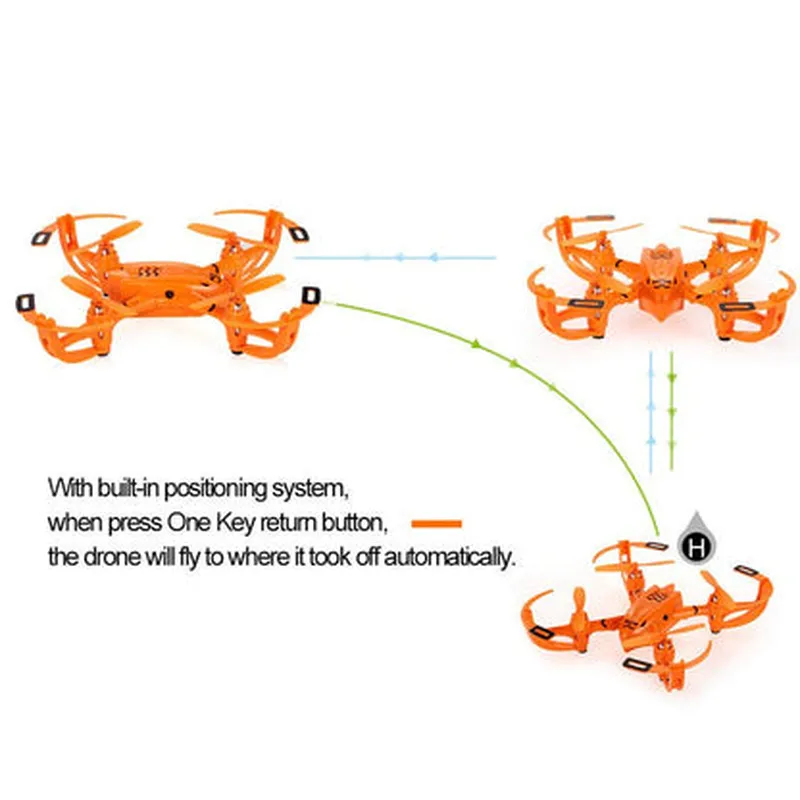
The onboard GPS module enables autonomous flight modes, such as way-point navigation, altitude hold, and return-to-home.

Aerial Photography

The quadcopter can be equipped with a camera for capturing high-quality aerial photos and videos.

Key Features

  • Modular Design: The DIY CX-002 Lark Quadcopter features a modular design, allowing users to easily replace or upgrade components, such as motors, ESCs, and flight controllers.
  • Durable Construction: The quadcopter's frame is made of high-quality carbon fiber, ensuring durability and resistance to crashes.
  • Powerful Motors: The quadcopter is equipped with four powerful brushless motors, each capable of producing 230W of power.
  • 30A Electronic Speed Controllers (ESCs): The quadcopter's ESCs are capable of handling high currents, ensuring efficient power delivery to the motors.
  • Flight Controller: The onboard flight controller features a 32-bit ARM Cortex-M4 processor, 3-axis gyroscope, 3-axis accelerometer, and barometer.
  • GPS Module: The quadcopter's GPS module supports GPS, GLONASS, and GALILEO satellite systems, providing accurate navigation and positioning.
  • Telemetry System: The quadcopter's telemetry system provides real-time flight data, including altitude, speed, and battery voltage, to the pilot or ground control station.
  • Configurable: The quadcopter's flight controller and autopilot system can be configured using a variety of software tools, such as QGroundControl or Mission Planner.
  • Battery and Power: The quadcopter is powered by a 3S 11.1V 2200mAh LiPo battery, providing up to 15 minutes of flight time.

Width

180 mm

Length

180 mm

Height

120 mm

Weight

430g (without battery)

Max Takeoff Weight

650g

Motor

Brushless, 230W each

ESC

30A, 3S LiPo compatible

Flight Controller

32-bit ARM Cortex-M4 processor, 3-axis gyroscope, 3-axis accelerometer, barometer

GPS Module

GPS, GLONASS, GALILEO support

Telemetry System

Real-time flight data transmission

Battery

3S 11.1V 2200mAh LiPo

Flight Time

Up to 15 minutes

Control Range

Up to 1.5 km

Applications

The DIY CX-002 Lark Quadcopter is suitable for a variety of applications, including

Aerial Photography and Videography

Capture stunning aerial footage and photos for real estate, filmmaking, or surveying purposes.

Surveillance and Inspection

Utilize the quadcopter for security, infrastructure inspection, or environmental monitoring.

Research and Development

Leverage the quadcopter's customizable platform for research in robotics, computer vision, or machine learning.

Hobby and Recreation

Enjoy the thrill of flying a customizable and highly capable quadcopter.

Pin Configuration

  • DIY CX-002 Lark Quadcopter Pinout Guide
  • The DIY CX-002 Lark Quadcopter is a popular IoT-based drone kit that requires careful connection of its various components to ensure proper functioning. This guide provides a detailed explanation of each pin on the quadcopter's flight controller and how to connect them correctly.
  • Pinout Structure:
  • The flight controller has a total of 34 pins, divided into four rows of 8 pins each (labeled A to H) and two additional power pins (VCC and GND).
  • Row A (Pins 1-8):
  • 1. VCC (Pin 1): 5V power supply for the flight controller. Connect to a suitable power source, such as a battery or a power module.
  • 2. GND (Pin 2): Ground pin for the flight controller. Connect to the negative terminal of the power source.
  • 3. PWR_STAT (Pin 3): Power status indicator pin. Connect to an LED or a status indicator module to monitor the power status.
  • 4. Buzzer (Pin 4): Buzzer pin for audible notifications. Connect to a buzzer module or a speaker.
  • 5. UART_RX (Pin 5): UART (Universal Asynchronous Receiver-Transmitter) receive pin for serial communication. Connect to a serial terminal or a Bluetooth module.
  • 6. UART_TX (Pin 6): UART transmit pin for serial communication. Connect to a serial terminal or a Bluetooth module.
  • 7. SCL (Pin 7): I2C (Inter-Integrated Circuit) clock pin for I2C communication. Connect to an I2C device, such as a sensor or a display module.
  • 8. SDA (Pin 8): I2C data pin for I2C communication. Connect to an I2C device, such as a sensor or a display module.
  • Row B (Pins 9-16):
  • 9. M1_SIG (Pin 9): Signal pin for Motor 1. Connect to the signal wire of Motor 1.
  • 10. M2_SIG (Pin 10): Signal pin for Motor 2. Connect to the signal wire of Motor 2.
  • 11. M3_SIG (Pin 11): Signal pin for Motor 3. Connect to the signal wire of Motor 3.
  • 12. M4_SIG (Pin 12): Signal pin for Motor 4. Connect to the signal wire of Motor 4.
  • 13. M1_EN (Pin 13): Enable pin for Motor 1. Connect to the enable wire of Motor 1.
  • 14. M2_EN (Pin 14): Enable pin for Motor 2. Connect to the enable wire of Motor 2.
  • 15. M3_EN (Pin 15): Enable pin for Motor 3. Connect to the enable wire of Motor 3.
  • 16. M4_EN (Pin 16): Enable pin for Motor 4. Connect to the enable wire of Motor 4.
  • Row C (Pins 17-24):
  • 17. GPS_RX (Pin 17): GPS receiver RX pin for serial communication. Connect to a GPS module.
  • 18. GPS_TX (Pin 18): GPS receiver TX pin for serial communication. Connect to a GPS module.
  • 19. COM_RX (Pin 19): COM (Communication) RX pin for serial communication. Connect to a serial terminal or a Bluetooth module.
  • 20. COM_TX (Pin 20): COM TX pin for serial communication. Connect to a serial terminal or a Bluetooth module.
  • 21. S1 (Pin 21): GPIO (General Purpose Input-Output) pin for custom use. Connect to a sensor, switch, or an LED module.
  • 22. S2 (Pin 22): GPIO pin for custom use. Connect to a sensor, switch, or an LED module.
  • 23. S3 (Pin 23): GPIO pin for custom use. Connect to a sensor, switch, or an LED module.
  • 24. S4 (Pin 24): GPIO pin for custom use. Connect to a sensor, switch, or an LED module.
  • Row D (Pins 25-32):
  • 25. BARO_SCK (Pin 25): SPI (Serial Peripheral Interface) clock pin for the barometer sensor. Connect to a barometer sensor module.
  • 26. BARO_MISO (Pin 26): SPI MISO (Master In Slave Out) pin for the barometer sensor. Connect to a barometer sensor module.
  • 27. BARO_MOSI (Pin 27): SPI MOSI (Master Out Slave In) pin for the barometer sensor. Connect to a barometer sensor module.
  • 28. BARO_CS (Pin 28): SPI chip select pin for the barometer sensor. Connect to a barometer sensor module.
  • 29. ACC_INT (Pin 29): Interrupt pin for the accelerometer sensor. Connect to an accelerometer sensor module.
  • 30. ACC_SCK (Pin 30): SPI clock pin for the accelerometer sensor. Connect to an accelerometer sensor module.
  • 31. ACC_MISO (Pin 31): SPI MISO pin for the accelerometer sensor. Connect to an accelerometer sensor module.
  • 32. ACC_MOSI (Pin 32): SPI MOSI pin for the accelerometer sensor. Connect to an accelerometer sensor module.
  • Additional Power Pins:
  • VCC (Pin 33): 5V power supply for the flight controller.
  • GND (Pin 34): Ground pin for the flight controller.
  • Connection Guidelines:
  • When connecting motors, ensure that the signal and enable wires are connected correctly to the corresponding pins.
  • Use appropriate voltage regulators or power modules to supply power to the flight controller and other components.
  • Connect GPS and communication modules according to their respective pinouts and protocols.
  • Use GPIO pins for custom sensors, switches, or LED modules as required.
  • Refer to the datasheets of individual components for specific connection requirements.
  • Remember to exercise caution when connecting the pins to avoid any damage to the flight controller or other components. Ensure that the connections are secure and follow proper breadboarding or PCB design practices.

Code Examples

DIY CX-002 Lark Quadcopter Component Documentation
Overview
The DIY CX-002 Lark Quadcopter is a customizable and affordable quadcopter kit designed for enthusiasts and developers. It features a sturdy frame, four brushless motors, and a range of sensors, making it an ideal platform for IoT and robotics projects.
Technical Specifications
Microcontroller: Arduino-compatible Flight Controller Board with ATmega328P
 Motors: 4x Brushless Motors (CW & CCW)
 Sensors: Accelerometer, Gyroscope, Barometer, GPS
 Communication: Serial UART, I2C, SPI, and USB
 Power: 7.4V 1500mAh Li-Po Battery
 Weight: approximately 350g
Getting Started
To use the DIY CX-002 Lark Quadcopter, you'll need to:
1. Assemble the quadcopter according to the manufacturer's instructions.
2. Install the Arduino IDE and necessary libraries.
3. Upload the flight control code to the microcontroller.
Code Examples
### Example 1: Basic Flight Control using Arduino
This example demonstrates how to use the DIY CX-002 Lark Quadcopter to fly autonomously using the built-in sensors and Arduino.
```cpp
#include <Wire.h>
#include <MPU6050.h>
MPU6050 imu(Wire);
void setup() {
  Serial.begin(9600);
  imu.begin();
}
void loop() {
  int16_t ax, ay, az;
  imu.readAcceleration(ax, ay, az);
// Calculate roll and pitch angles
  float roll = atan2(ay, az);
  float pitch = atan2(-ax, sqrt(pow(ay, 2) + pow(az, 2)));
// Control motors based on angle values
  motorControl(roll, pitch);
}
void motorControl(float roll, float pitch) {
  // Implement motor control logic here
  // For example, adjust motor speeds based on roll and pitch values
  // motor1.write(100 + roll  10);
  // motor2.write(100 + pitch  10);
  // motor3.write(100 - roll  10);
  // motor4.write(100 - pitch  10);
}
```
### Example 2: GPS-guided Flight using Python
This example demonstrates how to use the DIY CX-002 Lark Quadcopter with Python and the GPS module to fly to a predetermined location.
```python
import serial
import time
# Initialize serial communication with the quadcopter
ser = serial.Serial('COM3', 9600)
def get_gps_data():
  ser.write(b'GET_GPS_DATA
')
  data = ser.readline().decode().strip().split(',')
  return {'lat': float(data[0]), 'lon': float(data[1]), 'alt': float(data[2])}
def fly_to_location(lat, lon):
  # Calculate distance and bearing to target location
  current_gps = get_gps_data()
  distance = haversine_distance(current_gps['lat'], current_gps['lon'], lat, lon)
  bearing = calculate_bearing(current_gps['lat'], current_gps['lon'], lat, lon)
# Control motors to fly to target location
  while distance > 1.0:
    motor_control(bearing)
    time.sleep(0.5)
    current_gps = get_gps_data()
    distance = haversine_distance(current_gps['lat'], current_gps['lon'], lat, lon)
def motor_control(bearing):
  # Implement motor control logic here
  # For example, adjust motor speeds based on bearing value
  ser.write(b'MOTOR_CONTROL ' + str(bearing) + '
')
# Example usage
fly_to_location(37.7749, -122.4194)  # Fly to a predefined location (San Francisco)
```
Note: These examples are simplified and require additional logic and error handling to ensure safe and stable flight. It's essential to consult the DIY CX-002 Lark Quadcopter's documentation and follow proper safety guidelines when working with this component.