1 k to 50 k (dependent on model)


1 k to 50 k (dependent on model)
1% or better (dependent on model)
### 3. Power Management
3.3 V or 5 V (dependent on model)
typically <10 mA
Supports shutdown mode for reduced power consumption
### 4. Analog Performance
| High signal-to-noise ratio (SNR) | typically >80 dB |
typically <100 ppm/C
typically <100
### 5. Mechanical and Environmental
15 mm x 20 mm (0.6 in x 0.8 in) or smaller
-40C to +85C (-40F to +185F)
RoHS and REACH compliant
### 6. Additional Features
Internal EEPROM for storing configuration data
Support for daisy-chaining multiple devices
integrated voltage regulator and voltage reference
Applications
Industrial automation and process control
Robotics and mechatronics
Audio and video equipment
Medical devices and instrumentation
IoT devices and gateways
Package and Pinout
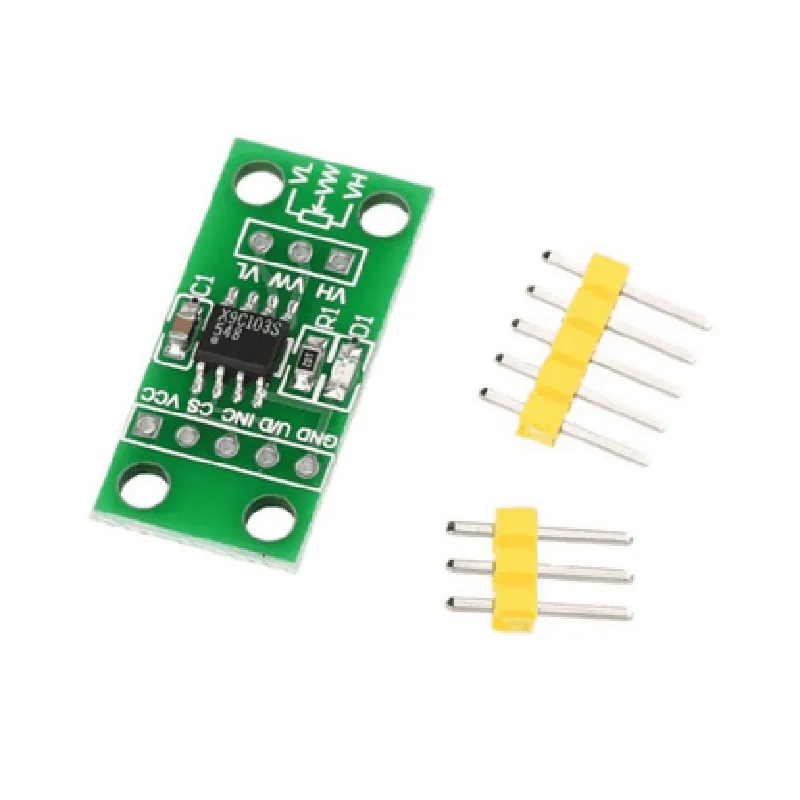
The Digital Potentiometer Board Module is available in a compact SMD (Surface-Mount Device) package, with a 10-pin or 14-pin layout, depending on the model. A detailed pinout diagram is provided in the datasheet.
Datasheet and Resources
For more detailed information, including technical specifications, schematics, and application notes, please refer to the datasheet and supporting resources available on the manufacturer's website.
Ordering Information
To purchase the Digital Potentiometer Board Module, please specify the model number, package type, and desired quantity. For large orders or customizations, contact the manufacturer or authorized distributor for more information.
Digital Potentiometer Board Module DocumentationOverviewThe Digital Potentiometer Board Module is a versatile electronic component that allows for digital control of analog circuits. It features a digital potentiometer IC,which is a programmable resistor that can be controlled using digital signals. This module is ideal for applications that require precise and flexible control of analog signals, such as audio equipment, motor control, and sensor interfaces.Pinout and ConnectionsThe Digital Potentiometer Board Module has the following pinout:VCC: Power supply (typically 5V or 3.3V)
GND: Ground
SCL: I2C clock line
SDA: I2C data line
CS: Chip select (optional)
A0, A1, A2: Analog output pins
Wiper (W): Output pin connected to the wiper of the digital potentiometerCode Examples### Example 1: Basic Analog Output Control using ArduinoIn this example, we'll use an Arduino Uno to control the digital potentiometer and output an analog signal.```c++
#include <Wire.h>const int csPin = 2; // Chip select pin (optional)void setup() {
Wire.begin(); // Initialize I2C communication
pinMode(csPin, OUTPUT); // Set CS pin as output if using
}void loop() {
int value = 128; // Set the digital potentiometer to mid-point (50% of 256 steps)
digitalWrite(csPin, LOW); // Enable the chip (if using CS pin)
Wire.beginTransmission(0x2F); // Write to the digital potentiometer IC (Address: 0x2F)
Wire.write(0x00); // Write to the wiper register
Wire.write(highByte(value)); // Write the high byte of the value
Wire.write(lowByte(value)); // Write the low byte of the value
Wire.endTransmission();
digitalWrite(csPin, HIGH); // Disable the chip (if using CS pin)delay(1000); // Wait 1 second before changing the value
}
```### Example 2: I2C Communication using Raspberry Pi (Python)In this example, we'll use a Raspberry Pi to communicate with the digital potentiometer module using I2C and output an analog signal.```python
import smbusbus = smbus.SMBus(1) # Use I2C bus 1 ( Raspberry Pi)def set_potentiometer(value):
bus.write_i2c_block_data(0x2F, 0x00, [(value >> 8) & 0xFF, value & 0xFF])while True:
value = 128 # Set the digital potentiometer to mid-point (50% of 256 steps)
set_potentiometer(value)
time.sleep(1) # Wait 1 second before changing the value
```Note: In both examples, the digital potentiometer is set to its mid-point (50% of 256 steps). You can adjust the value to control the analog output signal.Technical SpecificationsDigital potentiometer IC: X9C103 (or equivalent)
Resolution: 256 steps
Operating voltage: 2.7V to 5.5V
Analog output pins: A0, A1, A2
Wiper output pin: W
I2C communication: Up to 400 kHz
Size: 25.5mm x 20.5mm (1 inch x 0.8 inch)ApplicationsAudio equipment (volume control, tone control)
Motor control (speed control, direction control)
Sensor interfaces (gain control, offset control)
Automation and robotics
Industrial control systems