Stufin
Home Quick Cart Profile

Desktop Combo Kit for Raspberry Pi 4 Model B (without Raspberry Pi 4)

Buy Now on Stufin

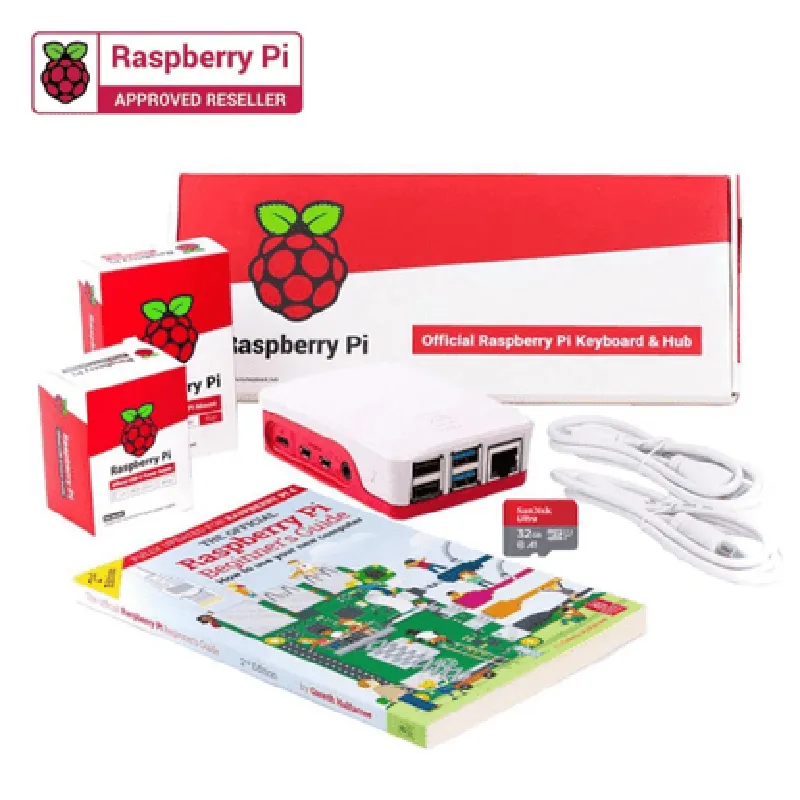
The Desktop Combo Kit includes the following components

  • ABS Plastic Case: A durable, high-quality ABS plastic case designed specifically for the Raspberry Pi 4 Model B. The case provides excellent protection for the board, while also offering easy access to all ports and connectors.
  • Cooling Fan: A high-performance cooling fan designed to keep the Raspberry Pi 4 Model B running at optimal temperatures. The fan is quiet, compact, and energy-efficient, making it an ideal solution for desktop applications.
  • Power Supply: A high-quality, 5V 3A power supply adapter capable of delivering stable power to the Raspberry Pi 4 Model B. The adapter features a compact design and is compatible with most international power outlets.
  • Micro-HDMI to HDMI Cable: A high-quality, 1-meter long micro-HDMI to HDMI cable designed for connecting the Raspberry Pi 4 Model B to HDMI displays.
  • USB-C Power Cable: A 1-meter long USB-C power cable for connecting the Raspberry Pi 4 Model B to the power supply adapter or other USB-C power sources.
  • 4-Port USB Hub: A compact, 4-port USB hub designed to expand the USB connectivity options of the Raspberry Pi 4 Model B. The hub supports USB 2.0 and USB 3.0 devices.
  • Heat Sink: A high-quality, aluminum heat sink designed to dissipate heat generated by the Raspberry Pi 4 Model B's CPU and other components.

Key Features

Improved Cooling

The cooling fan and heat sink work together to provide efficient heat dissipation, ensuring the Raspberry Pi 4 Model B operates within a safe temperature range.

Enhanced Connectivity

The kit includes a range of cables and adapters to provide convenient connectivity options for peripherals, displays, and power sources.

Compact Design

The ABS plastic case, cooling fan, and USB hub are designed to be compact and space-efficient, making them ideal for desktop applications.

Easy Installation

The kit is easy to assemble and install, with clear instructions provided for each component.

Compatibility

The kit is specifically designed for the Raspberry Pi 4 Model B and is compatible with most Raspberry Pi 4 Model B projects and applications.

Technical Specifications

Power Supply

5V 3A, compatible with most international power outlets

Cooling Fan

30mm x 30mm, 5V, 0.2A

USB-C Power Cable1-meter long, USB-C to USB-C
Micro-HDMI to HDMI Cable1-meter long, micro-HDMI to HDMI
4-Port USB HubUSB 2.0 and USB 3.0 compatible, supports up to 5V 2.5A per port

Heat Sink

Aluminum, 20mm x 20mm x 10mm

ABS Plastic Case

Compatible with Raspberry Pi 4 Model B, ABS plastic construction

Warranty and Support

The Desktop Combo Kit for Raspberry Pi 4 Model B comes with a limited 1-year warranty and dedicated customer support. For more information, please refer to the manufacturer's warranty and support documentation.

Pin Configuration

  • Desktop Combo Kit for Raspberry Pi 4 Model B (without Raspberry Pi 4) - Pinout Documentation
  • The Desktop Combo Kit for Raspberry Pi 4 Model B is a comprehensive kit that includes a range of peripherals and accessories designed to work with the Raspberry Pi 4 Model B. This documentation focuses on the pinout of the kit's components and provides a detailed explanation of each pin's function and connection.
  • GPIO Header (J8) - 40Pin
  • The GPIO header on the Desktop Combo Kit is a 40-pin connector that provides access to the Raspberry Pi's GPIO pins. Here's a breakdown of each pin:
  • 1. 3V3 (Pin 1)
  • Description: 3.3V power supply
  • Connection: Connect to a 3.3V power source or a component that requires 3.3V power
  • 2. 3V3 (Pin 2)
  • Description: 3.3V power supply
  • Connection: Connect to a 3.3V power source or a component that requires 3.3V power
  • 3. GPIO2 (Pin 3)
  • Description: General-purpose input/output pin
  • Connection: Connect to a device or sensor that requires GPIO communication (e.g., LED, button, sensor)
  • 4. GPIO3 (Pin 4)
  • Description: General-purpose input/output pin
  • Connection: Connect to a device or sensor that requires GPIO communication (e.g., LED, button, sensor)
  • 5. GPIO4 (Pin 5)
  • Description: General-purpose input/output pin
  • Connection: Connect to a device or sensor that requires GPIO communication (e.g., LED, button, sensor)
  • 6. GND (Pin 6)
  • Description: Ground
  • Connection: Connect to a ground pin on a device or sensor to complete a circuit
  • 7. GPIO7 (Pin 7)
  • Description: General-purpose input/output pin
  • Connection: Connect to a device or sensor that requires GPIO communication (e.g., LED, button, sensor)
  • 8. GPIO8 (Pin 8)
  • Description: General-purpose input/output pin
  • Connection: Connect to a device or sensor that requires GPIO communication (e.g., LED, button, sensor)
  • 9. GND (Pin 9)
  • Description: Ground
  • Connection: Connect to a ground pin on a device or sensor to complete a circuit
  • 10. GPIO9 (Pin 10)
  • Description: General-purpose input/output pin
  • Connection: Connect to a device or sensor that requires GPIO communication (e.g., LED, button, sensor)
  • 11. GPIO10 (Pin 11)
  • Description: General-purpose input/output pin
  • Connection: Connect to a device or sensor that requires GPIO communication (e.g., LED, button, sensor)
  • 12. GPIO11 (Pin 12)
  • Description: General-purpose input/output pin
  • Connection: Connect to a device or sensor that requires GPIO communication (e.g., LED, button, sensor)
  • 13. GPIO12 (Pin 13)
  • Description: General-purpose input/output pin
  • Connection: Connect to a device or sensor that requires GPIO communication (e.g., LED, button, sensor)
  • 14. GND (Pin 14)
  • Description: Ground
  • Connection: Connect to a ground pin on a device or sensor to complete a circuit
  • 15. GPIO13 (Pin 15)
  • Description: General-purpose input/output pin
  • Connection: Connect to a device or sensor that requires GPIO communication (e.g., LED, button, sensor)
  • 16. GPIO14 (Pin 16)
  • Description: General-purpose input/output pin
  • Connection: Connect to a device or sensor that requires GPIO communication (e.g., LED, button, sensor)
  • 17. 3V3 (Pin 17)
  • Description: 3.3V power supply
  • Connection: Connect to a 3.3V power source or a component that requires 3.3V power
  • 18. GPIO15 (Pin 18)
  • Description: General-purpose input/output pin
  • Connection: Connect to a device or sensor that requires GPIO communication (e.g., LED, button, sensor)
  • 19. GPIO16 (Pin 19)
  • Description: General-purpose input/output pin
  • Connection: Connect to a device or sensor that requires GPIO communication (e.g., LED, button, sensor)
  • 20. GND (Pin 20)
  • Description: Ground
  • Connection: Connect to a ground pin on a device or sensor to complete a circuit
  • 21. GPIO17 (Pin 21)
  • Description: General-purpose input/output pin
  • Connection: Connect to a device or sensor that requires GPIO communication (e.g., LED, button, sensor)
  • 22. GPIO18 (Pin 22)
  • Description: General-purpose input/output pin
  • Connection: Connect to a device or sensor that requires GPIO communication (e.g., LED, button, sensor)
  • 23. GPIO19 (Pin 23)
  • Description: General-purpose input/output pin
  • Connection: Connect to a device or sensor that requires GPIO communication (e.g., LED, button, sensor)
  • 24. GND (Pin 24)
  • Description: Ground
  • Connection: Connect to a ground pin on a device or sensor to complete a circuit
  • 25. GPIO20 (Pin 25)
  • Description: General-purpose input/output pin
  • Connection: Connect to a device or sensor that requires GPIO communication (e.g., LED, button, sensor)
  • 26. GPIO21 (Pin 26)
  • Description: General-purpose input/output pin
  • Connection: Connect to a device or sensor that requires GPIO communication (e.g., LED, button, sensor)
  • 27. GPIO22 (Pin 27)
  • Description: General-purpose input/output pin
  • Connection: Connect to a device or sensor that requires GPIO communication (e.g., LED, button, sensor)
  • 28. GPIO23 (Pin 28)
  • Description: General-purpose input/output pin
  • Connection: Connect to a device or sensor that requires GPIO communication (e.g., LED, button, sensor)
  • 29. GND (Pin 29)
  • Description: Ground
  • Connection: Connect to a ground pin on a device or sensor to complete a circuit
  • 30. GPIO24 (Pin 30)
  • Description: General-purpose input/output pin
  • Connection: Connect to a device or sensor that requires GPIO communication (e.g., LED, button, sensor)
  • 31. GPIO25 (Pin 31)
  • Description: General-purpose input/output pin
  • Connection: Connect to a device or sensor that requires GPIO communication (e.g., LED, button, sensor)
  • 32. GPIO26 (Pin 32)
  • Description: General-purpose input/output pin
  • Connection: Connect to a device or sensor that requires GPIO communication (e.g., LED, button, sensor)
  • 33. GND (Pin 33)
  • Description: Ground
  • Connection: Connect to a ground pin on a device or sensor to complete a circuit
  • 34. GPIO27 (Pin 34)
  • Description: General-purpose input/output pin
  • Connection: Connect to a device or sensor that requires GPIO communication (e.g., LED, button, sensor)
  • 35. GPIO28 (Pin 35)
  • Description: General-purpose input/output pin
  • Connection: Connect to a device or sensor that requires GPIO communication (e.g., LED, button, sensor)
  • 36. GPIO29 (Pin 36)
  • Description: General-purpose input/output pin
  • Connection: Connect to a device or sensor that requires GPIO communication (e.g., LED, button, sensor)
  • 37. GND (Pin 37)
  • Description: Ground
  • Connection: Connect to a ground pin on a device or sensor to complete a circuit
  • 38. GPIO30 (Pin 38)
  • Description: General-purpose input/output pin
  • Connection: Connect to a device or sensor that requires GPIO communication (e.g., LED, button, sensor)
  • 39. GPIO31 (Pin 39)
  • Description: General-purpose input/output pin
  • Connection: Connect to a device or sensor that requires GPIO communication (e.g., LED, button, sensor)
  • 40. GND (Pin 40)
  • Description: Ground
  • Connection: Connect to a ground pin on a device or sensor to complete a circuit
  • Other Components:
  • Micro-USB Port: Used for powering the Raspberry Pi 4 Model B
  • HDMI Port: Used for video output
  • USB Ports: Used for connecting peripherals such as keyboards, mice, and storage devices
  • Ethernet Port: Used for network connectivity
  • Audio Jack: Used for audio output
  • When connecting pins, ensure to:
  • Use the correct pin numbers and descriptions to avoid damage to the Raspberry Pi or connected devices.
  • Use appropriate connector cables or wires to connect devices to the GPIO header.
  • Follow proper circuitry and safety guidelines when working with electrical components.
  • Remember to consult the Raspberry Pi 4 Model B documentation and datasheets for more information on using the GPIO pins and other components.

Code Examples

Desktop Combo Kit for Raspberry Pi 4 Model B (without Raspberry Pi 4)
Overview
The Desktop Combo Kit for Raspberry Pi 4 Model B is a comprehensive kit designed to enhance the functionality of the Raspberry Pi 4 Model B single-board computer. This kit does not include the Raspberry Pi 4 Model B board itself, but provides all the necessary peripherals and accessories to get started with your projects. The kit includes a USB keyboard, USB mouse, power adapter, HDMI cable, and a high-quality ABS plastic case.
Components
1. USB Keyboard: A compact and lightweight USB keyboard designed for Raspberry Pi.
2. USB Mouse: A high-resolution USB optical mouse for precise navigation.
3. Power Adapter: A 5V 3A power adapter for powering the Raspberry Pi 4 Model B.
4. HDMI Cable: A high-quality HDMI cable for connecting the Raspberry Pi to a monitor or display.
5. ABS Plastic Case: A durable and stylish ABS plastic case that fits the Raspberry Pi 4 Model B snugly.
Code Examples
### Example 1: Using the USB Keyboard and Mouse with Python
This example demonstrates how to use the USB keyboard and mouse with Python to create a simple interactive program.
Code:
```python
import pygame
# Initialize Pygame
pygame.init()
# Set up the display
screen = pygame.display.set_mode((800, 600))
# Set up the keyboard and mouse
keyboard = pygame.keyboard
mouse = pygame.mouse
while True:
    # Handle events
    for event in pygame.event.get():
        if event.type == pygame.QUIT:
            pygame.quit()
            sys.exit()
        elif event.type == pygame.KEYDOWN:
            print("Key pressed:", event.key)
        elif event.type == pygame.MOUSEBUTTONDOWN:
            print("Mouse button pressed:", event.button)
# Update the display
    pygame.display.flip()
```
This code initializes Pygame, sets up a display window, and uses the USB keyboard and mouse to detect key presses and mouse clicks.
### Example 2: Using the HDMI Cable with OMXPlayer
This example demonstrates how to use the HDMI cable to play a video file using OMXPlayer on the Raspberry Pi.
Code:
```bash
omxplayer -o hdmi /path/to/video.mp4
```
This command plays the specified video file on the HDMI-connected display.
### Example 3: Using the Power Adapter with a Python Script
This example demonstrates how to use the power adapter to power the Raspberry Pi and execute a Python script that blinks an LED connected to GPIO pin 17.
Code:
```python
import RPi.GPIO as GPIO
import time
# Set up GPIO pin 17 as an output
GPIO.setmode(GPIO.BCM)
GPIO.setup(17, GPIO.OUT)
while True:
    # Blink the LED
    GPIO.output(17, GPIO.HIGH)
    time.sleep(1)
    GPIO.output(17, GPIO.LOW)
    time.sleep(1)
```
This code sets up GPIO pin 17 as an output and blinks an LED connected to it using the Raspberry Pi's GPIO library.
Note: These examples assume that you have already installed the necessary dependencies and configured your Raspberry Pi 4 Model B properly.