Stufin
Home Quick Cart Profile

HIPG854 Universal Programmer


Buy Now on Stufin

Component Name

HIPG854 Universal Programmer
Overview

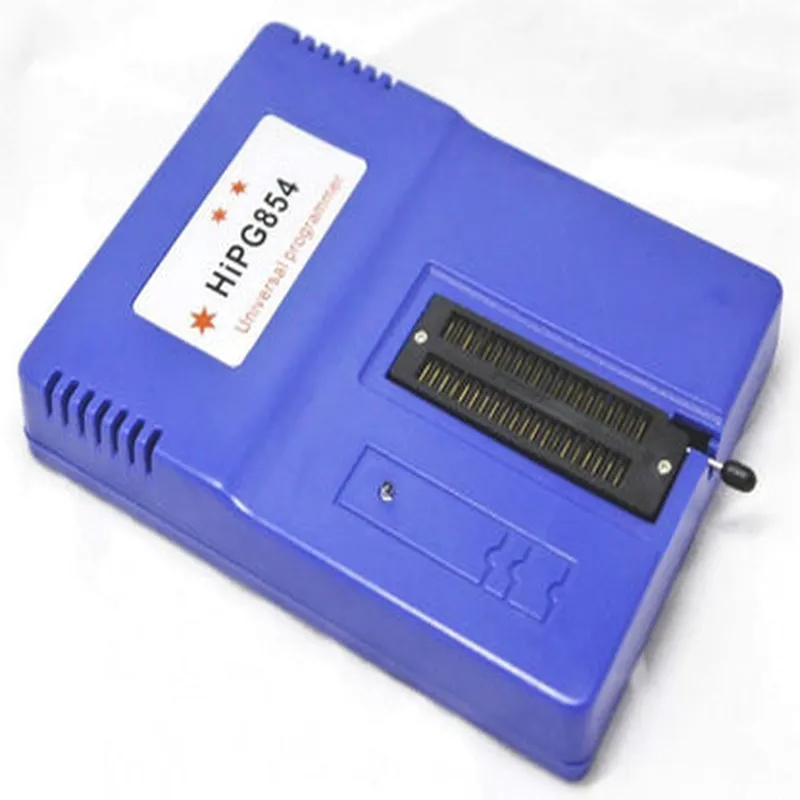
The HIPG854 Universal Programmer is a versatile and powerful programming device designed for flashing, programming, and debugging a wide range of microcontrollers, memory chips, and other programmable devices. This comprehensive programmer supports a vast array of devices, making it an essential tool for developers, engineers, and hobbyists working with various IoT projects.
Functionality

  • Device Programming: Programs and flashes microcontrollers, EPROMs, EEPROMs, Flash memories, and other programmable devices.
  • Device Debugging: Provides a debugging interface for troubleshooting and testing devices.
  • Memory Reading and Writing: Reads and writes data to various types of memory devices.
  • IC Package Support: Supports a wide range of IC packages, including DIP, PLCC, SOIC, TSOP, and QFP.
  • Serial and Parallel Communication: Communicates with devices via serial (UART, SPI, I2C, I2S) and parallel interfaces.
The HIPG854 Universal Programmer is capable of performing the following functions

Key Features

  • Universal Support: Compatible with over 50,000 devices from various manufacturers, including Atmel, Microchip, Texas Instruments, and more.
  • High-Speed Programming: Programs devices at speeds of up to 6 MB/s, significantly reducing programming time.
  • Auto-Detection: Automatically detects device type, memory size, and other parameters, simplifying the programming process.
  • Powerful Software: Bundled with an intuitive software suite that supports Windows, Linux, and macOS operating systems.
  • Multi-Protocol Support: Supports various protocols, including ISP, IAP, JTAG, and USB.
  • Compact Design: Features a compact and portable design, making it ideal for fieldwork, labs, and development environments.
  • High-Quality Construction: Built with high-quality components and a robust design, ensuring reliable operation and a long lifespan.
  • Expandable Architecture: Allows for easy firmware updates and support for new devices and protocols.
  • Industrial-Grade Components: Uses industrial-grade components, ensuring stability and reliability in harsh environments.
  • Comprehensive Documentation: Provided with detailed documentation, including user manuals, datasheets, and application notes.

Input Voltage

5V DC (via USB)

Output Voltage

1.8V to 5V (selectable)

Programming Speed

Up to 6 MB/s

Memory Capacity

Supports devices up to 128 MB

IC Package Support

DIP, PLCC, SOIC, TSOP, QFP, and more

Operating Temperature

0C to 40C (32F to 104F)

Dimensions

120 mm x 80 mm x 30 mm (4.7 in x 3.1 in x 1.2 in)

Conclusion

The HIPG854 Universal Programmer is a powerful and versatile tool that streamlines the programming and debugging process for a wide range of microcontrollers and memory devices. Its comprehensive feature set, high-speed programming capabilities, and compact design make it an ideal solution for professionals and hobbyists working on IoT projects.

Pin Configuration

  • HIPG854 Universal Programmer Pinout Explanation
  • The HIPG854 Universal Programmer is a versatile device that can program a wide range of microcontrollers, memory devices, and other programmable chips. The device features a 40-pin ZIF (Zero Insertion Force) socket and a variety of connectors for programming different types of devices. Here is a detailed explanation of the pins on the HIPG854 Universal Programmer:
  • ZIF Socket (40 pins)
  • The ZIF socket is the main programming interface of the HIPG854. It is used to connect the device to be programmed.
  • Pin 1-40: These pins are used to connect the device to be programmed. The pinout of the ZIF socket is dependent on the specific device being programmed.
  • ISP (In-System Programming) Connector (10 pins)
  • The ISP connector is used for in-system programming of microcontrollers.
  • Pin 1: VCC (Power supply voltage)
  • Pin 2: GND (Ground)
  • Pin 3: SCL (Serial Clock)
  • Pin 4: SDA (Serial Data)
  • Pin 5: RST (Reset)
  • Pin 6: TDI (Test Data In)
  • Pin 7: TCK (Test Clock)
  • Pin 8: TMS (Test Mode Select)
  • Pin 9: TDO (Test Data Out)
  • Pin 10: NC (Not Connected)
  • ICSP (In-Circuit Serial Programming) Connector (6 pins)
  • The ICSP connector is used for in-circuit serial programming of microcontrollers.
  • Pin 1: VCC (Power supply voltage)
  • Pin 2: GND (Ground)
  • Pin 3: CLK (Clock)
  • Pin 4: DAT (Data)
  • Pin 5: NC (Not Connected)
  • Pin 6: NC (Not Connected)
  • USB Connector (4 pins)
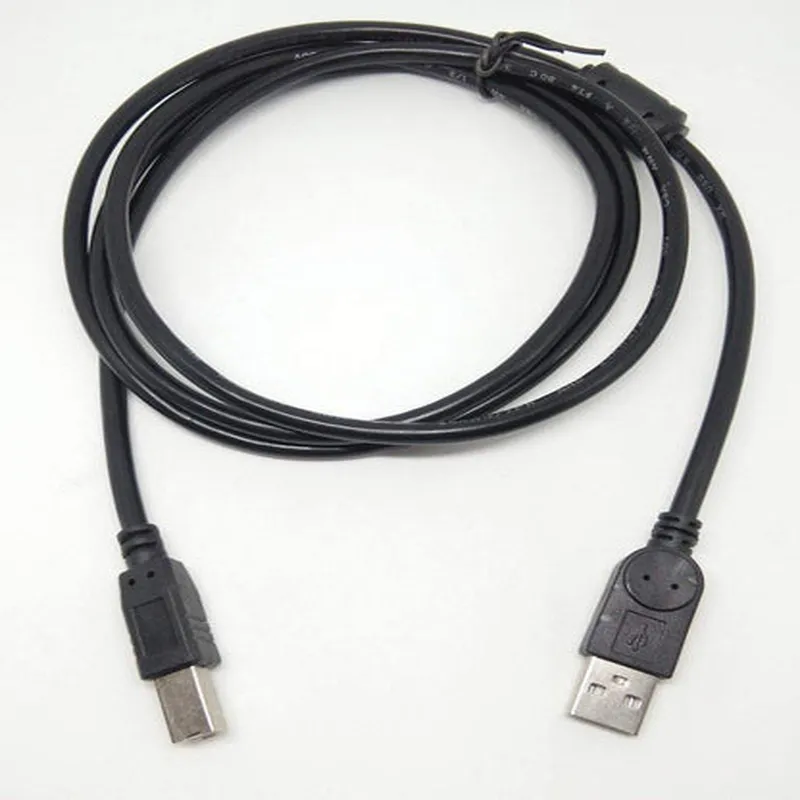
  • The USB connector is used to connect the HIPG854 to a computer for programming and communication.
  • Pin 1: VBUS (Power supply voltage from USB)
  • Pin 2: D- (USB Data-)
  • Pin 3: D+ (USB Data+)
  • Pin 4: GND (Ground)
  • Power Connector (5 pins)
  • The power connector is used to supply power to the HIPG854.
  • Pin 1: VCC (Power supply voltage)
  • Pin 2: GND (Ground)
  • Pin 3: NC (Not Connected)
  • Pin 4: NC (Not Connected)
  • Pin 5: NC (Not Connected)
  • Jumpers
  • The HIPG854 has several jumpers that allow the user to configure the device for different programming modes.
  • J1-J5: These jumpers are used to select the programming voltage (3.3V or 5V)
  • J6-J8: These jumpers are used to select the programming mode (ISP or ICSP)
  • LED Indicators
  • The HIPG854 has several LED indicators that provide status information during programming.
  • PWR LED: Indicates power is present
  • PROG LED: Indicates programming is in progress
  • ERR LED: Indicates an error has occurred
  • Connecting the Pins
  • To connect the pins, follow these steps:
  • 1. Identify the device to be programmed and its corresponding pinout.
  • 2. Connect the device to the ZIF socket, ensuring the pins are aligned correctly.
  • 3. Connect the ISP or ICSP connector to the device, depending on the programming mode required.
  • 4. Connect the power connector to a suitable power source.
  • 5. Connect the USB connector to a computer for programming and communication.
  • 6. Configure the jumpers according to the device's requirements.
  • 7. Power on the HIPG854 and begin the programming process.
  • Important:
  • Always ensure the device to be programmed is properly connected to the ZIF socket and the ISP or ICSP connector.
  • Verify the power supply voltage is set correctly using the jumpers.
  • Follow proper safety precautions when working with electrical circuits.
  • By following this guide, you should be able to successfully connect the pins on the HIPG854 Universal Programmer and begin programming your devices.

Code Examples

HIPG854 Universal Programmer Documentation
The HIPG854 Universal Programmer is a versatile programming device that supports a wide range of microcontrollers, flash memory, and other programmable devices. This documentation provides an overview of the component's features, specifications, and code examples to demonstrate its usage in various contexts.
Features and Specifications
Supports over 100,000 devices from various manufacturers
 Programming modes: parallel, serial, and IIC (I2C)
 High-speed programming of up to 10 MB/s
 Supports various file formats: HEX, BIN, MOT, and ASCII
 USB 2.0 interface for easy connectivity
 Compatible with Windows, Linux, and Mac OS
Code Examples
### Example 1: Programming an ATmega328P Microcontroller with Arduino IDE
In this example, we will use the HIPG854 Universal Programmer to program an ATmega328P microcontroller with a simple LED blinking sketch.
Hardware Requirements:
HIPG854 Universal Programmer
 ATmega328P microcontroller
 Breadboard
 LED
 220 resistor
 Jumper wires
Software Requirements:
Arduino IDE
 HIPG854 Universal Programmer software (download from the manufacturer's website)
Steps:
1. Connect the ATmega328P microcontroller to the HIPG854 Universal Programmer according to the pinout diagram.
2. Open the Arduino IDE and create a new project.
3. Write the following code:
```c
const int ledPin = 13;  // Pin 13 for the LED
void setup() {
  pinMode(ledPin, OUTPUT);
}
void loop() {
  digitalWrite(ledPin, HIGH);
  delay(1000);
  digitalWrite(ledPin, LOW);
  delay(1000);
}
```
4. Select the ATmega328P as the target device in the Arduino IDE.
5. Compile the code and generate the HEX file.
6. Open the HIPG854 Universal Programmer software and select the ATmega328P as the target device.
7. Load the generated HEX file and start the programming process.
### Example 2: Reading and Writing to a 24LC256 EEPROM using Python
In this example, we will use the HIPG854 Universal Programmer to read and write data to a 24LC256 EEPROM chip using Python.
Hardware Requirements:
HIPG854 Universal Programmer
 24LC256 EEPROM chip
 Breadboard
 Jumper wires
Software Requirements:
Python 3.x
 pyhipg854 library (download from the manufacturer's website)
Code:
```python
import pyhipg854
# Initialize the HIPG854 Universal Programmer
prog = pyhipg854.HIPG854()
# Select the 24LC256 EEPROM chip
prog.select_device("24LC256")
# Write data to the EEPROM
data = b"Hello, World!"
prog.write_eeprom(0x00, data)
# Read data from the EEPROM
read_data = prog.read_eeprom(0x00, len(data))
print(read_data.decode())
# Close the connection
prog.close()
```
Note: This code example assumes that the pyhipg854 library is installed and configured properly. Refer to the library's documentation for more information.
These examples demonstrate the versatility of the HIPG854 Universal Programmer in various contexts. Whether you're working with microcontrollers, flash memory, or other programmable devices, this component provides a reliable and efficient solution for programming and debugging.