-25C to 50C


-25C to 50C
-40C to 80C
### Security and Reliability
Supports secure boot and trusted platform module (TPM) for secure boot and data protection
Built-in watchdog timer and system reset functionality for reliable operation
Functionality
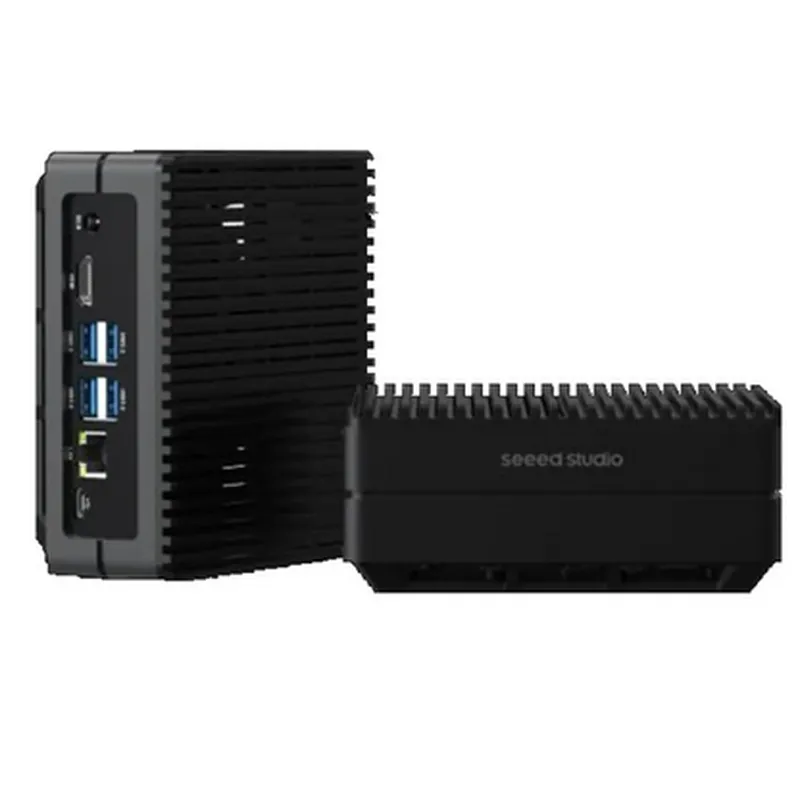
| The reComputer J4012-Edge AI Device is designed to accelerate AI computing at the edge, enabling real-time inference and processing of complex data sets. It is ideal for a wide range of applications, including |
Autonomous systems and robotics
Computer vision and object detection
Natural language processing and speech recognition
Edge AI and IoT devices
Industrial automation and control systems
Smart cities and infrastructure applications
Technical Specifications
For a detailed list of technical specifications, please consult the reComputer J4012-Edge AI Device datasheet.
Getting Started
To get started with the reComputer J4012-Edge AI Device, please visit the manufacturer's website for detailed documentation, software development kits, and community resources.
reComputer J4012-Edge AI Device with NVIDIA Jetson Orin NX 16GB Module DocumentationOverviewThe reComputer J4012-Edge AI Device is a powerful edge AI computing platform featuring the NVIDIA Jetson Orin NX 16GB module. This module is designed for AI applications at the edge, providing exceptional performance, power efficiency, and compact size. This documentation will provide an overview of the reComputer J4012-Edge AI Device, its technical specifications, and code examples to demonstrate its usage in various contexts.Technical SpecificationsProcessor: NVIDIA Jetson Orin NX 16GB module
CPU: 8-core ARM Cortex-A78 CPU
GPU: NVIDIA Ampere GPU with 2048 CUDA cores
Memory: 16GB LPDDR5 RAM
Storage: 32GB eMMC storage
Operating System: Ubuntu 18.04 (pre-installed)
Interfaces: 2x USB 3.0, 1x USB 2.0, 1x HDMI, 1x Gigabit Ethernet, 1x M.2 Key M (for Wi-Fi/Bluetooth), 1x SD card slot
Power consumption: 10W (typical)Code Examples### Example 1: Object Detection using TensorFlow and OpenCVThis example demonstrates how to use the reComputer J4012-Edge AI Device for object detection using TensorFlow and OpenCV.Hardware RequirementsreComputer J4012-Edge AI Device
Camera module (e.g., USB camera or CSI camera)Software RequirementsTensorFlow 2.x
OpenCV 4.x
Python 3.xCode
```python
import cv2
import numpy as np
import tensorflow as tf# Load the TensorFlow model
model = tf.keras.models.load_model('mobilenet_ssd_v2_coco_quant_postprocess_edgetpu.tflite')# Open the camera
cap = cv2.VideoCapture(0)while True:
ret, frame = cap.read()
if not ret:
break# Preprocess the image
frame = cv2.resize(frame, (300, 300))
frame = frame.astype(np.float32)
frame = frame[:, :, ::-1].copy()# Run the object detection model
inputs = np.expand_dims(frame, 0)
outputs = model(inputs)
scores = outputs['scores']
class_ids = outputs['class_ids']
boxes = outputs['boxes']# Draw bounding boxes and class labels
for i in range(scores.shape[1]):
score = scores[0, i]
if score > 0.5:
x, y, w, h = boxes[0, i]
class_id = class_ids[0, i]
cv2.rectangle(frame, (x, y), (x+w, y+h), (0, 255, 0), 2)
cv2.putText(frame, '%s %.2f' % (class_id, score), (x, y-10), cv2.FONT_HERSHEY_SIMPLEX, 0.5, (0, 255, 0), 2)cv2.imshow('Object Detection', frame)
if cv2.waitKey(1) & 0xFF == ord('q'):
breakcap.release()
cv2.destroyAllWindows()
```
This code uses the TensorFlow Lite model for object detection and OpenCV for image processing and display. The code captures video frames from the camera, preprocesses the images, and runs the object detection model to detect objects and draw bounding boxes.### Example 2: Image Classification using PyTorch and torchvisionThis example demonstrates how to use the reComputer J4012-Edge AI Device for image classification using PyTorch and torchvision.Hardware RequirementsreComputer J4012-Edge AI DeviceSoftware RequirementsPyTorch 1.x
torchvision 0.9.x
Python 3.xCode
```python
import torch
import torchvision
import torchvision.transforms as transforms# Load the PyTorch model
model = torchvision.models.mobilenet_v2(pretrained=True)# Load the image classification dataset
transform = transforms.Compose([transforms.Resize(256), transforms.CenterCrop(224), transforms.ToTensor()])
dataset = torchvision.datasets.ImageFolder('path/to/image/dataset', transform=transform)
data_loader = torch.utils.data.DataLoader(dataset, batch_size=1, shuffle=True)# Classify images
for images, labels in data_loader:
images = images.to('cuda')
labels = labels.to('cuda')
outputs = model(images)
_, predicted = torch.max(outputs, 1)
print(' Predicted label: %d' % predicted.item())
```
This code uses the PyTorch model for image classification and torchvision for data loading and preprocessing. The code loads the image classification dataset, preprocesses the images, and runs the model to classify the images.Note: These code examples are for demonstration purposes only and may require modifications to suit your specific use case.