Elecrow - CrowBot BOLT - Open Source Programmable Smart Robot Car, STEAM Kit with Joystick Handle


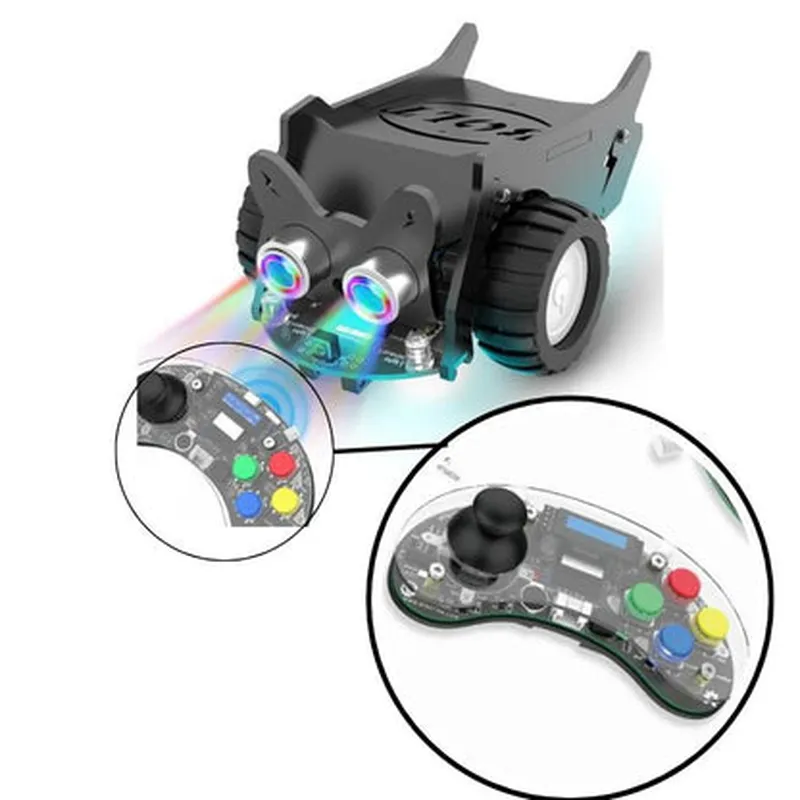
Elecrow - CrowBot BOLT - Open Source Programmable Smart Robot Car, STEAM Kit with Joystick Handle
The Elecrow CrowBot BOLT is an open-source, programmable smart robot car designed for STEAM (Science, Technology, Engineering, Arts, and Mathematics) education. This innovative kit combines robotics, IoT, and AI to provide an engaging and interactive learning experience for students, hobbyists, and professionals alike.
The CrowBot BOLT is a programmable robot car that can be controlled using a joystick handle, allowing users to navigate through obstacles and explore various environments. The robot car can be programmed using popular programming languages such as Python, C++, and Java, making it an ideal platform for learning programming concepts, robotics, and automation.
### Hardware Features
Ultrasonic sensor for obstacle detection and distance measurement.
Infrared sensor for line following and edge detection.
Light sensor for detecting ambient light levels.
### Software Features
### Educational Features
### Additional Features
| The Elecrow CrowBot BOLT is suitable for a wide range of applications, including |
The Elecrow CrowBot BOLT is a comprehensive, open-source programmable smart robot car designed for STEAM education and beyond. With its rich feature set, modularity, and ease of use, this kit provides an engaging and interactive learning experience for students, hobbyists, and professionals alike.
Elecrow - CrowBot BOLT - Open Source Programmable Smart Robot Car, STEAM Kit with Joystick HandleOverviewThe CrowBot BOLT is an open-source, programmable smart robot car designed for STEAM education. It comes with a joystick handle and is perfect for beginners and experienced users alike. This robot car is equipped with various sensors, a microcontroller, and a motor driver, making it an ideal platform for learning programming, robotics, and electronics.Hardware SpecificationsMicrocontroller: ESP32-WROVER-B
Motor Driver: L298P
Sensors: Ultrasonic, Infrared, and Line Follower
Joystick Handle: 2.4GHz Wireless Joystick
Power Source: 18650 Battery (Not Included)
Operating Voltage: 3.7V - 4.2V
Communication: Wi-Fi, Bluetooth, and SerialProgramming LanguagesThe CrowBot BOLT supports multiple programming languages, including:MicroPython
C/C++
Arduino IDEExample 1: Line Follower using MicroPythonIn this example, we will create a line follower robot using MicroPython. The robot will use the line follower sensor to detect the line and adjust its movement accordingly.Code:
```python
import machine
import utime# Initialize line follower sensor
line_sensor = machine.Pin(26, machine.Pin.IN)# Initialize motor pins
left_motor_forward = machine.Pin(13, machine.Pin.OUT)
left_motor_backward = machine.Pin(12, machine.Pin.OUT)
right_motor_forward = machine.Pin(14, machine.Pin.OUT)
right_motor_backward = machine.Pin(15, machine.Pin.OUT)while True:
# Read line sensor value
line_value = line_sensor.value()# Move forward if line is detected
if line_value == 1:
left_motor_forward.value(1)
right_motor_forward.value(1)
# Turn left if line is not detected
else:
left_motor_backward.value(1)
right_motor_forward.value(1)# Delay for 50ms
utime.sleep_ms(50)
```
Example 2: Obstacle Avoidance using C/C++In this example, we will create an obstacle avoidance robot using C/C++. The robot will use the ultrasonic sensor to detect obstacles and adjust its movement accordingly.Code:
```c
#include <Arduino.h>// Initialize ultrasonic sensor pins
const int trigPin = 2;
const int echoPin = 3;// Initialize motor pins
const int left_motor_forward = 13;
const int left_motor_backward = 12;
const int right_motor_forward = 14;
const int right_motor_backward = 15;void setup() {
pinMode(trigPin, OUTPUT);
pinMode(echoPin, INPUT);
pinMode(left_motor_forward, OUTPUT);
pinMode(left_motor_backward, OUTPUT);
pinMode(right_motor_forward, OUTPUT);
pinMode(right_motor_backward, OUTPUT);
}void loop() {
// Read ultrasonic sensor value
int distance = readUltrasonic();// Move forward if no obstacle is detected
if (distance > 20) {
digitalWrite(left_motor_forward, HIGH);
digitalWrite(right_motor_forward, HIGH);
}
// Turn right if obstacle is detected
else {
digitalWrite(left_motor_backward, HIGH);
digitalWrite(right_motor_forward, HIGH);
}// Delay for 50ms
delay(50);
}int readUltrasonic() {
digitalWrite(trigPin, LOW);
delayMicroseconds(2);
digitalWrite(trigPin, HIGH);
delayMicroseconds(10);
digitalWrite(trigPin, LOW);int duration = pulseIn(echoPin, HIGH);
int distance = duration 0.034 / 2;return distance;
}
```
Example 3: Joystick Control using Arduino IDEIn this example, we will create a joystick-controlled robot using the Arduino IDE. The robot will receive joystick data from the 2.4GHz wireless joystick and adjust its movement accordingly.Code:
```arduino
#include <CrowBot_BOLT.h>// Initialize joystick library
Joystick joystick;void setup() {
Serial.begin(115200);
joystick.begin();
}void loop() {
// Read joystick data
int xValue = joystick.getXAxis();
int yValue = joystick.getYAxis();// Move forward if joystick is pushed forward
if (yValue > 0) {
digitalWrite(left_motor_forward, HIGH);
digitalWrite(right_motor_forward, HIGH);
}
// Move backward if joystick is pushed backward
else if (yValue < 0) {
digitalWrite(left_motor_backward, HIGH);
digitalWrite(right_motor_backward, HIGH);
}
// Turn left if joystick is pushed left
else if (xValue < 0) {
digitalWrite(left_motor_backward, HIGH);
digitalWrite(right_motor_forward, HIGH);
}
// Turn right if joystick is pushed right
else if (xValue > 0) {
digitalWrite(left_motor_forward, HIGH);
digitalWrite(right_motor_backward, HIGH);
}// Delay for 50ms
delay(50);
}
```
These examples demonstrate how to use the CrowBot BOLT in various contexts, including line following, obstacle avoidance, and joystick control. The robot's flexibility and programmability make it an ideal platform for learning and development.