

Stufin
Home Quick Cart Profile

16x4 LCD blue JHD

Buy Now on Stufin

Component Name

16x4 LCD Blue JHD

Description

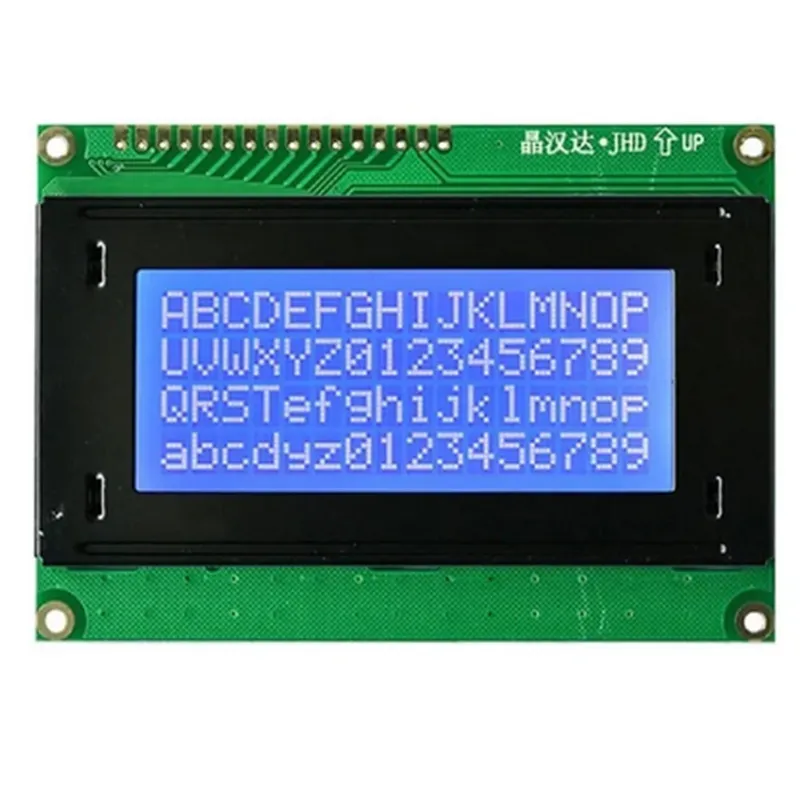
The 16x4 LCD Blue JHD is a liquid crystal display (LCD) module designed for use in various applications, including Internet of Things (IoT) projects, robotics, and embedded systems. This module is a popular choice among hobbyists and professionals due to its high visibility, low power consumption, and ease of use.

Functionality

The 16x4 LCD Blue JHD is a character-based LCD module that can display 16 characters in each of its 4 lines, making it suitable for displaying short messages, status updates, and other textual information. The module operates on a 5x7 dot matrix, where each character is comprised of 5x7 pixels. The display is based on a ST7066U controller/driver, which provides a simple interface for sending commands and data to the display.

Key Features

  • Display Characteristics:

Display Type

STN (Super-Twist Nematic)

Display Size

16 characters x 4 lines

Display Area

64x32 pixels

Character Size

5x7 pixels

Viewing Angle

60 (typical)

  • Interface:

Interface Type

Parallel

Interface Pins

16-pin (4-bit or 8-bit mode)

Communication Protocol

4-bit or 8-bit parallel mode

  • Power and Voltage:

Operating Voltage

5V 10%

Power Consumption

100 mA (typical)

Backlight Voltage

5V 10%

Backlight Current

100 mA (typical)

  • Physical Characteristics:

Module Size

80x36 mm (typical)

Weight

30 grams (typical)

Mounting Type

Through-hole or SMD (depending on the package)

  • Environment:

Operating Temperature

-20C to 70C

Storage Temperature

-30C to 80C

Humidity

5% to 95% RH (non-condensing)

  • Commands and Functions:

Clear Display

Set Cursor Position

Write Data to Display

Read Data from Display

Display On/Off

Cursor On/Off

Blinking Cursor

  • Additional Features:

Blue backlight for improved visibility

English/Japanese/Korean character sets

Support for custom character generation

Notes

The module requires an external power source and a microcontroller or other control device to operate.

The display is not backlit by default; an external backlight circuit is required for the blue backlight to function.

The module's pinout and commands may vary depending on the manufacturer and specific part number. Consult the datasheet for specific details on pin assignments, command formats, and usage guidelines.

By providing a clear and concise description of the 16x4 LCD Blue JHD, this documentation aims to facilitate the understanding and effective use of this component in various IoT and embedded system applications.

Pin Configuration

  • 16x4 LCD Blue JHD Component Documentation
  • Pin Description:
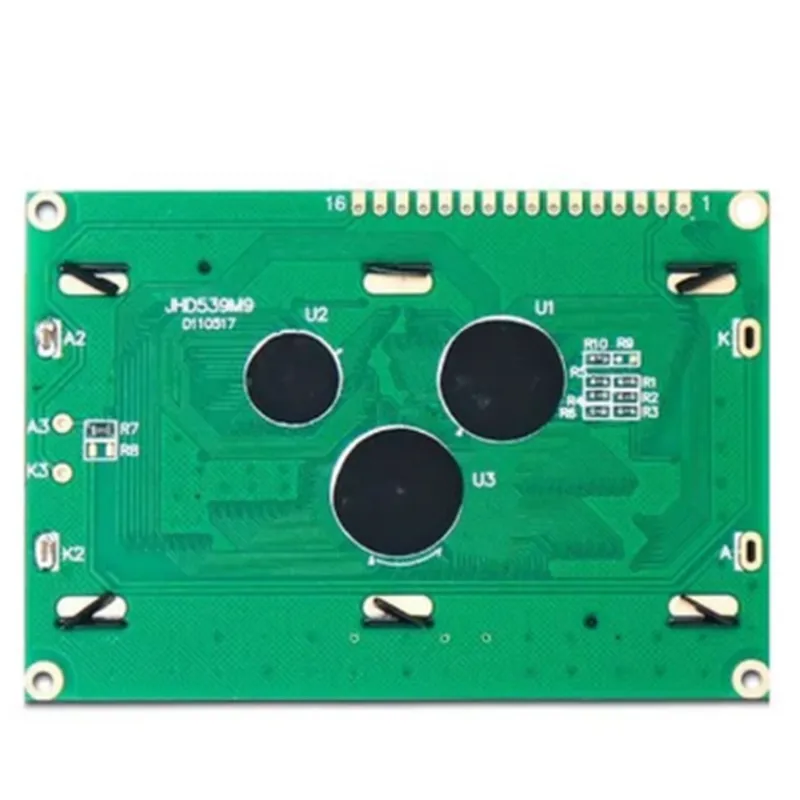
  • The 16x4 LCD Blue JHD component has 16 pins, which are used to interface with a microcontroller or other electronic devices. Here's a detailed description of each pin:
  • Pin 1: VSS (Ground)
  • Function: Ground pin, connects to the negative power supply or ground of the circuit
  • Description: This pin is connected to the ground of the power supply or the circuit to complete the circuit and provide a return path for the current.
  • Pin 2: VCC (Power Supply)
  • Function: Positive power supply pin, connects to the positive power supply of the circuit
  • Description: This pin is connected to the positive power supply of the circuit, typically +5V.
  • Pin 3: VE (Contrast Voltage)
  • Function: Contrast voltage pin, adjusts the display contrast
  • Description: This pin is used to adjust the contrast of the LCD display. A variable resistor or a potentiometer is typically connected between VCC and VE to adjust the contrast.
  • Pin 4: RS (Register Select)
  • Function: Register select pin, selects the type of data to be written or read
  • Description: This pin is used to select whether the LCD is receiving instructions (commands) or data. When RS is low (0), the LCD receives instructions. When RS is high (1), the LCD receives data.
  • Pin 5: RW (Read/Write)
  • Function: Read/Write pin, selects the mode of operation
  • Description: This pin is used to select the mode of operation. When RW is low (0), the LCD is in write mode, and data can be written to the display. When RW is high (1), the LCD is in read mode, and data can be read from the display.
  • Pin 6: EN (Enable)
  • Function: Enable pin, enables the LCD to receive data or instructions
  • Description: This pin is used to enable the LCD to receive data or instructions. When EN is high (1), the LCD is enabled, and data or instructions can be written to or read from the display.
  • Pin 7: DB0 (Data Bit 0)
  • Function: Data bit 0 pin, part of the 8-bit data bus
  • Description: This pin is part of the 8-bit data bus and carries the least significant bit (LSB) of the data or instruction being written to or read from the LCD.
  • Pin 8: DB1 (Data Bit 1)
  • Function: Data bit 1 pin, part of the 8-bit data bus
  • Description: This pin is part of the 8-bit data bus and carries the second least significant bit of the data or instruction being written to or read from the LCD.
  • Pin 9: DB2 (Data Bit 2)
  • Function: Data bit 2 pin, part of the 8-bit data bus
  • Description: This pin is part of the 8-bit data bus and carries the third least significant bit of the data or instruction being written to or read from the LCD.
  • Pin 10: DB3 (Data Bit 3)
  • Function: Data bit 3 pin, part of the 8-bit data bus
  • Description: This pin is part of the 8-bit data bus and carries the fourth least significant bit of the data or instruction being written to or read from the LCD.
  • Pin 11: DB4 (Data Bit 4)
  • Function: Data bit 4 pin, part of the 8-bit data bus
  • Description: This pin is part of the 8-bit data bus and carries the fifth least significant bit of the data or instruction being written to or read from the LCD.
  • Pin 12: DB5 (Data Bit 5)
  • Function: Data bit 5 pin, part of the 8-bit data bus
  • Description: This pin is part of the 8-bit data bus and carries the sixth least significant bit of the data or instruction being written to or read from the LCD.
  • Pin 13: DB6 (Data Bit 6)
  • Function: Data bit 6 pin, part of the 8-bit data bus
  • Description: This pin is part of the 8-bit data bus and carries the seventh least significant bit of the data or instruction being written to or read from the LCD.
  • Pin 14: DB7 (Data Bit 7)
  • Function: Data bit 7 pin, part of the 8-bit data bus
  • Description: This pin is part of the 8-bit data bus and carries the most significant bit (MSB) of the data or instruction being written to or read from the LCD.
  • Pin 15: Anode
  • Function: Backlight anode pin
  • Description: This pin is connected to the positive leg of the backlight LED.
  • Pin 16: Cathode
  • Function: Backlight cathode pin
  • Description: This pin is connected to the negative leg of the backlight LED.
  • Connection Structure:
  • To connect the 16x4 LCD Blue JHD component to a microcontroller or other electronic devices, follow this structure:
  • 1. Connect VSS (Pin 1) to ground (GND) of the power supply or circuit.
  • 2. Connect VCC (Pin 2) to the positive power supply of the circuit (typically +5V).
  • 3. Connect VE (Pin 3) to a variable resistor or potentiometer, which is connected to VCC and GND, to adjust the contrast of the LCD display.
  • 4. Connect RS (Pin 4) to a digital output pin of the microcontroller, which selects the type of data to be written or read.
  • 5. Connect RW (Pin 5) to a digital output pin of the microcontroller, which selects the mode of operation (write or read).
  • 6. Connect EN (Pin 6) to a digital output pin of the microcontroller, which enables the LCD to receive data or instructions.
  • 7. Connect DB0-DB7 (Pins 7-14) to digital output pins of the microcontroller, which form the 8-bit data bus.
  • 8. Connect the anode (Pin 15) and cathode (Pin 16) of the backlight LED to a power supply or a dedicated backlight driver.
  • Note: Make sure to check the datasheet of the specific 16x4 LCD Blue JHD component for any specific connection requirements or recommendations.

Code Examples

Component Documentation: 16x4 LCD Blue JHD
Overview
The 16x4 LCD Blue JHD is a popular alphanumeric liquid crystal display (LCD) module used in various Internet of Things (IoT) projects. It features a 16-character wide, 4-line display with a blue backlight and is compatible with HD44780U controller/driver.
Key Features
16 characters per line, 4 lines
 Blue backlight with adjustable brightness
 HD44780U controller/driver
 5x7 dot matrix character display
 Compatible with 4-bit and 8-bit microcontrollers
 Operating voltage: 5V
 Interface: 16-pin single row header
Pinout
| Pin No. | Pin Name | Function |
| --- | --- | --- |
| 1 | VSS | Ground |
| 2 | VCC | Power Supply (5V) |
| 3 | VEE | Contrast Adjustment |
| 4 | RS | Register Select |
| 5 | R/W | Read/Write |
| 6 | E | Enable |
| 7-10 | DB0-DB3 | Data Bus (4-bit mode) |
| 11-14 | DB4-DB7 | Data Bus (8-bit mode) |
| 15 | BLA | Backlight Anode |
| 16 | K | Backlight Cathode |
Code Examples
### Example 1: Basic Character Display using Arduino
This example demonstrates how to display a simple message on the LCD using an Arduino Uno.
```c
#include <LiquidCrystal.h>
// Define LCD pins
const int rs = 12, en = 11, d4 = 5, d5 = 4, d6 = 3, d7 = 2;
LiquidCrystal_I2C lcd(rs, en, d4, d5, d6, d7);
void setup() {
  lcd.begin(16, 4); // Initialize LCD with 16x4 dimensions
  lcd.setCursor(0, 0); // Set cursor to top-left corner
  lcd.print("Hello, World!"); // Display message
}
void loop() {
  // No operation
}
```
### Example 2:Temperature Display using Raspberry Pi (Python)
This example demonstrates how to display the temperature reading from a DS18B20 temperature sensor using a Raspberry Pi.
```python
import RPi.GPIO as GPIO
from RPLCD import CharLCD
import time
# Define LCD pins
lcd = CharLCD(cols=16, rows=4, pin_rs=7, pin_e=8, pins_data=[25, 24, 23, 18])
# Initialize DS18B20 temperature sensor
temp_sensor = '/sys/bus/w1/devices/28-000008a71564/w1_slave'
while True:
    # Read temperature from sensor
    with open(temp_sensor, 'r') as f:
        temp_data = f.read()
        temp = float(temp_data.split("t=")[1]) / 1000
# Clear LCD and display temperature
    lcd.clear()
    lcd.cursor_pos = (0, 0)
    lcd.write_string("Temperature: {:.1f} C".format(temp))
time.sleep(1)  # Update every 1 second
```
These examples demonstrate the basic usage of the 16x4 LCD Blue JHD in different contexts. You can modify and extend these examples to suit your specific project requirements.