Stufin
Home Quick Cart Profile

HDMI to Micro HDMI Cable


Buy Now on Stufin

Component Name

HDMI to Micro HDMI Cable
Overview

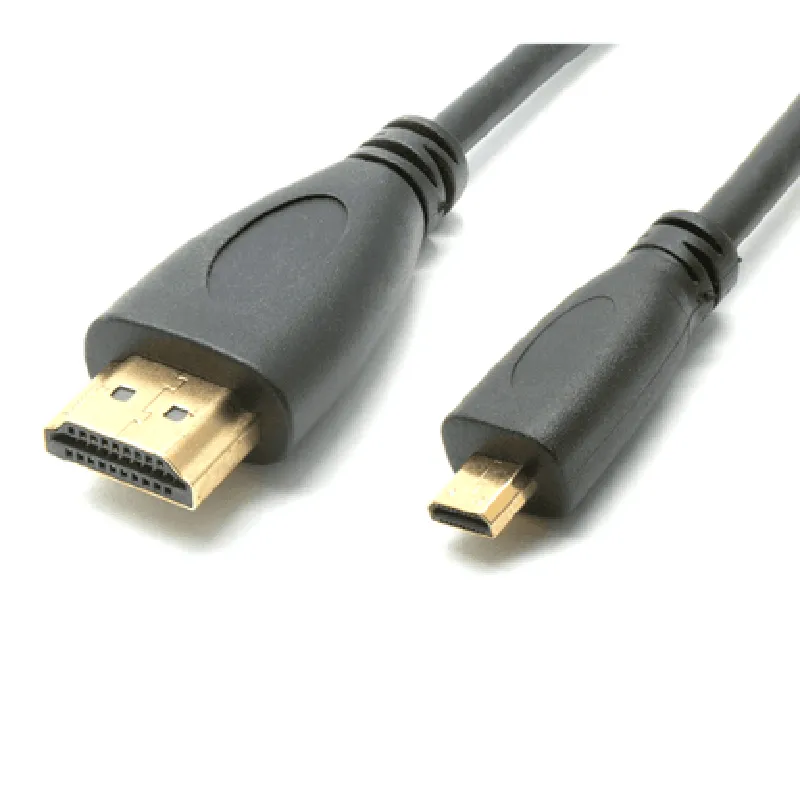
The HDMI to Micro HDMI Cable is a high-quality, compact cable designed to connect devices with standard HDMI ports to devices with micro HDMI ports. This cable enables the transmission of high-definition audio and video signals between devices, making it an essential component for various applications, including gaming, video streaming, and data transfer.
Functionality

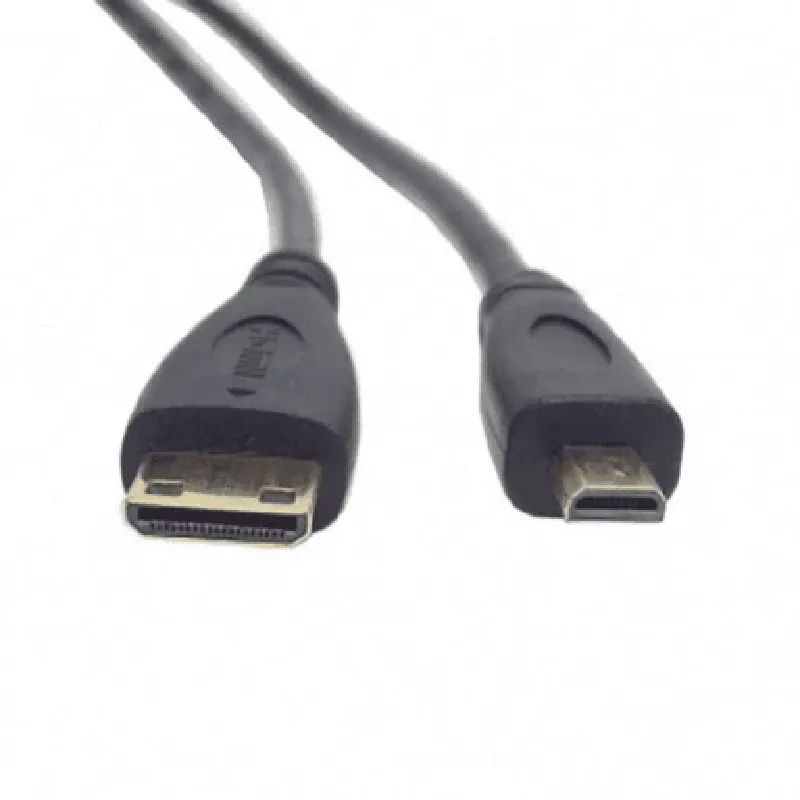
The HDMI to Micro HDMI Cable functions as a bridge between devices with different HDMI port sizes, allowing users to connect devices that would otherwise be incompatible. This cable supports the transmission of

High-definition video signals up to 4K resolution (3840 x 2160 pixels) at 30 Hz

Multi-channel audio signals, including Dolby TrueHD and DTS-HD Master Audio

Ethernet connectivity, enabling internet access and device control

Key Features

  • Reversible Design: The micro HDMI connector is designed to be reversible, allowing for easy connection and disconnection.
  • High-Speed Data Transfer: The cable supports high-speed data transfer rates of up to 10.2 Gbps, ensuring fast and reliable transmission of audio and video signals.
  • Gold-Plated Connectors: The connectors are gold-plated to prevent corrosion and ensure a secure connection, reducing the risk of signal degradation or loss.
  • Shielded Cable: The cable is shielded to minimize electromagnetic interference (EMI) and radio-frequency interference (RFI), ensuring a stable and reliable signal transmission.
  • Compact Design: The micro HDMI connector is designed to be compact and lightweight, making it ideal for use in portable devices, such as smartphones, tablets, and laptops.
  • Wide Compatibility: The cable is compatible with a wide range of devices, including TVs, monitors, projectors, gaming consoles, and computers.

HDMI Version

1.4

Resolution

Up to 4K (3840 x 2160 pixels) at 30 Hz

Audio

Multi-channel, including Dolby TrueHD and DTS-HD Master Audio

Data Transfer Rate

Up to 10.2 Gbps

Cable Length

[Insert length, e.g., 1m, 2m, 3m]

Connector Type

HDMI Type A (standard) to Micro HDMI Type D (reversible)

Materials

Shielded copper cable with gold-plated connectors

Operating Temperature

-20C to 80C (-4F to 176F)

Applications

The HDMI to Micro HDMI Cable is suitable for various applications, including

Connecting smartphones or tablets to TVs or monitors for video streaming or gaming

Connecting laptops to projectors or displays for presentations or demonstrations

Connecting gaming consoles to TVs or monitors for an immersive gaming experience

Connecting computers to monitors or displays for extended desktop or mirroring applications

Pin Configuration

  • HDMI to Micro HDMI Cable Documentation
  • Overview
  • The HDMI to Micro HDMI cable is a type of digital video cable used to connect devices with HDMI ports to devices with Micro HDMI ports. This cable allows for the transmission of high-definition video and audio signals between devices.
  • Pinout Structure
  • The HDMI to Micro HDMI cable has 19 pins on the standard HDMI connector and 19 pins on the Micro HDMI connector. The pinout structure is as follows:
  • HDMI Connector (Type A) Pinout
  • 1. TMDS Clock+: Carries the clock signal for the transition-minimized differential signaling (TMDS) data.
  • 2. TMDS Clock-: Carries the inverted clock signal for the TMDS data.
  • 3. TMDS Data 2+: Carries one of the three TMDS data channels.
  • 4. TMDS Data 2-: Carries the inverted signal of TMDS Data 2+.
  • 5. TMDS Data 1+: Carries one of the three TMDS data channels.
  • 6. TMDS Data 1-: Carries the inverted signal of TMDS Data 1+.
  • 7. TMDS Data 0+: Carries one of the three TMDS data channels.
  • 8. TMDS Data 0-: Carries the inverted signal of TMDS Data 0+.
  • 9. CEC: Carries the Consumer Electronics Control (CEC) signal, used for remote control and device control.
  • 10. Reserved (NC): Not connected, reserved for future use.
  • 11. SCL (DDC Clock): Carries the clock signal for the Display Data Channel (DDC).
  • 12. SDA (DDC Data): Carries the data signal for the DDC.
  • 13. HOT.PLUG: Detects the presence of a device on the HDMI connection.
  • 14. 5V Power: Supplies power to the device.
  • 15. Ground: Provides a ground connection.
  • 16. HEAC+: Carries the High-speed Ethernet Audio Return Channel (HEAC) signal.
  • 17. HEAC-: Carries the inverted signal of HEAC+.
  • 18. DDC/CEC Ground: Provides a ground connection for the DDC and CEC signals.
  • 19. Shield: Provides a shield connection for the cable.
  • Micro HDMI Connector (Type D) Pinout
  • 1. TMDS Clock+: Carries the clock signal for the TMDS data.
  • 2. TMDS Clock-: Carries the inverted clock signal for the TMDS data.
  • 3. TMDS Data 2+: Carries one of the three TMDS data channels.
  • 4. TMDS Data 2-: Carries the inverted signal of TMDS Data 2+.
  • 5. TMDS Data 1+: Carries one of the three TMDS data channels.
  • 6. TMDS Data 1-: Carries the inverted signal of TMDS Data 1+.
  • 7. TMDS Data 0+: Carries one of the three TMDS data channels.
  • 8. TMDS Data 0-: Carries the inverted signal of TMDS Data 0+.
  • 9. CEC: Carries the Consumer Electronics Control (CEC) signal.
  • 10. Reserved (NC): Not connected, reserved for future use.
  • 11. SCL (DDC Clock): Carries the clock signal for the Display Data Channel (DDC).
  • 12. SDA (DDC Data): Carries the data signal for the DDC.
  • 13. HOT.PLUG: Detects the presence of a device on the Micro HDMI connection.
  • 14. 5V Power: Supplies power to the device.
  • 15. Ground: Provides a ground connection.
  • 16. HEAC+: Carries the High-speed Ethernet Audio Return Channel (HEAC) signal.
  • 17. HEAC-: Carries the inverted signal of HEAC+.
  • 18. DDC/CEC Ground: Provides a ground connection for the DDC and CEC signals.
  • 19. Shield: Provides a shield connection for the cable.
  • Connection Structure
  • To connect the HDMI to Micro HDMI cable:
  • Connect the HDMI connector (Type A) to the device with a standard HDMI port.
  • Connect the Micro HDMI connector (Type D) to the device with a Micro HDMI port.
  • Ensure the cable is securely connected to both devices.
  • The cable will transmit high-definition video and audio signals between the two devices.
  • Note
  • The HDMI to Micro HDMI cable is a passive cable, meaning it does not actively convert or modify the signal.
  • The cable is designed to work with devices that support HDMI and Micro HDMI connections.
  • The cable may not work with devices that have different pinout structures or configurations. Always check the device documentation before connecting the cable.

Code Examples

HDMI to Micro HDMI Cable Documentation
Overview
The HDMI to Micro HDMI Cable is a versatile connectivity component designed for interfacing between devices with standard HDMI ports and devices with micro HDMI ports. This cable enables the transmission of high-definition audio and video signals between devices, making it an essential component in various IoT applications.
Features
Supports high-definition video resolutions up to 4K at 30Hz
 Compatible with HDMI 1.4 specifications
 Gold-plated connectors for reliable signal transmission
 Shielded cable construction for reduced interference
 1-meter long cable provides flexible installation options
Technical Specifications
Connector Type: Standard HDMI (Type A) to Micro HDMI (Type D)
 Cable Length: 1 meter
 Resolution Support: Up to 4K at 30Hz
 Bandwidth: 10.2 Gbps
 Power Consumption: Passive, no external power required
Code Examples
### Example 1: Raspberry Pi 4 to Micro HDMI Display
In this example, we'll demonstrate how to use the HDMI to Micro HDMI Cable to connect a Raspberry Pi 4 to a micro HDMI display.
Hardware Required
Raspberry Pi 4
 Micro HDMI display
 HDMI to Micro HDMI Cable
Software
Raspbian OS (latest version)
 Python 3.x
Code
```python
import raspbian
# Initialize the HDMI output
raspbian.hdmisettings.set_hdmi_output(1)
# Set the display resolution to 1080p
raspbian.hdmisettings.set_resolution(1920, 1080)
# Display a sample video
video_file = "path/to/video.mp4"
raspbian.omxplayer.play_video(video_file)
```
Note: This code assumes that you have the `raspbian` library installed and configured on your Raspberry Pi 4.
### Example 2: Intel Edison to Micro HDMI Camera
In this example, we'll demonstrate how to use the HDMI to Micro HDMI Cable to connect an Intel Edison board to a micro HDMI camera.
Hardware Required
Intel Edison board
 Micro HDMI camera
 HDMI to Micro HDMI Cable
Software
Intel Edison Yocto Linux (latest version)
 OpenCV 3.x
Code
```c
#include <opencv2/opencv.hpp>
int main() {
    // Initialize the camera
    cv::VideoCapture camera(0);
// Set the camera resolution to 720p
    camera.set(cv::CAP_PROP_FRAME_WIDTH, 1280);
    camera.set(cv::CAP_PROP_FRAME_HEIGHT, 720);
// Capture and display video frames
    while (true) {
        cv::Mat frame;
        camera >> frame;
        cv::imshow("Camera Feed", frame);
        cv::waitKey(1);
    }
return 0;
}
```
Note: This code assumes that you have the OpenCV library installed and configured on your Intel Edison board.
By using the HDMI to Micro HDMI Cable, developers can easily integrate devices with standard HDMI ports with devices featuring micro HDMI ports, enabling a wide range of IoT applications, from smart displays to robotics and computer vision projects.