3 in 1 Raspberry Pi Aluminium Heat Sink for Pi 3


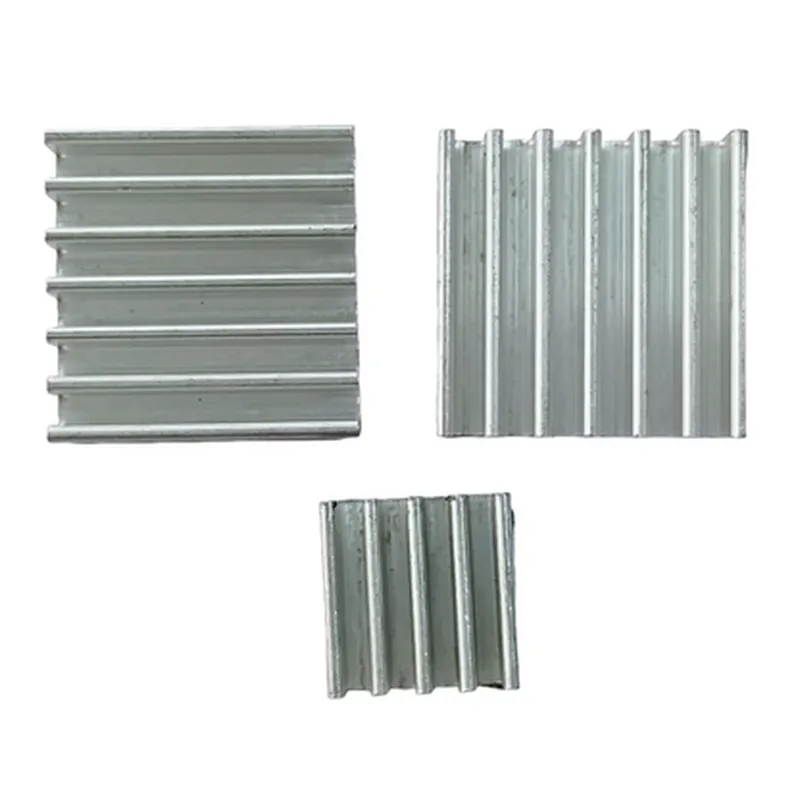

3 in 1 Raspberry Pi Aluminium Heat Sink for Pi 3
The 3 in 1 Raspberry Pi Aluminium Heat Sink for Pi 3 is a high-performance heat dissipation solution designed specifically for the Raspberry Pi 3 model. This heat sink is engineered to provide efficient cooling for the Raspberry Pi's CPU, GPU, and RAM, ensuring reliable operation and preventing overheating issues.
| The primary function of the 3 in 1 Raspberry Pi Aluminium Heat Sink is to dissipate heat generated by the Raspberry Pi 3's components, particularly the CPU, GPU, and RAM. This is achieved through a combination of conduction, convection, and radiation. The heat sink's aluminium construction and thermal interface material work together to |
Conduct heat away from the components
Increase the surface area for heat dissipation
Facilitate airflow and convection
Reduce thermal resistance
| By effectively managing heat, the heat sink helps to |
Prevent overheating and throttling
Maintain optimal operating temperatures
Ensure reliable and stable performance
Extend the lifespan of the Raspberry Pi 3
Aluminium
[Insert dimensions]
[Insert weight]
[Insert thermal resistance value]
[Insert operating temperature range]
Raspberry Pi 3 Model
For optimal performance, ensure the heat sink is installed in a well-ventilated area, away from obstructions.
Regularly clean the heat sink to maintain its thermal performance and prevent dust buildup.
Consider using thermal tape or a thermal interface material to further enhance heat transfer between the heat sink and components.
By incorporating the 3 in 1 Raspberry Pi Aluminium Heat Sink for Pi 3 into your project, you can ensure reliable and efficient operation of your Raspberry Pi 3, even in demanding applications.
Component Documentation: 3 in 1 Raspberry Pi Aluminium Heat Sink for Pi 3OverviewThe 3 in 1 Raspberry Pi Aluminium Heat Sink for Pi 3 is a high-quality heat dissipation solution designed specifically for the Raspberry Pi 3. This heat sink is designed to efficiently dissipate heat generated by the Raspberry Pi's CPU, ensuring optimal performance and prolonging the lifespan of the device.Features3-in-1 design allows for easy installation and compatibility with multiple Raspberry Pi models (Pi 3, Pi 3+, and Pi 3 A+)
Aluminium construction provides excellent heat conductivity and durability
Easy-to-install design with adhesive thermal tape for simple attachment to the Raspberry PiTechnical SpecificationsMaterial: Aluminium
Dimensions: 30 x 20 x 10 mm (L x W x H)
Weight: 15g
Thermal Conductivity: 237 W/mK
Operating Temperature: -40C to 150CCode Examples### Example 1: Monitoring Temperature with PythonThis example demonstrates how to use the 3 in 1 Raspberry Pi Aluminium Heat Sink for Pi 3 in conjunction with a Python script to monitor the Raspberry Pi's temperature.Hardware Requirements:Raspberry Pi 3
3 in 1 Raspberry Pi Aluminium Heat Sink for Pi 3
Breadboard and jumper wires (optional)Software Requirements:Raspbian OS (or compatible)
Python 3.xCode:
```python
import os
import time# Get the current temperature from the system
temp = os.popen("vcgencmd measure_temp").readline()# Remove the newline character and extract the temperature value
temp = temp.replace("temp=","").replace("
","")# Print the temperature value
print("Current temperature: ", temp)while True:
# Take a 10-second reading
temp = os.popen("vcgencmd measure_temp").readline()
temp = temp.replace("temp=","").replace("
","")
print("Current temperature: ", temp)
time.sleep(10)
```
This script uses the `vcgencmd` command to read the current temperature of the Raspberry Pi and prints it to the console every 10 seconds.### Example 2: Fan Control with Python (Optional)This example demonstrates how to use the 3 in 1 Raspberry Pi Aluminium Heat Sink for Pi 3 with a fan to regulate temperature. Note that this example requires additional hardware components, including a fan and a transistor.Hardware Requirements:Raspberry Pi 3
3 in 1 Raspberry Pi Aluminium Heat Sink for Pi 3
Breadboard and jumper wires
Fan (e.g., 5V, 0.5A)
Transistor (e.g., 2N3904)
Diode (e.g., 1N4007)
Resistors (e.g., 1k and 2k)Software Requirements:Raspbian OS (or compatible)
Python 3.xCode:
```python
import RPi.GPIO as GPIO
import time# Set up GPIO mode
GPIO.setmode(GPIO.BCM)# Define fan pin and set it as an output
fan_pin = 17
GPIO.setup(fan_pin, GPIO.OUT)# Define temperature threshold (e.g., 60C)
temp_threshold = 60while True:
# Get the current temperature
temp = os.popen("vcgencmd measure_temp").readline()
temp = temp.replace("temp=","").replace("
","")# Convert temperature to Celsius
temp_c = float(temp)# Check if temperature exceeds threshold
if temp_c > temp_threshold:
# Turn on the fan
GPIO.output(fan_pin, GPIO.HIGH)
else:
# Turn off the fan
GPIO.output(fan_pin, GPIO.LOW)# Wait 10 seconds before checking again
time.sleep(10)
```
This script uses the `RPi.GPIO` library to control a fan connected to the Raspberry Pi. The script monitors the temperature and turns the fan on if the temperature exceeds the specified threshold.Note: These code examples are for demonstration purposes only and may require modifications to suit specific project requirements. Ensure proper installation and setup of the 3 in 1 Raspberry Pi Aluminium Heat Sink for Pi 3 before running these examples.