Stufin
Home Quick Cart Profile

Dual USB 5V 1A 2.1A PCB Power Module with LCD

Buy Now on Stufin

Component Name

Dual USB 5V 1A 2.1A PCB Power Module with LCD

Overview

-----------

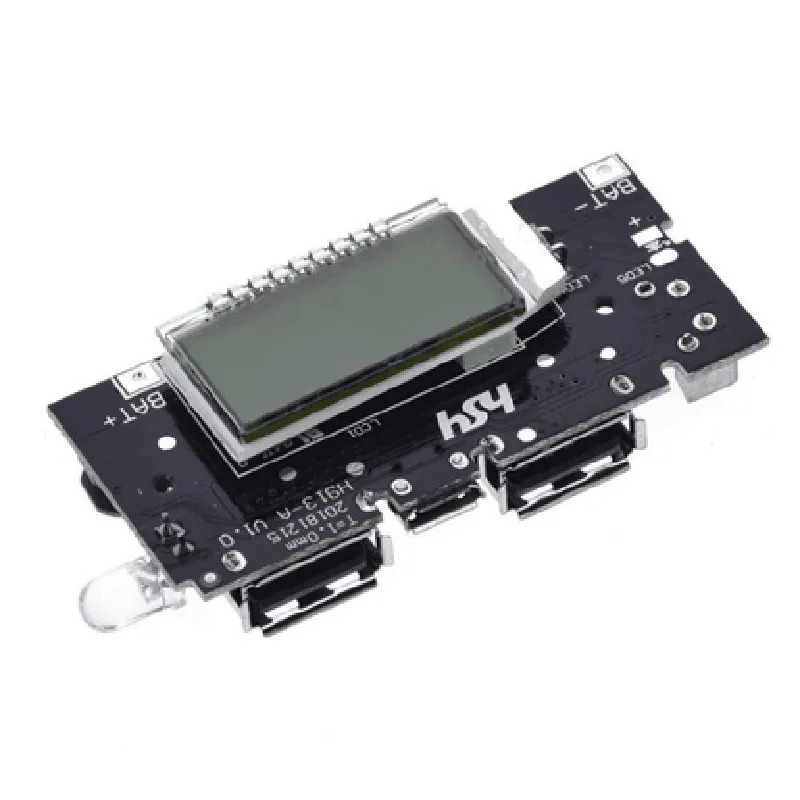
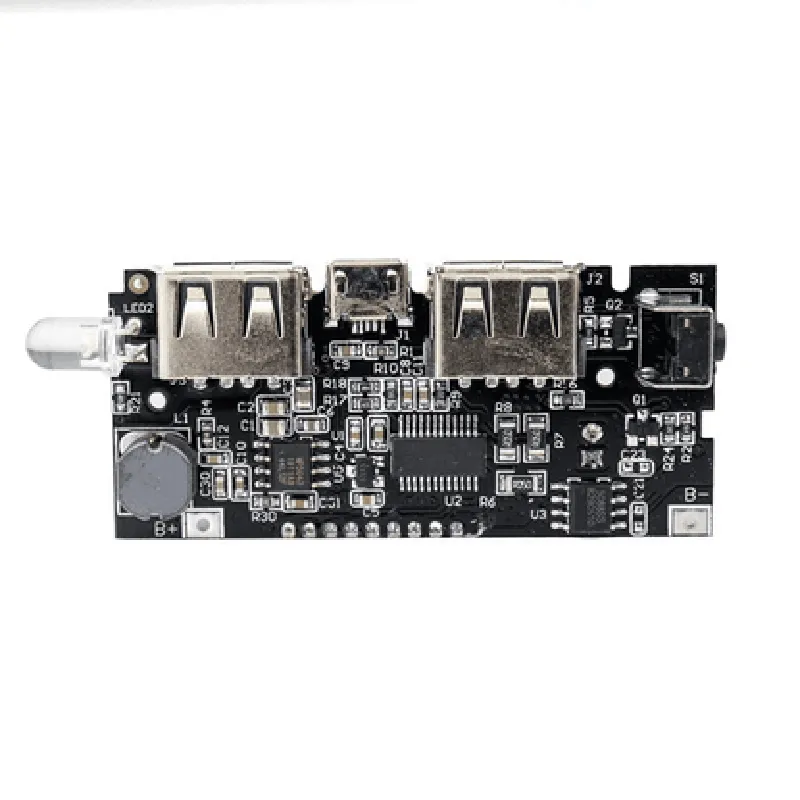
The Dual USB 5V 1A 2.1A PCB Power Module with LCD is a compact, high-performance power management component designed for various IoT applications, robotics, and embedded systems. This module integrates two USB ports, a voltage regulator, and an LCD display, providing a convenient and efficient solution for powering and monitoring USB devices.

Functionality

--------------

The primary function of this module is to provide a stable and regulated 5V power supply to two USB ports, with current ratings of 1A and 2.1A, respectively. The module can be used to power a wide range of USB devices, including smartphones, tablets, and peripheral devices. Additionally, the integrated LCD display allows for real-time monitoring of voltage, current, and power consumption.

Key Features

--------------

### Power Management

Dual USB ports with independent voltage regulators

5V output voltage with 2% accuracy

Maximum output current

+ USB Port 11A
+ USB Port 22.1A

Overcurrent protection (OCP) and short-circuit protection (SCP) for each USB port

### LCD Display

1.54-inch LCD display with a resolution of 128x64 pixels

Real-time monitoring of

+ Input voltage (VIN)

+ Output voltage (VOUT)

+ Output current (IOUT)

+ Power consumption (POW)

Display update rate

1s

### Power Input

Input voltage range

6.5V to 36V DC

Recommended input voltage

7V to 24V DC

### Protection Features

Overvoltage protection (OVP) for input voltage

Undervoltage protection (UVP) for input voltage

Overtemperature protection (OTP) for the module

### Physical Characteristics

PCB dimensions

45mm x 30mm (1.77" x 1.18")

Thickness

1.6mm (0.063")

Weight

approximately 15g (0.53 oz)

Operating temperature range

-20C to 85C (-4F to 185F)

Storage temperature range

-40C to 125C (-40F to 257F)

### Certifications and Compliance

RoHS compliant

CE certified

FCC compliant

Applications

--------------

The Dual USB 5V 1A 2.1A PCB Power Module with LCD is suitable for various IoT applications, including

Robotics and automation systems

Embedded systems and single-board computers

USB peripheral devices and accessories

Medical devices and equipment

Consumer electronics and appliances

Conclusion

----------

The Dual USB 5V 1A 2.1A PCB Power Module with LCD is a high-performance power management component ideal for IoT applications requiring efficient and reliable power supply and monitoring capabilities. Its compact design, high accuracy, and integrated LCD display make it an excellent choice for a wide range of projects and devices.

Pin Configuration

  • Dual USB 5V 1A 2.1A PCB Power Module with LCD Documentation
  • Overview
  • The Dual USB 5V 1A 2.1A PCB Power Module with LCD is a compact and efficient power management module designed for IoT and embedded systems applications. It features two USB ports, each capable of delivering 5V at 1A and 2.1A, respectively, making it ideal for powering small devices and charging batteries. The module also includes an LCD display for real-time voltage and current monitoring.
  • Pinout Description
  • The module has a total of 9 pins, which are described below:
  • Pin 1: VCC (5V Input)
  • Function: 5V input power supply
  • Description: This pin is the main power input for the module. A stable 5V DC power source should be connected to this pin.
  • Recommended wire size: 20 AWG or thicker
  • Pin 2: GND (Ground)
  • Function: Ground reference
  • Description: This pin is the ground reference point for the module. It should be connected to the negative terminal of the power source and the ground pin of the device being powered.
  • Recommended wire size: 20 AWG or thicker
  • Pin 3: USB1_VBUS (5V, 1A Output)
  • Function: USB output voltage (5V, 1A)
  • Description: This pin provides a 5V output at a maximum current of 1A. It is suitable for powering small devices, such as sensors, microcontrollers, or low-power peripherals.
  • Recommended wire size: 22 AWG or thicker
  • Pin 4: USB1_GND (Ground)
  • Function: Ground reference for USB1
  • Description: This pin is the ground reference point for the USB1 output. It should be connected to the negative terminal of the device being powered.
  • Recommended wire size: 22 AWG or thicker
  • Pin 5: USB2_VBUS (5V, 2.1A Output)
  • Function: USB output voltage (5V, 2.1A)
  • Description: This pin provides a 5V output at a maximum current of 2.1A. It is suitable for powering devices that require higher currents, such as smartphones or tablets.
  • Recommended wire size: 20 AWG or thicker
  • Pin 6: USB2_GND (Ground)
  • Function: Ground reference for USB2
  • Description: This pin is the ground reference point for the USB2 output. It should be connected to the negative terminal of the device being powered.
  • Recommended wire size: 20 AWG or thicker
  • Pin 7: LCD_VCC (LCD Power)
  • Function: Power supply for the LCD display
  • Description: This pin provides the power supply for the onboard LCD display. It should be connected to a stable 5V DC power source.
  • Recommended wire size: 24 AWG or thicker
  • Pin 8: LCD_SDA (LCD Data)
  • Function: Data line for the LCD display
  • Description: This pin is the data line for the LCD display. It should be connected to the corresponding data pin on the microcontroller or other display driver.
  • Recommended wire size: 24 AWG or thicker
  • Pin 9: LCD_SCL (LCD Clock)
  • Function: Clock line for the LCD display
  • Description: This pin is the clock line for the LCD display. It should be connected to the corresponding clock pin on the microcontroller or other display driver.
  • Recommended wire size: 24 AWG or thicker
  • Connection Structure
  • To connect the pins, follow these steps:
  • 1. Connect the 5V power source to Pin 1 (VCC) and Pin 2 (GND).
  • 2. Connect the device to be powered to Pin 3 (USB1_VBUS) and Pin 4 (USB1_GND) for a 1A output, or to Pin 5 (USB2_VBUS) and Pin 6 (USB2_GND) for a 2.1A output.
  • 3. Connect the LCD display driver to Pin 7 (LCD_VCC), Pin 8 (LCD_SDA), and Pin 9 (LCD_SCL).
  • Important Notes
  • The module should be operated within the recommended temperature range of -20C to 85C.
  • The USB outputs are short-circuit protected, but it is still recommended to use a fuse or other overcurrent protection device to prevent damage from excessive current draw.
  • The LCD display may require additional configuration or calibration depending on the specific display driver and microcontroller used.
  • By following these guidelines and pinout descriptions, you can effectively utilize the Dual USB 5V 1A 2.1A PCB Power Module with LCD in your IoT and embedded systems projects.

Code Examples

Dual USB 5V 1A 2.1A PCB Power Module with LCD Documentation
Overview
The Dual USB 5V 1A 2.1A PCB Power Module with LCD is a compact and versatile power management module designed for IoT applications. It features two USB ports, each capable of delivering 1A and 2.1A of current, respectively, and an integrated LCD display for monitoring voltage and current. This module is ideal for powering small devices, such as microcontrollers, sensors, and other IoT components.
Features
Dual USB ports: 1x 5V 1A, 1x 5V 2.1A
 High-precision voltage and current monitoring
 Integrated LCD display for real-time monitoring
 Compact PCB design for easy integration
 Operating voltage: 5V
 Operating temperature: -20C to 80C
Pinout
| Pin | Function |
| --- | --- |
| VCC | 5V input power |
| GND | Ground |
| USB1+ | USB port 1 positive |
| USB1- | USB port 1 negative |
| USB2+ | USB port 2 positive |
| USB2- | USB port 2 negative |
| SCL | I2C clock |
| SDA | I2C data |
| LCD_VCC | LCD power supply |
| LCD_GND | LCD ground |
Communication Protocol
The Dual USB 5V 1A 2.1A PCB Power Module with LCD communicates via I2C protocol. The module's I2C address is 0x20.
Code Examples
### Example 1: Monitoring Voltage and Current using Arduino
In this example, we will use an Arduino board to communicate with the Dual USB 5V 1A 2.1A PCB Power Module with LCD and display the voltage and current readings on the serial monitor.
```cpp
#include <Wire.h>
#define PM_MODULE_ADDRESS 0x20
void setup() {
  Serial.begin(9600);
  Wire.begin();
}
void loop() {
  int voltage = readVoltage();
  int current = readCurrent();
Serial.print("Voltage: ");
  Serial.print(voltage);
  Serial.println("mV");
  Serial.print("Current: ");
  Serial.print(current);
  Serial.println("mA");
delay(1000);
}
int readVoltage() {
  byte voltageHigh = 0;
  byte voltageLow = 0;
Wire.beginTransmission(PM_MODULE_ADDRESS);
  Wire.write(0x01);
  Wire.endTransmission();
  Wire.requestFrom(PM_MODULE_ADDRESS, 2);
voltageHigh = Wire.read();
  voltageLow = Wire.read();
int voltage = (voltageHigh << 8) | voltageLow;
  voltage = (voltage  5) / 1024;
return voltage;
}
int readCurrent() {
  byte currentHigh = 0;
  byte currentLow = 0;
Wire.beginTransmission(PM_MODULE_ADDRESS);
  Wire.write(0x02);
  Wire.endTransmission();
  Wire.requestFrom(PM_MODULE_ADDRESS, 2);
currentHigh = Wire.read();
  currentLow = Wire.read();
int current = (currentHigh << 8) | currentLow;
  current = (current  100) / 1024;
return current;
}
```
### Example 2: Powering a Raspberry Pi using Python
In this example, we will use a Raspberry Pi to communicate with the Dual USB 5V 1A 2.1A PCB Power Module with LCD and monitor the voltage and current readings.
```python
import smbus
import time
bus = smbus.SMBus(1)
PM_MODULE_ADDRESS = 0x20
def read_voltage():
    bus.write_byte(PM_MODULE_ADDRESS, 0x01)
    voltage_data = bus.read_i2c_block_data(PM_MODULE_ADDRESS, 0x00, 2)
    voltage = (voltage_data[0] << 8) | voltage_data[1]
    voltage = (voltage  5) / 1024
    return voltage
def read_current():
    bus.write_byte(PM_MODULE_ADDRESS, 0x02)
    current_data = bus.read_i2c_block_data(PM_MODULE_ADDRESS, 0x00, 2)
    current = (current_data[0] << 8) | current_data[1]
    current = (current  100) / 1024
    return current
while True:
    voltage = read_voltage()
    current = read_current()
    print("Voltage: {}mV, Current: {}mA".format(voltage, current))
    time.sleep(1)
```
Note: In this example, we assume that the Raspberry Pi is connected to the power module via I2C bus. The `smbus` library is used to communicate with the power module.
These examples demonstrate how to use the Dual USB 5V 1A 2.1A PCB Power Module with LCD in various contexts. The module's integrated LCD display can be used to monitor voltage and current readings, while the I2C interface allows for real-time monitoring and control of the power module.