Stufin
Home Quick Cart Profile

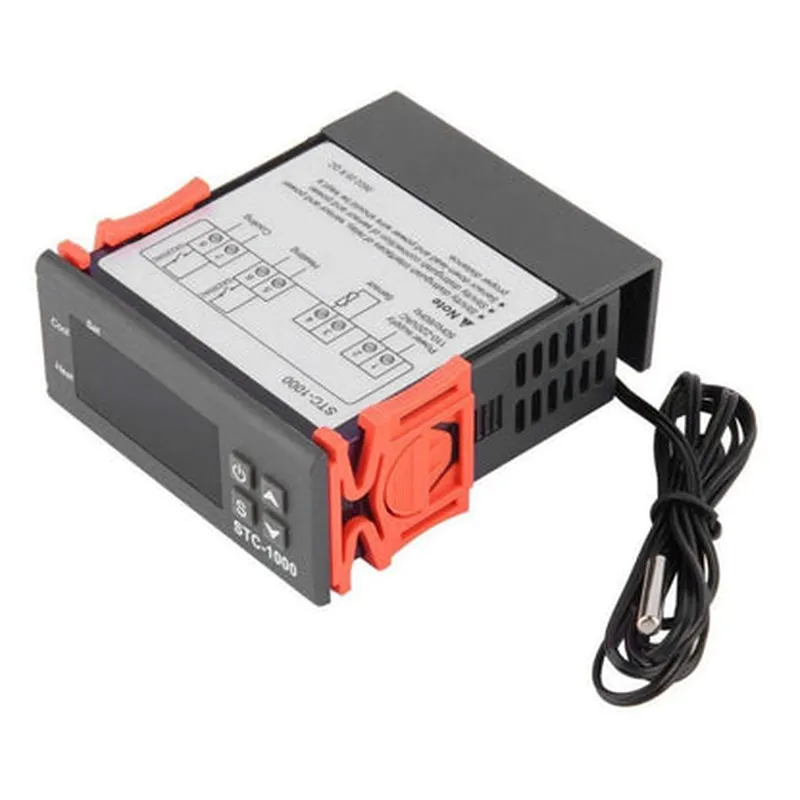
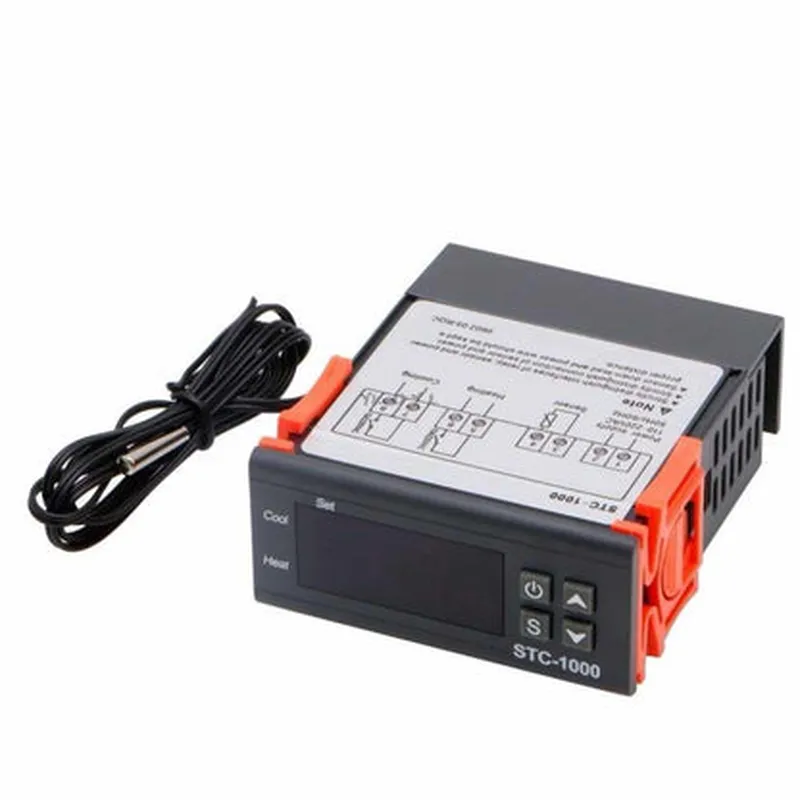
110V~ 220V AC All-Purpose Temperature Control Controller with Sensor 2 Relay Output Thermostat Stc-1000

Buy Now on Stufin

Component Description

The STC-1000 is a 110V~220V AC all-purpose temperature control controller with a built-in sensor and 2 relay outputs. This thermostat is designed to monitor and control temperatures in various environments, making it an ideal component for a wide range of IoT applications.

Functionality

The STC-1000 temperature control controller is used to regulate temperature within a specified range. It continuously monitors the temperature through its built-in sensor and compares the reading to a user-setpoint. When the temperature deviates from the setpoint, the controller activates or deactivates the connected relays to control the flow of power to the connected devices.

Key Features

  • Input Power: 110V~220V AC, 50/60Hz
  • Built-in Sensor: Accurate temperature measurement with a built-in sensor, eliminating the need for an external sensor.
  • Dual Relay Outputs: Two independent relay outputs (NO/NC) that can control two separate devices or circuits.
  • Temperature Range: -50C to 120C (-58F to 248F) with an accuracy of 0.5C.
  • Setpoint Adjustment: User-adjustable temperature setpoint through the onboard potentiometer.
  • Hysteresis: Adjustable hysteresis (0.1C to 10C) allows for precise temperature control and prevents relay chatter.
  • LED Indicators: Three LED indicators display the current temperature, relay status, and alarm condition.
  • Alarm Function: Configurable alarm output when the temperature exceeds a user-defined limit.
  • Compact Design: The controller is housed in a compact, DIN-rail mountable enclosure, making it suitable for industrial, commercial, or residential applications.
  • Easy Installation: Simple wiring and a clear instruction manual ensure easy integration into existing systems.

Relay Contact Rating

10A/250V AC

Operating Humidity

20% to 80% RH

Dimensions

72mm x 35mm x 65mm (W x H x D)

Weight

approximately 150g

Applications

The STC-1000 temperature control controller is suitable for a wide range of IoT applications, including

HVAC systems

Industrial temperature control

Greenhouse automation

Refrigeration control

Medical equipment

Laboratory equipment

Food processing

Home automation

Safety Precautions

The STC-1000 must be installed in accordance with local electrical codes and regulations.

Ensure proper insulation and protection of the controller and connected devices from environmental factors.

Avoid exposing the controller to excessive temperatures, humidity, or physical stress.

By incorporating the STC-1000 temperature control controller into your IoT system, you can achieve precise temperature control, increased efficiency, and improved system reliability.

Pin Configuration

  • STC-1000 Temperature Control Controller Documentation
  • Overview
  • The STC-1000 is a 110V~220V AC all-purpose temperature control controller with a built-in temperature sensor and 2 relay outputs. This module is designed to control and regulate temperature in various applications such as HVAC systems, refrigeration units, and industrial automation.
  • Pinout Description
  • The STC-1000 module has a total of 11 pins, which are categorized into three groups: Power Supply, Sensor, and Relay Outputs. Here's a detailed explanation of each pin:
  • Power Supply (3 pins)
  • 1. L (Live/AC Input)
  • Description: 110V~220V AC power input
  • Type: AC voltage input
  • Connection: Connect to a 110V~220V AC power source
  • 2. N (Neutral/AC Input)
  • Description: 110V~220V AC power input
  • Type: AC voltage input
  • Connection: Connect to a 110V~220V AC power source
  • 3. G (Ground)
  • Description: System ground
  • Type: GND
  • Connection: Connect to the system's ground or 0V reference point
  • Sensor (3 pins)
  • 1. S (Sensor Input)
  • Description: Temperature sensor input
  • Type: Thermistor/NTC sensor
  • Connection: Connect to a thermistor/NTC temperature sensor
  • 2. + (Sensor VCC)
  • Description: Power supply for the temperature sensor
  • Type: DC voltage output
  • Connection: Connect to the VCC pin of the temperature sensor
  • 3. - (Sensor GND)
  • Description: Ground for the temperature sensor
  • Type: GND
  • Connection: Connect to the GND pin of the temperature sensor
  • Relay Outputs (5 pins)
  • 1. NO1 (Normally Open 1)
  • Description: Relay output 1 normally open contact
  • Type: Relay output
  • Connection: Connect to a load or device to be controlled (e.g., heating element, fan, etc.)
  • 2. COM1 (Common 1)
  • Description: Relay output 1 common contact
  • Type: Relay output
  • Connection: Connect to a load or device to be controlled (e.g., heating element, fan, etc.)
  • 3. NC1 (Normally Closed 1)
  • Description: Relay output 1 normally closed contact
  • Type: Relay output
  • Connection: Connect to a load or device to be controlled (e.g., heating element, fan, etc.)
  • 4. NO2 (Normally Open 2)
  • Description: Relay output 2 normally open contact
  • Type: Relay output
  • Connection: Connect to a load or device to be controlled (e.g., heating element, fan, etc.)
  • 5. COM2 (Common 2)
  • Description: Relay output 2 common contact
  • Type: Relay output
  • Connection: Connect to a load or device to be controlled (e.g., heating element, fan, etc.)
  • Connection Structure
  • Here's a suggested connection structure for the STC-1000 module:
  • Power Supply:
  • + Connect the L and N pins to a 110V~220V AC power source.
  • + Connect the G pin to the system's ground or 0V reference point.
  • Sensor:
  • + Connect the S pin to the output of the thermistor/NTC temperature sensor.
  • + Connect the + pin to the VCC pin of the temperature sensor.
  • + Connect the - pin to the GND pin of the temperature sensor.
  • Relay Outputs:
  • + Connect the NO1, COM1, and NC1 pins to a load or device to be controlled (e.g., heating element, fan, etc.).
  • + Connect the NO2 and COM2 pins to another load or device to be controlled (e.g., heating element, fan, etc.).
  • Important Notes
  • Ensure proper wiring and connections to avoid electrical shock, fire hazards, or damage to the module or connected devices.
  • Use a suitable thermistor/NTC temperature sensor compatible with the STC-1000 module.
  • Consult the datasheet and user manual for specific instructions, warnings, and precautions regarding the use of the STC-1000 module.

Code Examples

Component Documentation: 110V~220V AC All-Purpose Temperature Control Controller with Sensor 2 Relay Output Thermostat STC-1000
Overview
The STC-1000 is a temperature control controller designed for use in various IoT applications. It features a built-in temperature sensor, two relay outputs, and supports a wide range of input voltages (110V~220V AC). This component is ideal for controlling heating, ventilation, and air conditioning (HVAC) systems, refrigeration units, and other temperature-critical devices.
Technical Specifications
Input Voltage: 110V~220V AC
 Temperature Range: -50C to 120C (-58F to 248F)
 Temperature Accuracy: 1C (1.8F)
 Relay Output: 2x SPDT (Single Pole Double Throw) relays, 10A @ 250V AC
Sensor Type: Built-in thermistor temperature sensor
 Operating Frequency: 50/60 Hz
 Dimensions: 73mm x 53mm x 33mm (2.87in x 2.09in x 1.3in)
Pinout
The STC-1000 has the following pinout:
VCC: 110V~220V AC input
 GND: Ground
 T1: Temperature sensor input
 R1: Relay 1 output
 R2: Relay 2 output
 SET: Set button input
 -/+: Display adjustment buttons
Code Examples
### Example 1: Basic Temperature Control using Arduino
In this example, we'll use an Arduino board to read the temperature from the STC-1000 and control two relays to turn on/off a heating element and a fan.
```c++
// Define pins for the STC-1000
const int tempPin = A0;  // Temperature sensor input
const int relay1Pin = 2;  // Relay 1 output
const int relay2Pin = 3;  // Relay 2 output
void setup() {
  // Initialize relay pins as outputs
  pinMode(relay1Pin, OUTPUT);
  pinMode(relay2Pin, OUTPUT);
}
void loop() {
  // Read temperature from STC-1000
  int tempVal = analogRead(tempPin);
  float temperature = (tempVal  5.0 / 1024.0) - 50.0;  // Convert to Celsius
// Set temperature thresholds
  const float heatingThreshold = 20.0;  // Turn on heating element below this temperature
  const float coolingThreshold = 25.0;  // Turn on fan above this temperature
// Control relays based on temperature
  if (temperature < heatingThreshold) {
    digitalWrite(relay1Pin, HIGH);  // Turn on heating element
    digitalWrite(relay2Pin, LOW);  // Turn off fan
  } else if (temperature > coolingThreshold) {
    digitalWrite(relay1Pin, LOW);  // Turn off heating element
    digitalWrite(relay2Pin, HIGH);  // Turn on fan
  } else {
    digitalWrite(relay1Pin, LOW);  // Turn off heating element
    digitalWrite(relay2Pin, LOW);  // Turn off fan
  }
  delay(1000);  // Wait 1 second before reading temperature again
}
```
### Example 2: Home Automation using ESP32 and Wi-Fi
In this example, we'll use an ESP32 board to connect the STC-1000 to a Wi-Fi network and control two relays remotely using a mobile app.
```c++
#include <WiFi.h>
#include <HTTPClient.h>
// Define pins for the STC-1000
const int tempPin = 32;  // Temperature sensor input
const int relay1Pin = 15;  // Relay 1 output
const int relay2Pin = 2;  // Relay 2 output
// Wi-Fi credentials
const char ssid = "your_wifi_ssid";
const char password = "your_wifi_password";
// Set up Wi-Fi client
WiFiClient client;
HTTPClient http;
void setup() {
  // Initialize relay pins as outputs
  pinMode(relay1Pin, OUTPUT);
  pinMode(relay2Pin, OUTPUT);
// Connect to Wi-Fi
  WiFi.begin(ssid, password);
  while (WiFi.status() != WL_CONNECTED) {
    delay(1000);
    Serial.println("Connecting to WiFi...");
  }
Serial.println("Connected to WiFi");
  Serial.println("Initializing HTTP client...");
}
void loop() {
  // Read temperature from STC-1000
  int tempVal = analogRead(tempPin);
  float temperature = (tempVal  5.0 / 1024.0) - 50.0;  // Convert to Celsius
// Send temperature data to a remote server using HTTP
  http.begin("http://your_server_ip/temperature");
  http.addHeader("Content-Type", "application/json");
  String temperatureData = "{""temperature"": " + String(temperature) + "}";
  int httpResponseCode = http.POST(temperatureData);
  http.end();
// Control relays based on remote commands
  if (httpResponseCode == 200) {
    String responseBody = http.getString();
    if (responseBody == "heating_on") {
      digitalWrite(relay1Pin, HIGH);  // Turn on heating element
    } else if (responseBody == "cooling_on") {
      digitalWrite(relay2Pin, HIGH);  // Turn on fan
    } else {
      digitalWrite(relay1Pin, LOW);  // Turn off heating element
      digitalWrite(relay2Pin, LOW);  // Turn off fan
    }
  }
  delay(1000);  // Wait 1 second before reading temperature again
}
```
These examples demonstrate how to use the STC-1000 in various contexts, including basic temperature control with Arduino and home automation with ESP32 and Wi-Fi.