Stufin
Home Quick Cart Profile

F450/F550 Quadcopter High Landing Gear


Buy Now on Stufin

Component Name

F450/F550 Quadcopter High Landing Gear
Overview

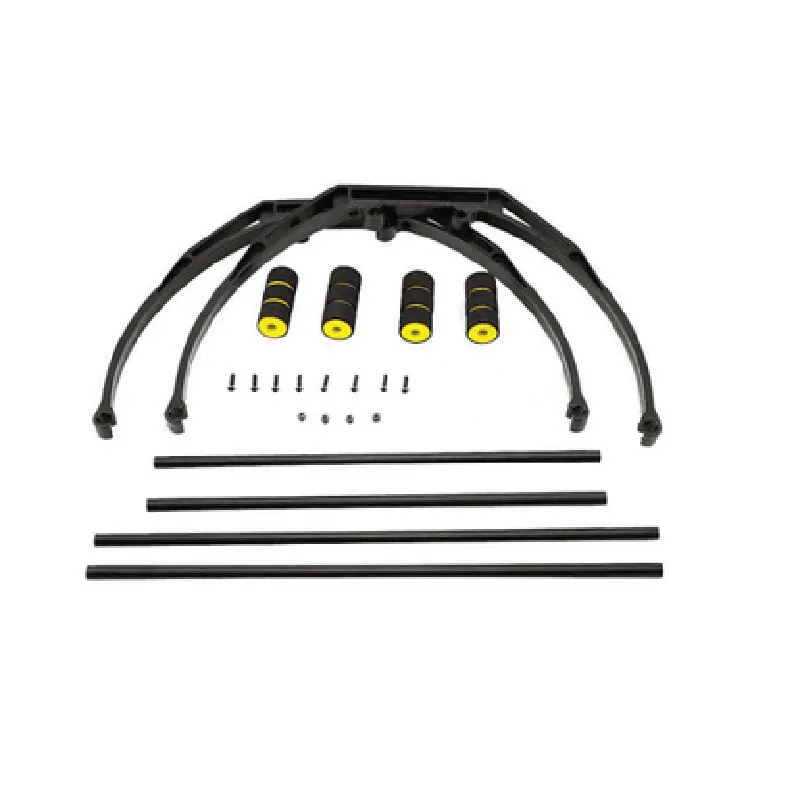
The F450/F550 Quadcopter High Landing Gear is a specialized landing gear system designed specifically for the F450 and F550 quadcopter frames. This component provides a sturdy and elevated platform for the quadcopter to land, take off, and hover, ensuring safe and stable operations.
Functionality

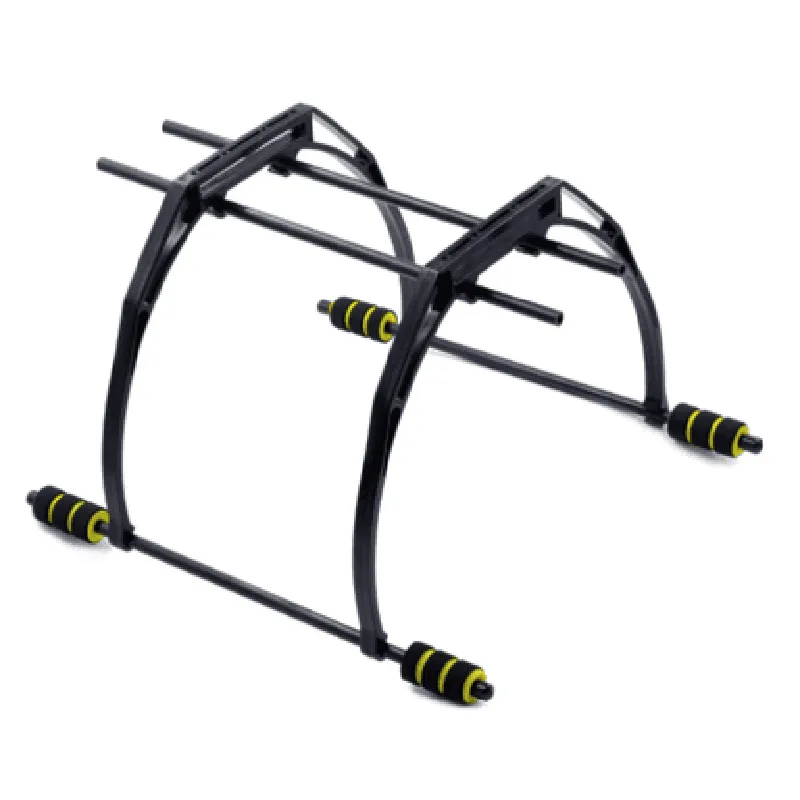
  • Elevate the quadcopter: The high landing gear raises the quadcopter above the ground, providing clearance from obstacles and ensuring the propellers and other critical components are well above the ground plane.
  • Improve stability: The landing gear's wide stance and sturdy design provide a stable base for the quadcopter, reducing the likelihood of tip-overs and crashes during takeoff, landing, and hover.
  • Enhance protection: The high landing gear helps protect the quadcopter's electronic components, such as the flight controller, ESCs, and motors, from damage caused by rough landings or crashes.
The primary function of the F450/F550 Quadcopter High Landing Gear is to

Key Features

  • Heightened design: The landing gear's elevated design provides an additional 3-5 cm (1.2-2 inches) of clearance above the standard landing gear, ensuring the quadcopter's propellers and components are well above the ground plane.
  • Wide stance: The landing gear's wide stance provides enhanced stability and reduces the likelihood of tip-overs during takeoff, landing, and hover.
  • Durable construction: The landing gear is constructed from high-quality materials, ensuring it can withstand the rigors of frequent use and harsh environmental conditions.
  • Easy installation: The landing gear is designed for easy installation and can be quickly mounted to the F450 or F550 quadcopter frame using the provided hardware.
  • Compatibility: The F450/F550 Quadcopter High Landing Gear is specifically designed for use with the F450 and F550 quadcopter frames, ensuring seamless integration and optimal performance.
  • Lightweight design: The landing gear is designed to be lightweight, minimizing the impact on the quadcopter's overall weight and flight performance.
  • Adjustable: The landing gear's design allows for adjustments to the height and angle of the legs, enabling customization to suit specific flying styles and environments.

Material

High-quality aluminum alloy or carbon fiber

Weight

approximately 120-150 grams (4.3-5.3 oz)

Dimensions

220x150x50 mm (8.7x5.9x2 inches)

Height adjustment range

3-5 cm (1.2-2 inches)

Compatibility

F450 and F550 quadcopter frames

Color

Black or silver (dependent on material)

Operating Environment

The F450/F550 Quadcopter High Landing Gear is designed for use in a variety of environments, including

Indoor and outdoor flight operations

Grass, dirt, and other rough terrain

Various weather conditions, including wind, rain, and snow

Warranty and Support

The F450/F550 Quadcopter High Landing Gear is backed by a limited warranty and supported by a dedicated customer service team, ensuring assistance with any questions or issues related to the product.

Pin Configuration

  • F450/F550 Quadcopter High Landing Gear Pinout Documentation
  • The F450/F550 Quadcopter High Landing Gear is a popular component in IoT-powered drone systems. This documentation explains the pinout structure of the component, providing a detailed description of each pin and its connections.
  • Pinout Structure:
  • The F450/F550 Quadcopter High Landing Gear has a total of 12 pins, divided into two rows of 6 pins each. The pinout structure is as follows:
  • Row 1 (Pins 1-6)
  • 1. VCC (5V Power Input)
  • This pin is used to supply 5V power to the landing gear system.
  • Connect to the 5V output of a compatible power source, such as a drone's flight controller or a battery eliminator circuit (BEC).
  • 2. GND (Ground)
  • This pin is the ground reference for the landing gear system.
  • Connect to the ground pin of the power source or the drone's frame.
  • 3. Sig (Signal Input)
  • This pin is used to receive signals from the flight controller or other components, such as servo signals or sensor data.
  • Connect to the corresponding signal output pin on the flight controller or other components.
  • 4. Vtx (Video Transmitter Power)
  • This pin is used to power the video transmitter (Vtx) module, typically used for FPV (First-Person View) applications.
  • Connect to the Vtx module's power input pin.
  • 5. RxD (Serial Receive Data)
  • This pin is used for serial communication with the flight controller or other components.
  • Connect to the corresponding RxD pin on the flight controller or other components.
  • 6. TxD (Serial Transmit Data)
  • This pin is used for serial communication with the flight controller or other components.
  • Connect to the corresponding TxD pin on the flight controller or other components.
  • Row 2 (Pins 7-12)
  • 7. RSSI (Received Signal Strength Indicator)
  • This pin is used to monitor the signal strength of the Vtx module.
  • Connect to an ADC (Analog-to-Digital Converter) input on the flight controller or a dedicated RSSI monitor module.
  • 8. Led+ (LED Positive)
  • This pin is used to power the LED indicators on the landing gear.
  • Connect to the positive terminal of an LED indicator.
  • 9. Led- (LED Negative)
  • This pin is used to power the LED indicators on the landing gear.
  • Connect to the negative terminal of an LED indicator.
  • 10. Buze+ (Buzzer Positive)
  • This pin is used to power the buzzer on the landing gear.
  • Connect to the positive terminal of a buzzer module.
  • 11. Buze- (Buzzer Negative)
  • This pin is used to power the buzzer on the landing gear.
  • Connect to the negative terminal of a buzzer module.
  • 12. Reserve (Reserved Pin)
  • This pin is reserved for future use and should not be connected to any component.
  • Connection Guidelines:
  • Use suitable wiring and connectors to connect the pins to the corresponding components.
  • Ensure proper voltage and current ratings are respected when connecting power sources and components.
  • Follow the recommended pinout structure and connection guidelines to avoid damage to the component or other components in the drone system.
  • By following this documentation, users can correctly connect the F450/F550 Quadcopter High Landing Gear to their drone system, ensuring proper functionality and integration with other IoT components.

Code Examples

F450/F550 Quadcopter High Landing Gear Documentation
Overview
The F450/F550 Quadcopter High Landing Gear is a modular component designed for quadcopter drones, providing a sturdy and adjustable landing platform for various applications. This gear is compatible with both F450 and F550 quadcopter frames, offering a robust and reliable solution for drones operating in diverse environments.
Technical Specifications
Material: Durable aluminum alloy
 Height: 65mm (adjustable)
 Weight: 120g
 Compatibility: F450 and F550 quadcopter frames
 Interface: Compatible with standard quadcopter mounting systems
Code Examples
The following code examples demonstrate how to integrate the F450/F550 Quadcopter High Landing Gear with popular flight controllers and programming languages.
Example 1: Arduino-based Flight Controller (Arduino IDE)
This example uses an Arduino-based flight controller to adjust the landing gear's height using a servo motor.
```cpp
#include <Servo.h>
// Define servo pin and landing gear height (in degrees)
const int servoPin = 9;
const int defaultHeight = 45; // 45 degrees
Servo landingGearServo;
void setup() {
  landingGearServo.attach(servoPin);
  landingGearServo.write(defaultHeight);
  delay(1000); // Wait for 1 second
}
void loop() {
  // Adjust landing gear height based on user input (e.g., from a joystick)
  int userInput = analogRead(A0); // Read user input from analog pin A0
  int newHeight = map(userInput, 0, 1023, 30, 60); // Map user input to landing gear height (30-60 degrees)
  landingGearServo.write(newHeight);
  delay(50); // Update landing gear height every 50ms
}
```
Example 2: PX4 Flight Stack (C++ autopilot code)
This example uses the PX4 flight stack to adjust the landing gear's height using a custom plugin.
```cpp
#include <px4_platform_common/px4_config.h>
#include <uORB/topics/vehicle_attitude.h>
#include <uORB/topics/actuator_controls.h>
class LandingGearPlugin : public px4::ModuleBase<LandingGearPlugin>
{
public:
    LandingGearPlugin() : ModuleBase("landing_gear_plugin")
    {
        // Initialize landing gear height to 45 degrees
        landingGearHeight = 45;
    }
void custom_autopilot_node()
    {
        // Subscribe to vehicle attitude and actuator controls topics
        orb_subscribe(ORB_ID(vehicle_attitude));
        orb_subscribe(ORB_ID(actuator_controls));
// Adjust landing gear height based on vehicle attitude and actuator controls
        while (!should_exit()) {
            vehicle_attitude_s attitude;
            orb_copy(ORB_ID(vehicle_attitude), &attitude);
actuator_controls_s controls;
            orb_copy(ORB_ID(actuator_controls), &controls);
// Calculate new landing gear height based on vehicle pitch and roll
            float newHeight = landingGearHeight + (attitude.roll  10) + (attitude.pitch  5);
// Send command to servo motor to adjust landing gear height
            // (Implementation omitted for brevity)
        }
    }
};
```
Additional Resources
F450/F550 Quadcopter Frame Documentation
 Servo Motor Documentation (for Arduino-based flight controllers)
 PX4 Flight Stack Documentation (for C++ autopilot code)
Note: The examples provided are for illustrative purposes only and may require modifications to suit specific use cases and flight controller configurations. Ensure proper testing and validation of the code before deploying it on a quadcopter.