Stufin
Home Quick Cart Profile

1200W PWM Motor Speed Controller with Potentiometer


Buy Now on Stufin

Component Name

1200W PWM Motor Speed Controller with Potentiometer
Description

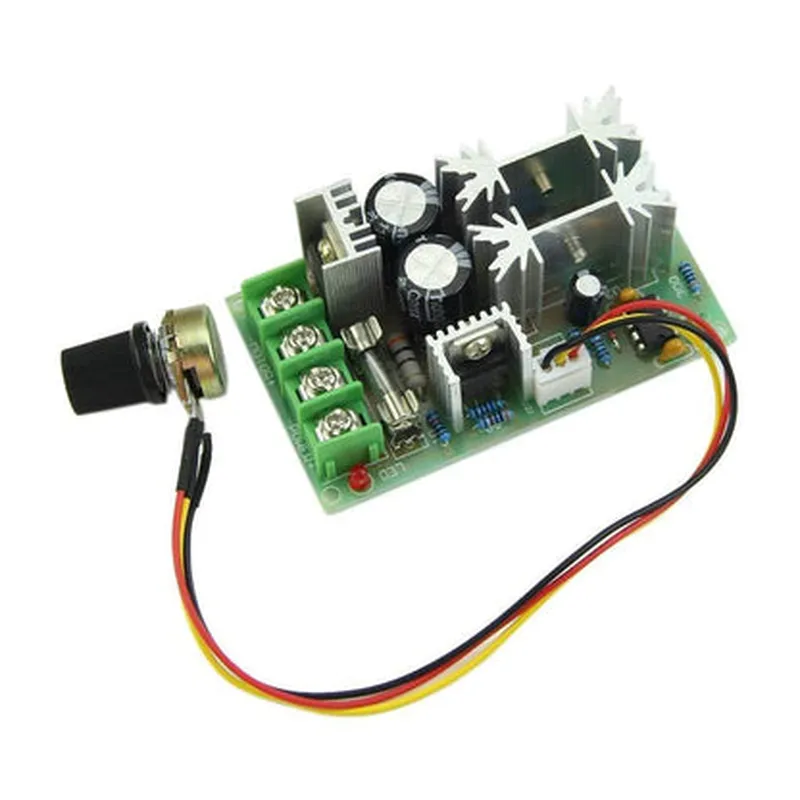
The 1200W PWM Motor Speed Controller with Potentiometer is a high-power, pulse-width modulation (PWM) based motor speed controller designed to regulate the speed of DC motors. This component is ideal for applications requiring precise speed control, high power handling, and ease of operation.
Functionality

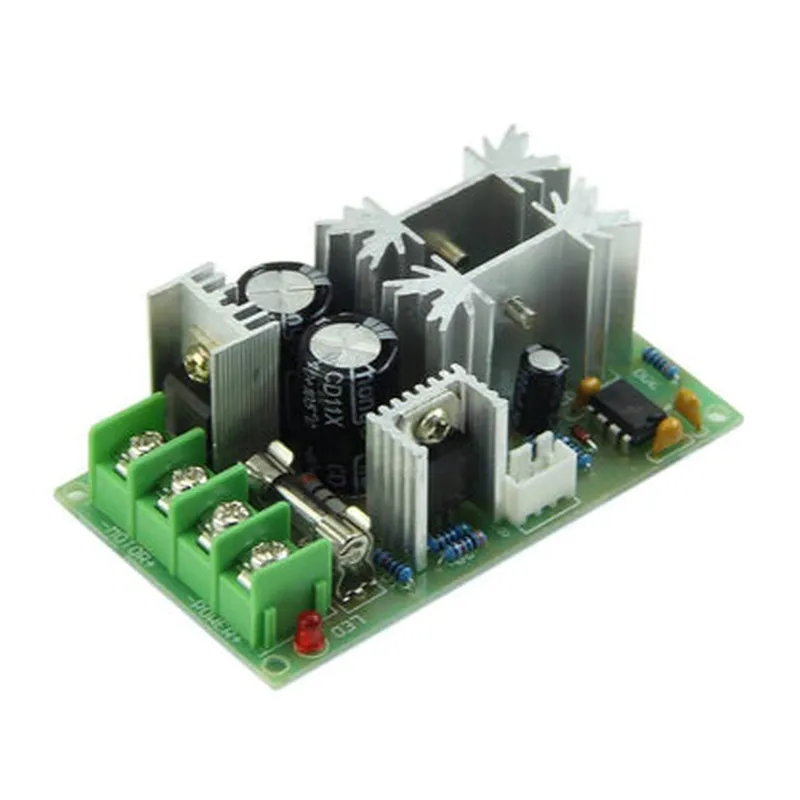
The 1200W PWM Motor Speed Controller with Potentiometer is designed to control the speed of DC motors by generating a PWM signal that switches the motor on and off at high frequencies. The potentiometer allows for manual adjustment of the motor speed, providing a convenient way to set the desired speed.

The controller works by converting the input voltage to a PWM signal, which is then sent to the motor. The PWM signal is generated based on the position of the potentiometer, allowing the user to adjust the motor speed in real-time.

Key Features

  • High Power Handling: The controller is capable of handling up to 1200W of power, making it suitable for large and high-torque DC motors.
  • PWM Signal Generation: The controller generates a high-frequency PWM signal to regulate the motor speed, ensuring smooth and efficient operation.
  • Potentiometer Control: The onboard potentiometer allows for manual adjustment of the motor speed, providing a convenient way to set the desired speed.
  • Adjustable Speed Range: The controller allows for adjustable speed range, enabling the user to set the minimum and maximum speed limits.
  • Overcurrent Protection: The controller features built-in overcurrent protection, ensuring that the motor and controller are protected from excessive currents.
  • Short-Circuit Protection: The controller also features short-circuit protection, preventing damage to the motor and controller in the event of a short circuit.
  • Voltage Input: The controller accepts an input voltage range of 12V-24V, making it compatible with a wide range of power supplies.
  • Compact Design: The controller is designed to be compact and lightweight, making it easy to integrate into a variety of applications.
  • Easy Installation: The controller features a simple and intuitive design, making it easy to install and operate.

Applications

The 1200W PWM Motor Speed Controller with Potentiometer is suitable for a wide range of applications, including

Industrial automation systems

Robotics and robotic arms

Electric vehicles

Medical equipment

HVAC systems

Power tools and machinery

Input Voltage

12V-24V

Output Power

1200W

PWM Frequency

15kHz

Potentiometer Resistance

10k

Overcurrent Protection

30A

Short-Circuit ProtectionYes

Operating Temperature

-20C to 60C

Storage Temperature

-30C to 80C

Dimension

80mm x 60mm x 30mm

Weight

150g

Certifications

CE marked

RoHS compliant

UL recognized

Pin Configuration

  • 1200W PWM Motor Speed Controller with Potentiometer Pinout
  • The 1200W PWM Motor Speed Controller with Potentiometer is a high-power motor control module designed for DC motors. It features a built-in potentiometer for speed adjustment and PWM (Pulse Width Modulation) control for efficient motor operation. This documentation explains the pinout of the module, describing each pin's function and how to connect them properly.
  • Pinout:
  • 1. VIN (Input Voltage)
  • Function: Power input for the module (DC voltage supply)
  • Range: 12V to 40V
  • Recommended: Use a suitable power source with proper voltage and current rating
  • 2. VOUT (Output Voltage)
  • Function: Output voltage for the motor
  • Range: Same as input voltage (Vin)
  • 3. GND (Ground)
  • Function: Ground connection for the module
  • Connection: Connect to the negative terminal of the power source and the motor
  • 4. POT (Potentiometer)
  • Function: Speed adjustment input (0V to 5V)
  • Connection: Connect a potentiometer's wiper terminal to this pin, and the potentiometer's other two terminals to GND and VCC (5V)
  • 5. PWM (Pulse Width Modulation)
  • Function: PWM signal input for speed control
  • Connection: Connect to a microcontroller's PWM output pin or a PLL/PWM generator module
  • 6. EN (Enable)
  • Function: Enable/disable input for the module
  • Connection: Connect to a digital output pin of a microcontroller or a switch (High: Enable, Low: Disable)
  • 7. FB (Feedback)
  • Function: Feedback pin for monitoring motor speed (optional)
  • Connection: Connect to a microcontroller's analog input pin or a monitoring device (e.g., an oscilloscope)
  • 8. VCC (5V Regulated Voltage)
  • Function: 5V regulated voltage output for external circuitry (e.g., microcontroller, sensors)
  • Connection: Connect to external circuitry requiring a 5V power supply
  • 9. M+ (Motor Positive)
  • Function: Motor positive terminal connection
  • Connection: Connect to the positive terminal of the DC motor
  • 10. M- (Motor Negative)
  • Function: Motor negative terminal connection
  • Connection: Connect to the negative terminal of the DC motor
  • Connection Structure:
  • Step 1: Power Connection
  • Connect VIN to a suitable power source (e.g., a battery or a regulated power supply)
  • Connect GND to the negative terminal of the power source and the motor
  • Step 2: Potentiometer Connection
  • Connect POT to the wiper terminal of a potentiometer
  • Connect the potentiometer's other two terminals to GND and VCC (5V)
  • Step 3: PWM Control Connection
  • Connect PWM to a microcontroller's PWM output pin or a PLL/PWM generator module
  • Step 4: Enable and Feedback Connections
  • Connect EN to a digital output pin of a microcontroller or a switch
  • Connect FB to a microcontroller's analog input pin or a monitoring device (optional)
  • Step 5: Motor Connection
  • Connect M+ to the positive terminal of the DC motor
  • Connect M- to the negative terminal of the DC motor
  • Important Notes:
  • Ensure proper voltage and current ratings for the power source, motor, and other connected components.
  • Use suitable wire gauges and insulation to prevent overheating and electrical shock.
  • Follow proper safety precautions when working with high-power electrical systems.
  • By following these instructions and understanding the pinout, you can safely and effectively connect the 1200W PWM Motor Speed Controller with Potentiometer to control your DC motor.

Code Examples

Component Documentation: 1200W PWM Motor Speed Controller with Potentiometer
Overview
The 1200W PWM Motor Speed Controller with Potentiometer is a high-power motor controller designed to regulate the speed of DC motors up to 1200W. It features a built-in potentiometer for manual speed adjustment and PWM (Pulse Width Modulation) output for precise motor control. This component is suitable for a wide range of applications, including robotics, industrial automation, and DIY projects.
Technical Specifications
Input Voltage: 12V - 24V DC
 Output Power: 1200W
 PWM Frequency: 15 kHz
 Potentiometer Range: 0 - 100% ( variable speed control )
 Operating Temperature: -20C to 85C
 Dimensions: 70mm x 50mm x 30mm
Connection Diagram
The motor speed controller has the following connections:
VCC (Input Voltage): Connect to a 12V - 24V DC power source
 GND (Ground): Connect to the negative terminal of the power source and the motor
 OUT+ (Output Positive): Connect to the positive terminal of the motor
 OUT- (Output Negative): Connect to the negative terminal of the motor
 POT (Potentiometer): Connect to a potentiometer or a variable resistor for manual speed control
 PWM (Pulse Width Modulation): Connect to a microcontroller or a logic level signal for PWM control
Code Examples
### Example 1: Arduino Uno Control with Potentiometer
In this example, we will use an Arduino Uno to control the motor speed using the built-in potentiometer.
```cpp
const int potPin = A0;  // Potentiometer connected to analog input A0
const int pwmPin = 9;  // PWM output connected to digital pin 9
void setup() {
  pinMode(pwmPin, OUTPUT);
}
void loop() {
  int potValue = analogRead(potPin);
  int pwmValue = map(potValue, 0, 1023, 0, 255);
  analogWrite(pwmPin, pwmValue);
  delay(10);
}
```
In this code, we read the analog value from the potentiometer and map it to a PWM value between 0 and 255. We then write the PWM value to the digital pin connected to the motor speed controller's PWM input.
### Example 2: Raspberry Pi Control with Python
In this example, we will use a Raspberry Pi to control the motor speed using Python and the RPi.GPIO library.
```python
import RPi.GPIO as GPIO
import time
GPIO.setmode(GPIO.BCM)
pwm_pin = 18  # PWM output connected to GPIO 18
GPIO.setup(pwm_pin, GPIO.OUT)
pwm_frequency = 50
pwm = GPIO.PWM(pwm_pin, pwm_frequency)
while True:
    for dc in range(0, 101, 1):
        pwm.ChangeDutyCycle(dc)
        time.sleep(0.01)
    for dc in range(100, -1, -1):
        pwm.ChangeDutyCycle(dc)
        time.sleep(0.01)
```
In this code, we set up the PWM output on GPIO 18 and create a PWM object with a frequency of 50 Hz. We then create a loop that varies the duty cycle of the PWM signal from 0 to 100% and back to 0, effectively creating a speed ramp.
Note: Make sure to adjust the pin connections and frequencies according to your specific setup and requirements.