

Stufin
Home Quick Cart Profile

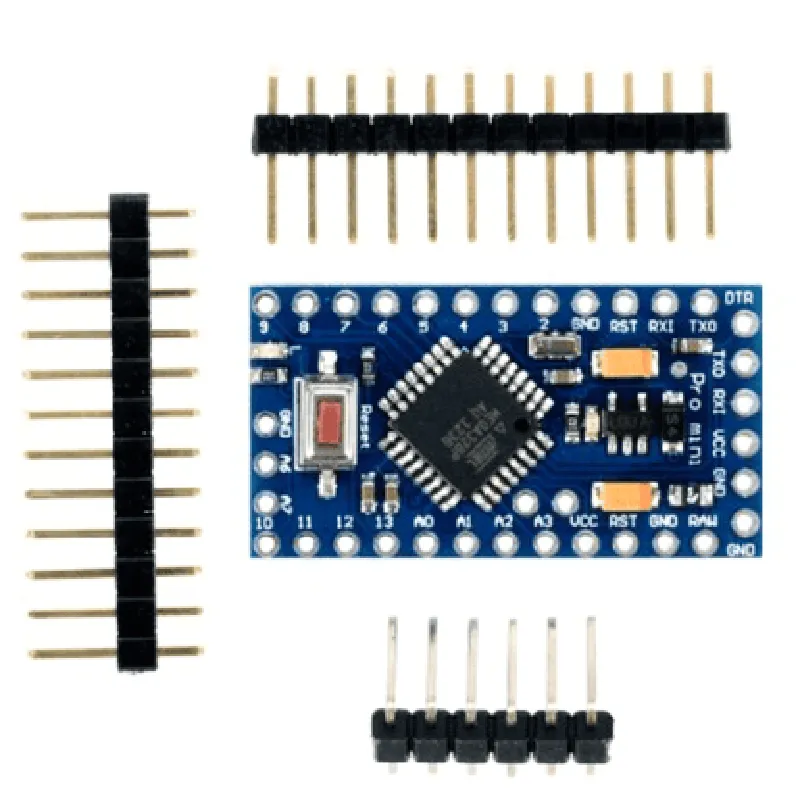
Arduino Pro Mini 5V 16MHz ATMEGA328P compatible

Buy Now on Stufin

Component Name

Arduino Pro Mini 5V 16MHz ATMEGA328P Compatible

Overview

The Arduino Pro Mini 5V 16MHz ATMEGA328P Compatible is a compact, low-cost microcontroller board based on the popular Arduino platform. This board is designed to be a drop-in replacement for the original Arduino Pro Mini, offering identical functionality and compatibility with a wide range of shields and accessories.

Description

The Arduino Pro Mini 5V 16MHz ATMEGA328P Compatible is a microcontroller board that features the ATMEGA328P microcontroller, a 16MHz crystal oscillator, and a 5V voltage regulator. The board is designed for use with a wide range of sensors, actuators, and communication modules, making it an ideal platform for IoT, robotics, and other projects that require a high degree of customization and flexibility.

Key Features

  • Microcontroller: ATMEGA328P

32KB of flash memory

2KB of SRAM

1KB of EEPROM

  • Clock Speed: 16MHz
  • Voltage Regulator: 5V

On-board voltage regulator for powering external components

  • Digital I/O Pins: 14

6 PWM outputs

12 digital input/output pins

  • Analog Input Pins: 6

Supports analog-to-digital conversion (ADC) for sensing analog signals

  • Communication: UART, SPI, and I2C serial communication protocols
  • Size: 18mm x 33mm (0.7in x 1.3in)
  • Weight: Approximately 5g (0.18oz)
  • Power Consumption: Low power consumption for battery-powered applications
  • Compatibility: Compatible with a wide range of Arduino shields and accessories

Functionality

  • Automation: Control and monitor automated systems, such as robotic arms, conveyor belts, and other machinery.
  • IoT: Develop Internet of Things (IoT) projects, such as sensor networks, smart home systems, and wearable devices.
  • Sensing and Monitoring: Use the on-board analog-to-digital converter to sense and monitor analog signals from sensors, such as temperature, humidity, and light.
  • Communication: Establish serial communication with other devices using UART, SPI, and I2C protocols.
The Arduino Pro Mini 5V 16MHz ATMEGA328P Compatible is designed to be a flexible and versatile platform for a wide range of applications, including

Advantages

  • Compact Size: The small form factor of the Arduino Pro Mini makes it ideal for projects where space is limited.
  • Low Power Consumption: The board's low power consumption makes it suitable for battery-powered applications.
  • Compatibility: The board is compatible with a wide range of Arduino shields and accessories, making it easy to expand and customize projects.

Target Audience

The Arduino Pro Mini 5V 16MHz ATMEGA328P Compatible is designed for technical professionals and informed hobbyists who require a flexible and versatile microcontroller platform for their projects.

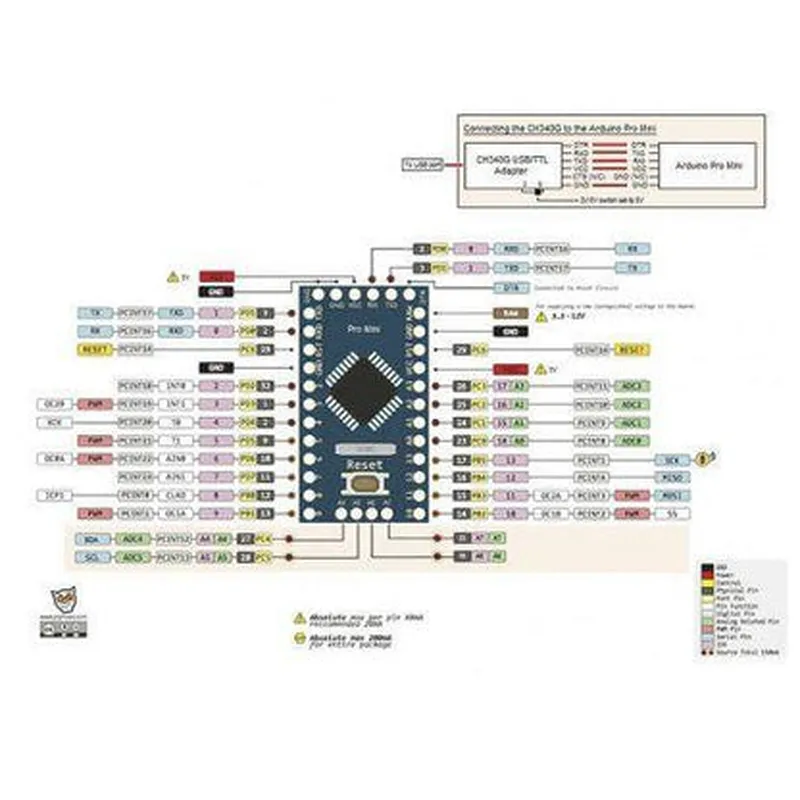
Pin Configuration

  • Arduino Pro Mini 5V 16MHz ATMEGA328P Compatible
  • The Arduino Pro Mini is a compact, versatile, and widely-used microcontroller board based on the ATMEGA328P microchip. This documentation provides a detailed explanation of each pin on the board, along with guidance on how to connect them.
  • Pinout Diagram:
  • Before we dive into the individual pin descriptions, here is the pinout diagram for the Arduino Pro Mini:
  • ```
  • +-----------+
  • | VCC |
  • | GND |
  • | RX (D0) |
  • | TX (D1) |
  • | D2 |
  • | D3 |
  • | D4 |
  • | D5 |
  • | D6 |
  • | D7 |
  • | D8 |
  • | D9 |
  • | D10 |
  • | D11 |
  • | D12 |
  • | D13 |
  • | SCL (D14)|
  • | SDA (D15)|
  • | RST |
  • | AREF|
  • +-----------+
  • ```
  • Pin Descriptions:
  • Here's a detailed explanation of each pin on the Arduino Pro Mini:
  • 1. VCC (5V Power Input)
  • Function: Power supply pin for the microcontroller
  • Description: This pin is used to supply 5V power to the Arduino Pro Mini board.
  • Connection: Connect to a 5V power source, such as a USB port or a battery.
  • 2. GND (Ground)
  • Function: Ground reference point
  • Description: This pin provides a ground reference point for the circuit.
  • Connection: Connect to the negative terminal of a power source or a ground plane.
  • 3. RX (D0) - Serial Receive
  • Function: Serial communication receiver pin
  • Description: This pin is used for serial communication and is connected to the RX pin of the ATMEGA328P microcontroller.
  • Connection: Connect to the TX pin of a serial device, such as a serial monitor or another microcontroller.
  • 4. TX (D1) - Serial Transmit
  • Function: Serial communication transmitter pin
  • Description: This pin is used for serial communication and is connected to the TX pin of the ATMEGA328P microcontroller.
  • Connection: Connect to the RX pin of a serial device, such as a serial monitor or another microcontroller.
  • 5-12. D2-D10 (Digital I/O Pins)
  • Function: Digital input/output pins
  • Description: These pins can be used as digital inputs or outputs, and are connected to the digital pins of the ATMEGA328P microcontroller.
  • Connection: Connect to digital devices, such as LEDs, buttons, or sensors.
  • 13. D11 (PCINT11/PWM) - Digital I/O Pin
  • Function: Digital input/output pin with PWM capability
  • Description: This pin can be used as a digital input or output, and also has PWM (Pulse Width Modulation) capability.
  • Connection: Connect to digital devices, such as LEDs, buttons, or sensors, or use for PWM applications.
  • 14. D12 (PCINT12) - Digital I/O Pin
  • Function: Digital input/output pin
  • Description: This pin can be used as a digital input or output.
  • Connection: Connect to digital devices, such as LEDs, buttons, or sensors.
  • 15. D13 (PCINT13/SCK) - Digital I/O Pin
  • Function: Digital input/output pin with SPI clock output
  • Description: This pin can be used as a digital input or output, and also serves as the clock output for the SPI (Serial Peripheral Interface) bus.
  • Connection: Connect to digital devices, such as LEDs, buttons, or sensors, or use for SPI communication.
  • 16. SCL (D14) - I2C Clock
  • Function: I2C clock pin
  • Description: This pin is used for I2C (Inter-Integrated Circuit) communication and is connected to the SCL pin of the ATMEGA328P microcontroller.
  • Connection: Connect to the SCL pin of an I2C device, such as a sensor or display.
  • 17. SDA (D15) - I2C Data
  • Function: I2C data pin
  • Description: This pin is used for I2C communication and is connected to the SDA pin of the ATMEGA328P microcontroller.
  • Connection: Connect to the SDA pin of an I2C device, such as a sensor or display.
  • 18. RST (Reset)
  • Function: Reset pin
  • Description: This pin is used to reset the microcontroller.
  • Connection: Connect to a reset button or a reset signal from another device.
  • 19. AREF (Analog Reference)
  • Function: Analog reference voltage pin
  • Description: This pin is used as an analog reference voltage for the ATMEGA328P microcontroller's ADC (Analog-to-Digital Converter).
  • Connection: Connect to an analog voltage source, such as a potentiometer or a voltage divider.
  • Important Notes:
  • Always use appropriate voltage levels when connecting to the pins (5V for digital I/O, 0-5V for analog inputs).
  • Use a breadboard or a printed circuit board (PCB) to connect components and avoid accidental shorts.
  • Be cautious when connecting to the reset pin, as it can reset the microcontroller unexpectedly.
  • By understanding the functions and connections of each pin on the Arduino Pro Mini, you can unlock its full potential and create a wide range of innovative IoT projects.

Code Examples

Arduino Pro Mini 5V 16MHz ATMEGA328P Compatible Documentation
Overview
The Arduino Pro Mini 5V 16MHz ATMEGA328P compatible board is a compact, low-power microcontroller board based on the ATMEGA328P microcontroller. It is compatible with the Arduino Pro Mini board and is suitable for a wide range of IoT applications, including robotics, automation, and wearable devices.
Features
Microcontroller: ATMEGA328P
 Operating Voltage: 5V
 Clock Speed: 16MHz
 Flash Memory: 32KB
 SRAM: 2KB
 EEPROM: 1KB
 Digital I/O Pins: 14
 Analog Input Pins: 6
 UARTs: 1
 I2C: 1
 SPI: 1
 Operating Temperature: -40C to 85C
Code Examples
### Example 1: Blinking LED
In this example, we will use the Arduino Pro Mini to blink an LED connected to digital pin 13.
```c++
const int ledPin = 13; // choose the pin for the LED
void setup() {
  pinMode(ledPin, OUTPUT); // declare the LED pin as an output
}
void loop() {
  digitalWrite(ledPin, HIGH); // turn the LED on
  delay(1000); // wait for 1 second
  digitalWrite(ledPin, LOW); // turn the LED off
  delay(1000); // wait for 1 second
}
```
### Example 2: Reading Analog Sensor Data
In this example, we will use the Arduino Pro Mini to read analog sensor data from a potentiometer connected to analog pin A0.
```c++
const int sensorPin = A0; // choose the pin for the sensor
int sensorValue = 0; // variable to store the sensor value
void setup() {
  Serial.begin(9600); // initialize the serial communication
}
void loop() {
  sensorValue = analogRead(sensorPin); // read the sensor value
  Serial.print("Sensor Value: ");
  Serial.println(sensorValue); // print the sensor value
  delay(100); // wait for 100ms
}
```
Note: Make sure to connect the components correctly and upload the code to the Arduino Pro Mini board using the Arduino Integrated Development Environment (IDE).
Resources
[Arduino Pro Mini 5V 16MHz ATMEGA328P compatible board datasheet](https://www.arduino.cc/en/Main/ArduinoBoardProMini)
 [Arduino IDE](https://www.arduino.cc/en/Main/Software)
 [ATMEGA328P microcontroller datasheet](https://www.microchip.com/wwwdatasheets/ATMEGA328P.pdf)
I hope this documentation helps! Let me know if you need more information or examples.