Rocker Switch 16A 250V SPDT 3PIN Red LED


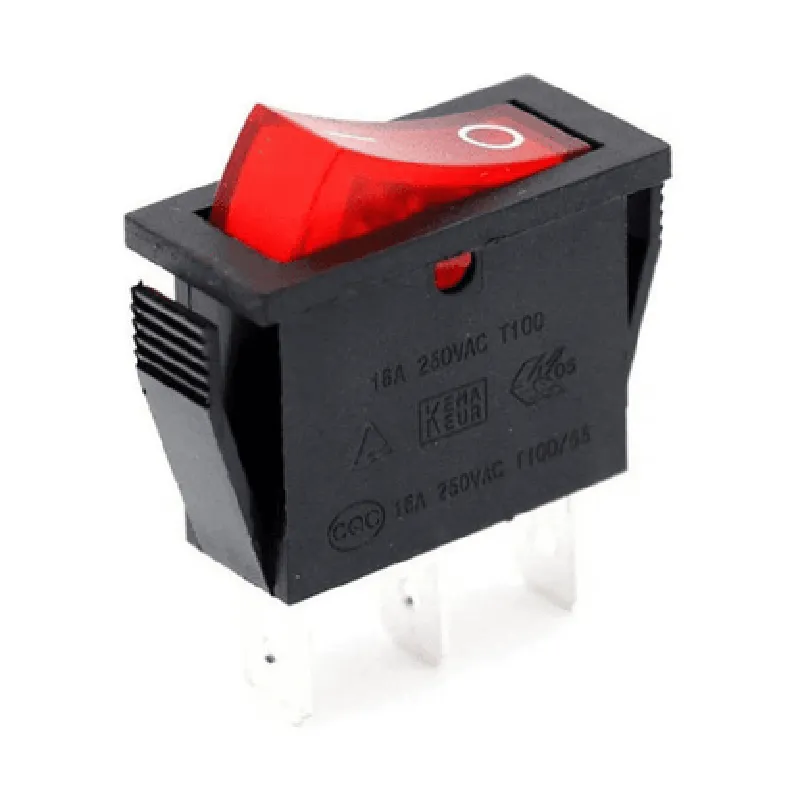
Rocker Switch 16A 250V SPDT 3PIN Red LED
The Rocker Switch 16A 250V SPDT 3PIN Red LED is a type of electrical switch designed for use in various applications, including IoT devices, industrial control systems, and consumer electronics. This component combines a single-pole double-throw (SPDT) switching mechanism with a 3-pin configuration and a built-in red LED indicator.
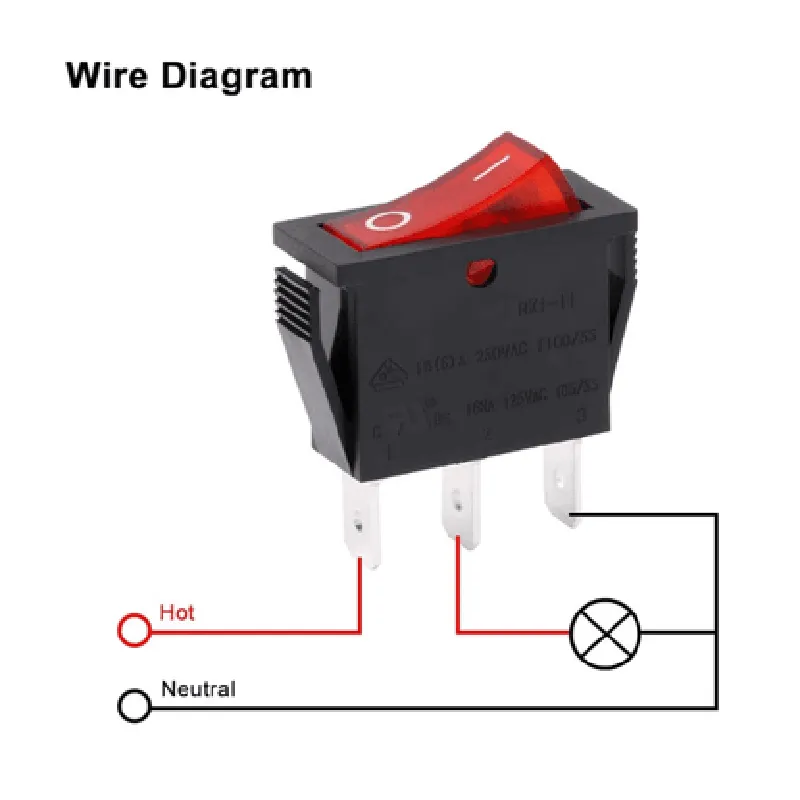
| The Rocker Switch 16A 250V SPDT 3PIN Red LED is used to control the flow of electrical current between two circuits or devices. The switch has three terminals | one common (C) terminal and two output (NO and NC) terminals. The switch can be actuated by a physical rocker mechanism, which toggles the connection between the common terminal and one of the two output terminals. |
When the switch is in the ON position, the common terminal is connected to the normally open (NO) terminal, allowing current to flow through the circuit. When the switch is in the OFF position, the common terminal is connected to the normally closed (NC) terminal, disconnecting the circuit.
250V AC
16A
Single-pole double-throw (SPDT)
3-pin (C, NO, NC)
Red
Rocker mechanism
[Insert dimensions]
[Insert weight]
[Insert temperature range]
| The Rocker Switch 16A 250V SPDT 3PIN Red LED is suitable for a wide range of applications, including |
IoT devices
Industrial control systems
Consumer electronics
Home automation systems
Lighting control systems
Security systems
When working with the Rocker Switch 16A 250V SPDT 3PIN Red LED, it is essential to follow proper safety precautions to avoid electrical shock, injury, or damage to the component. Ensure that the switch is used within its rated specifications and follow proper installation and handling procedures.
Rocker Switch 16A 250V SPDT 3PIN Red LED DocumentationOverviewThe Rocker Switch 16A 250V SPDT 3PIN Red LED is a high-power, single-pole double-throw (SPDT) rocker switch suitable for a wide range of IoT applications. It features a 3-pin interface, a 16A/250V rating, and a red LED indicator.PinoutThe switch has three pins:| Pin | Function |
| --- | --- |
| 1 | Common (COM) |
| 2 | Normally Open (NO) |
| 3 | Normally Closed (NC) |Operating PrincipleThe rocker switch operates by connecting the common pin (1) to either the normally open pin (2) or the normally closed pin (3) depending on the switch position.Code Examples### Example 1: Simple On/Off Control using ArduinoIn this example, we'll use the rocker switch to control an LED connected to an Arduino board.HardwareRocker Switch 16A 250V SPDT 3PIN Red LED
Arduino Board (e.g., Arduino Uno)
LED
1 k resistor
Breadboard and jumper wiresSoftware
```c
const int ledPin = 13; // LED connected to digital pin 13
const int switchPin = 2; // Rocker switch connected to digital pin 2void setup() {
pinMode(ledPin, OUTPUT);
pinMode(switchPin, INPUT);
}void loop() {
int switchState = digitalRead(switchPin);
if (switchState == HIGH) {
digitalWrite(ledPin, HIGH); // Turn on LED when switch is in ON position
} else {
digitalWrite(ledPin, LOW); // Turn off LED when switch is in OFF position
}
delay(50); // Debounce switch readings
}
```
### Example 2: Home Automation using ESP32 and MicroPythonIn this example, we'll use the rocker switch to control a relay connected to an ESP32 board, which in turn controls a household appliance.HardwareRocker Switch 16A 250V SPDT 3PIN Red LED
ESP32 Board (e.g., ESP32 DevKitC)
Relay Module (e.g., SRD-05VDC-SL-C)
Household Appliance (e.g., a lamp)
Breadboard and jumper wiresSoftware
```python
import machine# Define pin connections
switch_pin = machine.Pin(0, machine.Pin.IN) # Rocker switch connected to GPIO 0
relay_pin = machine.Pin(2, machine.Pin.OUT) # Relay connected to GPIO 2while True:
switch_state = switch_pin.value()
if switch_state == 1:
relay_pin.value(1) # Turn on relay when switch is in ON position
else:
relay_pin.value(0) # Turn off relay when switch is in OFF position
time.sleep(0.1) # Debounce switch readings
```
Note: Make sure to modify the pin connections according to your specific board and setup.### Example 3: Industrial Control using Raspberry Pi and PythonIn this example, we'll use the rocker switch to control a motor connected to a Raspberry Pi board.HardwareRocker Switch 16A 250V SPDT 3PIN Red LED
Raspberry Pi Board (e.g., Raspberry Pi 4 Model B)
L293D Motor Driver IC
DC Motor
Breadboard and jumper wiresSoftware
```python
import RPi.GPIO as GPIO# Define pin connections
switch_pin = 17 # Rocker switch connected to GPIO 17
motor_pin = 23 # Motor driver IC connected to GPIO 23GPIO.setmode(GPIO.BCM)
GPIO.setup(switch_pin, GPIO.IN)
GPIO.setup(motor_pin, GPIO.OUT)while True:
switch_state = GPIO.input(switch_pin)
if switch_state == 1:
GPIO.output(motor_pin, GPIO.HIGH) # Turn on motor when switch is in ON position
else:
GPIO.output(motor_pin, GPIO.LOW) # Turn off motor when switch is in OFF position
time.sleep(0.1) # Debounce switch readings
```
Note: Make sure to modify the pin connections according to your specific board and setup.Safety PrecautionsAlways ensure the rocker switch is rated for the desired load and voltage.
Use proper safety measures when working with high-power circuits.
Follow proper electrical installation and wiring practices.By following these examples and guidelines, you can effectively incorporate the Rocker Switch 16A 250V SPDT 3PIN Red LED into your IoT projects.