8 kHz to 900 MHz


8 kHz to 900 MHz
CMOS, LVPECL, LVDS
Up to 8
| I2C Interface | Yes |
5V or 3.3V
-40C to +85C
25.4 mm x 23.5 mm x 4.5 mm (L x W x H)
Applications
| The Si5351A Clock Signal Generator Module is suitable for a wide range of applications, including |
Microcontroller clock sources
FPGA clock sources
Digital system clock sources
High-speed data acquisition systems
Communication systems
Aerospace and defense systems
Automotive systems
Conclusion
The Si5351A Clock Signal Generator Module is a versatile and accurate clock signal generator device that offers high-frequency capability, multi-channel functionality, and I2C programmability. Its compact design, low-jitter performance, and adjustable frequency make it an ideal solution for a wide range of digital system applications.
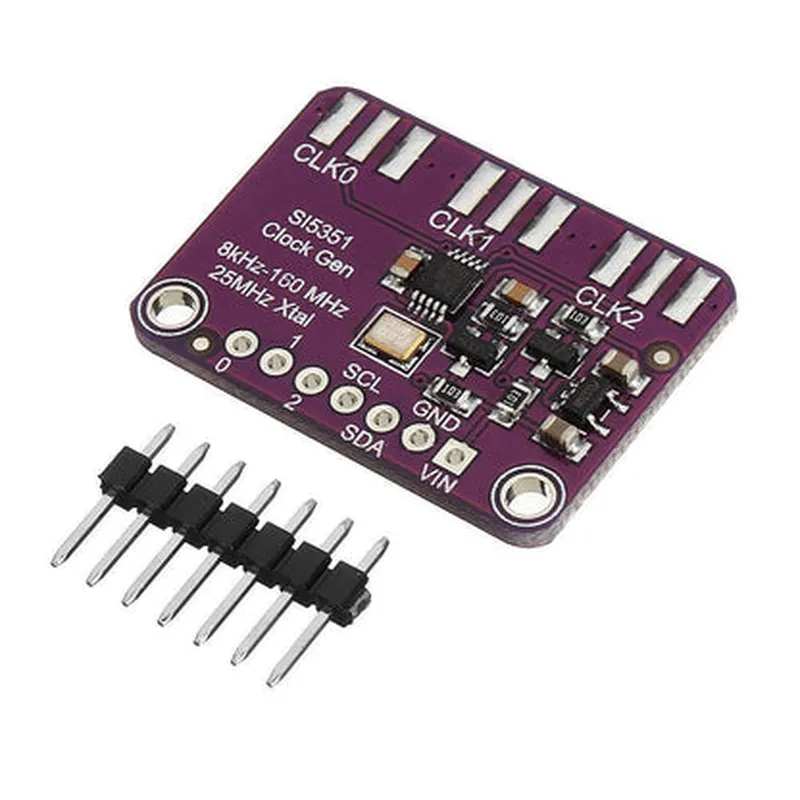
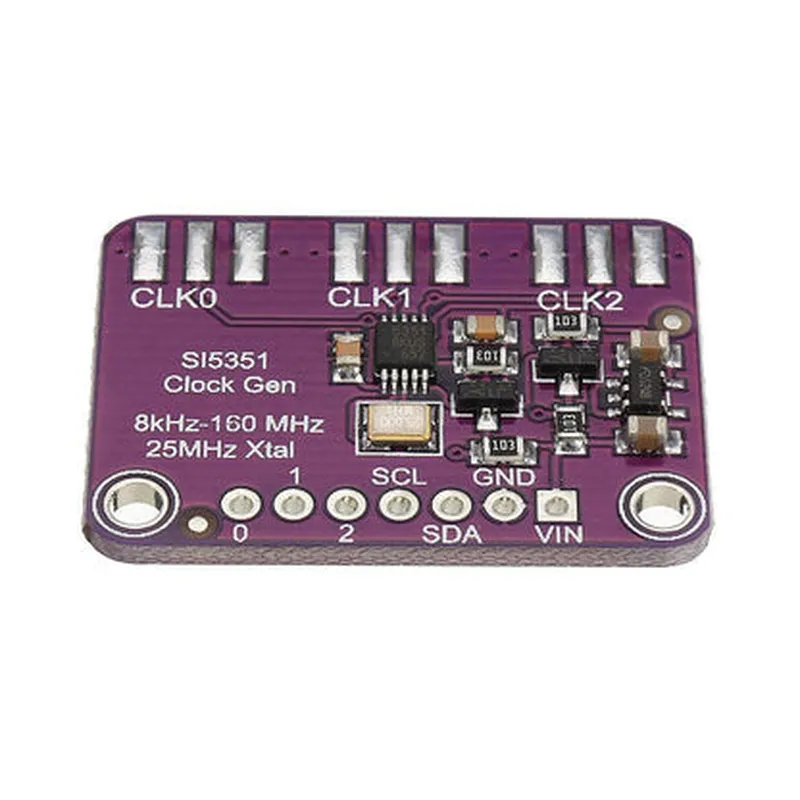
Si5351A Clock Signal Generator Module DocumentationOverviewThe Si5351A Clock Signal Generator Module is a highly versatile and accurate clock signal generator that can produce a wide range of frequencies up to 200 MHz. It is based on the Silicon Laboratories Si5351A chip, which is a low-jitter, high-frequency clock generator with a built-in PLL (Phase-Locked Loop) and VCO (Voltage-Controlled Oscillator). This module is ideal for various applications, including clock generation for microcontrollers, FPGAs, and other digital systems.Pinout and ConnectionsThe Si5351A Clock Signal Generator Module has the following pinout:VCC: 3.3V or 5V power supply
GND: Ground
SCL: I2C clock signal
SDA: I2C data signal
CLK0, CLK1, CLK2: Three output clock signals ( CLK0 is the default output)Code Examples### Example 1: Using the Si5351A with an Arduino BoardThis example demonstrates how to use the Si5351A Clock Signal Generator Module with an Arduino board to generate a 16 MHz clock signal.```c++
#include <Wire.h>
#include <Si5351A.h>Si5351A si5351a;void setup() {
Wire.begin(); // Initialize I2C
si5351a.begin(); // Initialize Si5351A// Set the frequency to 16 MHz
si5351a.setFrequency(16000000, CLK0);// Enable the clock output
si5351a.enableOutput(CLK0);
}void loop() {
// No operation in the loop, the clock signal is generated continuously
}
```### Example 2: Using the Si5351A with a Raspberry Pi (Python)This example demonstrates how to use the Si5351A Clock Signal Generator Module with a Raspberry Pi to generate a 50 MHz clock signal using Python.```python
import smbus
import time# I2C bus address
I2C_BUS = 1# Si5351A address
SI5351A_ADDR = 0x60# Initialize I2C bus
bus = smbus.SMBus(I2C_BUS)# Set the frequency to 50 MHz
frequency = 50000000
bus.write_i2c_block_data(SI5351A_ADDR, 0x00, [(frequency >> 24) & 0xFF, (frequency >> 16) & 0xFF, (frequency >> 8) & 0xFF, frequency & 0xFF])# Enable the clock output
bus.write_byte_data(SI5351A_ADDR, 0x07, 0x10)while True:
# No operation in the loop, the clock signal is generated continuously
time.sleep(1)
```### Example 3: Using the Si5351A with a MicroPython Board (ESP32/ESP8266)This example demonstrates how to use the Si5351A Clock Signal Generator Module with a MicroPython board (ESP32/ESP8266) to generate a 25 MHz clock signal.```python
import i2c
import time# Initialize I2C
i2c = I2C(0, freq=400000)# Si5351A address
si5351a_addr = 0x60# Set the frequency to 25 MHz
frequency = 25000000
i2c.writeto(si5351a_addr, bytearray([(frequency >> 24) & 0xFF, (frequency >> 16) & 0xFF, (frequency >> 8) & 0xFF, frequency & 0xFF]))# Enable the clock output
i2c.writeto(si5351a_addr, bytearray([0x07, 0x10]))while True:
# No operation in the loop, the clock signal is generated continuously
time.sleep(1)
```Note: In all examples, ensure that the Si5351A Clock Signal Generator Module is properly connected to the microcontroller or development board, and the I2C bus is correctly configured.