Stufin
Home Quick Cart Profile

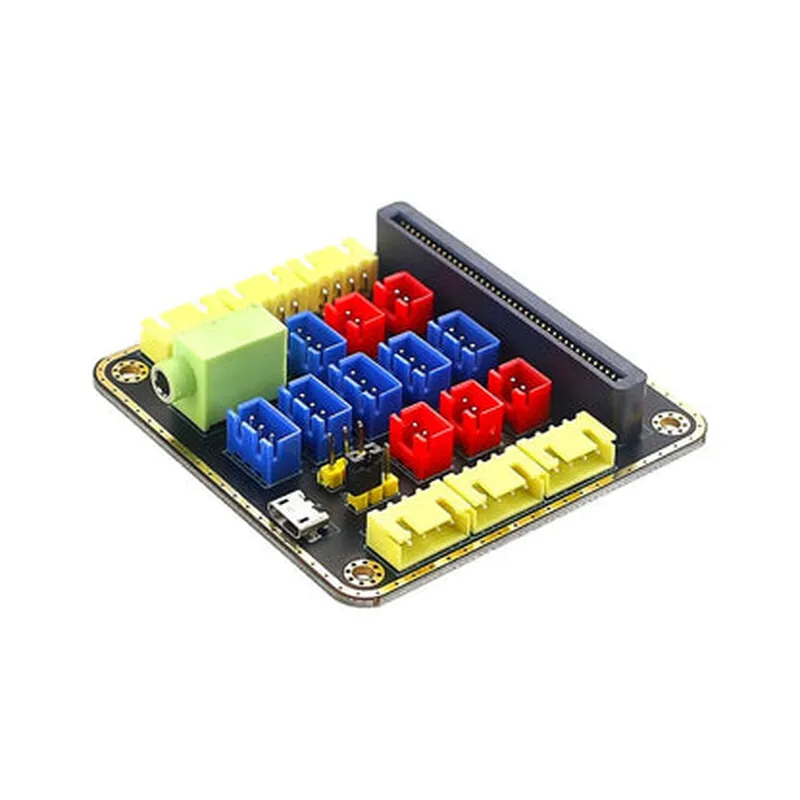
Micro:Bit Breakout Python Expansion Adapter Board

Buy Now on Stufin

Micro

Bit Breakout Python Expansion Adapter Board

Overview

The Micro

  • Access GPIO Pins: The adapter board breaks out the 25 GPIO pins of the Micro:Bit, making it easy to connect sensors, actuators, and other peripherals.
  • Expand Project Possibilities: With the adapter board, users can create more complex projects by interfacing with a wide range of external components, such as motors, sensors, and displays.
  • Streamline Prototyping: The board's compact design and Grove-compatible connectors simplify the prototyping process, reducing the need for messy breadboarding and jumper wires.
  • Enhance Learning Experience: The adapter board is an excellent tool for educational purposes, allowing students to focus on programming and project development without worrying about intricate circuitry.
Bit Breakout Python Expansion Adapter Board serves as an interface between the MicroBit and external components, enabling users to:

Key Features

  • GPIO Pin Breakout: The adapter board provides access to all 25 GPIO pins of the Micro:Bit, making it easy to connect external components.
  • Grove-Compatible Connectors: The board features Grove-compatible connectors, allowing users to easily connect and disconnect peripherals without the need for soldering or complicated wiring.
  • Compact Design: The adapter board is designed to be compact and lightweight, making it easy to integrate into projects without adding bulk.
  • Python Compatibility: The board is optimized for use with Python, allowing users to leverage the popular programming language to develop complex projects.
  • Micro:Bit Compatibility: The adapter board is specifically designed for use with the BBC Micro:Bit, ensuring seamless integration and compatibility.

Specifications

Dimensions

65mm x 45mm x 15mm (2.56in x 1.77in x 0.59in)

Operating Voltage

3.3V

GPIO Pin Count

25

Grove Connectors

4

Compatibility

BBC MicroBit

Programming Language

Python

Getting Started

To get started with the Micro

  • A BBC Micro:Bit
  • A computer with the Micro:Bit Python editor installed
  • External components (sensors, actuators, displays, etc.) for project development
  • Basic knowledge of Python programming and Micro:Bit development
Bit Breakout Python Expansion Adapter Board, users will need

With the Micro

Bit Breakout Python Expansion Adapter Board, users can unlock the full potential of their MicroBit, creating innovative projects and learning valuable skills in electronics and programming.

Pin Configuration

  • Micro: Bit Breakout Python Expansion Adapter Board Pinout Guide
  • The Micro:Bit Breakout Python Expansion Adapter Board is a versatile board that allows you to connect your micro:bit to a wide range of sensors, actuators, and other devices. This guide provides a comprehensive explanation of each pin on the board, along with guidelines on how to connect them.
  • Pinout Structure:
  • The Micro:Bit Breakout Python Expansion Adapter Board has a total of 20 pins, divided into three categories:
  • 1. Micro:Bit Interface Pins (5 pins): These pins connect directly to the micro:bit board, allowing you to access its digital and analog inputs/outputs.
  • 2. GPIO Expansion Pins (8 pins): These pins provide additional digital input/output capabilities, compatible with various sensors and devices.
  • 3. Power and Ground Pins (7 pins): These pins provide power supply connections and ground references for your projects.
  • Micro: Bit Interface Pins:
  • 1. Pin 1: 3V - This pin connects to the micro:bit's 3.3V power supply. Use this pin to power your external devices or sensors.
  • 2. Pin 2: GND - This pin connects to the micro:bit's ground reference. Use this pin to provide a ground connection for your external devices or sensors.
  • 3. Pin 3: P0 - This pin connects to the micro:bit's digital pin P0. Use this pin as a digital input/output for your projects.
  • 4. Pin 4: P1 - This pin connects to the micro:bit's digital pin P1. Use this pin as a digital input/output for your projects.
  • 5. Pin 5: P2 - This pin connects to the micro:bit's digital pin P2. Use this pin as a digital input/output for your projects.
  • GPIO Expansion Pins:
  • 1. Pin 6: D0 - This pin is a digital input/output pin, compatible with 3.3V logic levels. Use this pin to connect sensors, LEDs, or other devices.
  • 2. Pin 7: D1 - This pin is a digital input/output pin, compatible with 3.3V logic levels. Use this pin to connect sensors, LEDs, or other devices.
  • 3. Pin 8: D2 - This pin is a digital input/output pin, compatible with 3.3V logic levels. Use this pin to connect sensors, LEDs, or other devices.
  • 4. Pin 9: D3 - This pin is a digital input/output pin, compatible with 3.3V logic levels. Use this pin to connect sensors, LEDs, or other devices.
  • 5. Pin 10: A0 - This pin is an analog input pin, compatible with 3.3V analog signals. Use this pin to connect analog sensors or devices.
  • 6. Pin 11: A1 - This pin is an analog input pin, compatible with 3.3V analog signals. Use this pin to connect analog sensors or devices.
  • 7. Pin 12: A2 - This pin is an analog input pin, compatible with 3.3V analog signals. Use this pin to connect analog sensors or devices.
  • 8. Pin 13: A3 - This pin is an analog input pin, compatible with 3.3V analog signals. Use this pin to connect analog sensors or devices.
  • Power and Ground Pins:
  • 1. Pin 14: 3V - This pin provides an additional 3.3V power supply connection for your external devices or sensors.
  • 2. Pin 15: GND - This pin provides an additional ground reference connection for your external devices or sensors.
  • 3. Pin 16: VIN - This pin connects to an external power source (e.g., battery) and provides power to the micro:bit through the on-board voltage regulator.
  • 4. Pin 17: GND - This pin provides an additional ground reference connection for your external power source.
  • 5. Pin 18: 3V - This pin provides an additional 3.3V power supply connection for your external devices or sensors.
  • 6. Pin 19: GND - This pin provides an additional ground reference connection for your external devices or sensors.
  • 7. Pin 20: GND - This pin provides an additional ground reference connection for your external devices or sensors.
  • Connection Guidelines:
  • When connecting your devices or sensors to the Micro:Bit Breakout Python Expansion Adapter Board, ensure you follow these guidelines:
  • Use the correct voltage levels: 3.3V for digital and analog inputs/outputs, and the appropriate voltage level for your external power source (e.g., battery).
  • Use the correct pinouts: match the pin functions on your device or sensor with the corresponding pins on the breakout board.
  • Avoid overloading the pins: do not exceed the maximum current rating for each pin (typically 20mA for digital outputs and 10mA for analog inputs).
  • Use proper wiring and connections: ensure secure, soldered connections or use reliable connectors to prevent damage or electrical noise.
  • By following this guide, you'll be able to effectively utilize the Micro:Bit Breakout Python Expansion Adapter Board to expand the capabilities of your micro:bit projects.

Code Examples

Micro:Bit Breakout Python Expansion Adapter Board Documentation
The Micro:Bit Breakout Python Expansion Adapter Board is a versatile component designed to expand the capabilities of the BBC micro:bit, a popular microcontroller used in educational and hobbyist projects. This adapter board provides access to additional GPIO pins, allowing users to connect and control a wide range of sensors, actuators, and other devices.
Hardware Specifications
Compatible with BBC micro:bit v1 and v2
 Provides access to 12 GPIO pins, 3V and GND pins
 Onboard 3.3V voltage regulator
 Breadboard-friendly design for easy prototyping
 Supports both 5V and 3.3V devices
Software Compatibility
The Micro:Bit Breakout Python Expansion Adapter Board is compatible with MicroPython, a lightweight implementation of the Python programming language. The following examples demonstrate how to use this component in various contexts.
Example 1: Reading an Analog Sensor
In this example, we'll use the adapter board to read data from an analog sensor, such as a light sensor or a temperature sensor.
Hardware Requirements
BBC micro:bit v1 or v2
 Micro:Bit Breakout Python Expansion Adapter Board
 Analog sensor (e.g., light sensor or temperature sensor)
 Breadboard and jumper wires
Code Example
```python
import microbit
from microbit import
# Initialize the adapter board
adapter = microbit.Adapter()
# Define the analog input pin
analog_pin = adapter.pin[0]
while True:
    # Read the analog value from the sensor
    value = analog_pin.read_analog()
    print("Analog value:", value)
# Perform any necessary scaling or calculations
    # ...
# Display the result on the micro:bit screen
    microbit.display.scroll(str(value))
# Wait for 500ms before taking the next reading
    microbit.sleep(500)
```
Example 2: Controlling a Servo Motor
In this example, we'll use the adapter board to control a servo motor, commonly used in robotics and automation projects.
Hardware Requirements
BBC micro:bit v1 or v2
 Micro:Bit Breakout Python Expansion Adapter Board
 Servo motor
 Breadboard and jumper wires
Code Example
```python
import microbit
from microbit import
# Initialize the adapter board
adapter = microbit.Adapter()
# Define the digital output pin for the servo motor
servo_pin = adapter.pin[1]
while True:
    # Set the servo motor to 0
    servo_pin.write_digital(0)
    microbit.sleep(500)
# Set the servo motor to 90
    servo_pin.write_digital(1)
    microbit.sleep(500)
# Set the servo motor to 180
    servo_pin.write_digital(2)
    microbit.sleep(500)
```
These examples demonstrate the versatility of the Micro:Bit Breakout Python Expansion Adapter Board and its ability to interface with various sensors and actuators. By providing access to additional GPIO pins, this adapter board unlocks the full potential of the BBC micro:bit, enabling users to create a wide range of innovative projects.