Stufin
Home Quick Cart Profile

198 Experiments Electronics Kit


Buy Now on Stufin

Component Name

198 Experiments Electronics Kit
Overview

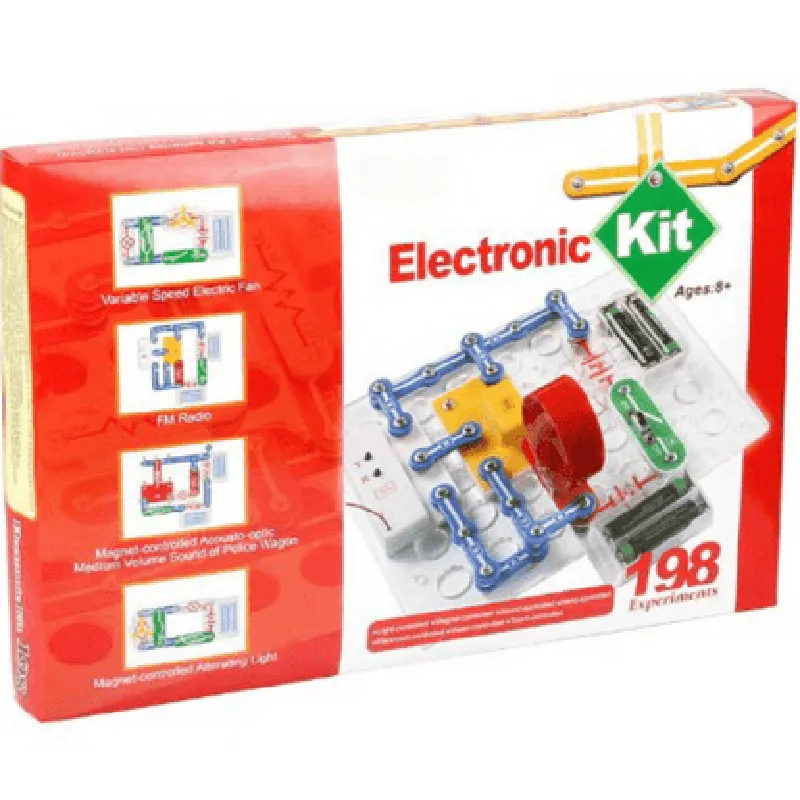
The 198 Experiments Electronics Kit is a comprehensive and versatile electronics learning platform designed for educational institutions, hobbyists, and professionals. This kit provides a hands-on approach to learning and experimenting with various electronic circuits and concepts, making it an ideal tool for understanding the fundamentals of electronics.
Functionality

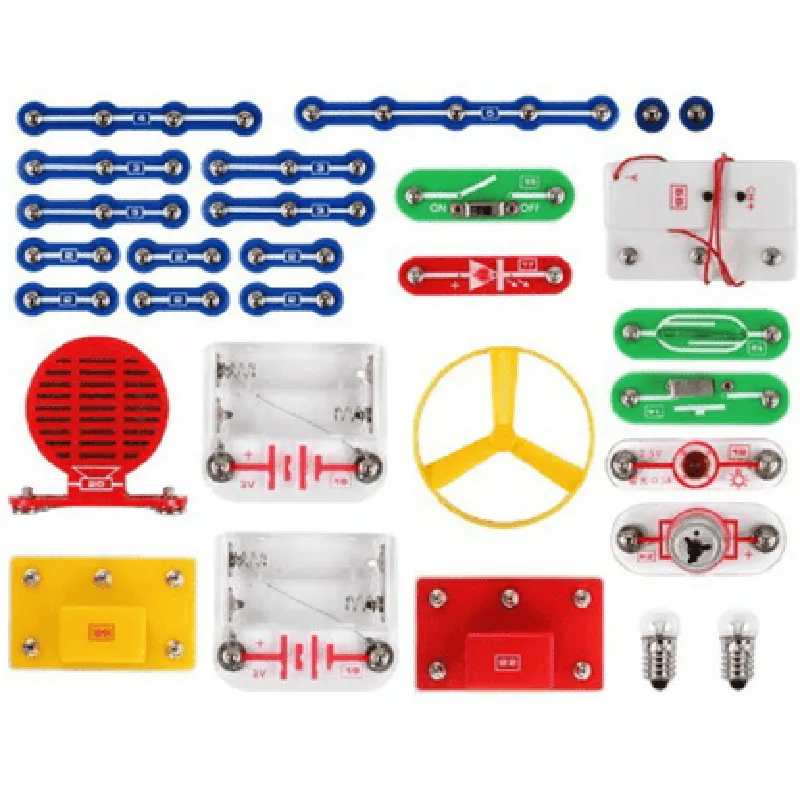
The 198 Experiments Electronics Kit is a self-contained platform that allows users to build and test a wide range of electronic circuits and projects. The kit includes a variety of components, including Resistors, Capacitors, Diodes, Transistors, ICs, and other discrete components, which can be connected and configured to perform various functions. The kit is designed to facilitate experimentation and learning in the following areas

Basic Electronics

Understanding Ohm's Law, series and parallel circuits, and fundamental electronic concepts

Digital Electronics

Building and testing digital circuits, understanding logic gates, and flip-flops

Analog Electronics

Exploring amplifier circuits, filters, and oscillators

Microcontrollers

Programming and interacting with microcontrollers using various interfaces

Key Features

  • Comprehensive Component List: The kit includes a vast array of components, including:

Resistors (1k to 1M)

Capacitors (10nF to 100F)

Diodes (1N4148, 1N4007, Zener Diodes)

Transistors (NPN, PNP, FET)

ICs (741, 555, 4026, 4017)

Breadboard and jumper wires

  • Modular Design: The kit's components are organized into separate modules, making it easy to access and use the components as needed.
  • Project-Based Learning: The kit includes a comprehensive manual with 198 experiments and projects, covering topics from basic electronics to advanced microcontroller-based projects.
  • Easy-to-Use: The kit's components are clearly labeled, and the manual provides step-by-step instructions, making it accessible to users with varying levels of expertise.
  • Compatibility: The kit is compatible with most breadboards and can be used with a variety of power supplies.
  • Durable and Long-Lasting: The components are of high quality and built to withstand repeated use and handling.
  • Easy Storage: The kit comes in a compact and organized storage case, making it easy to store and transport.

Power Supply

3V to 12V DC (not included)

Breadboard Size

830 points

Component Quantity

Over 500 pieces

Weight

Approximately 1.5 kg

Dimensions

340 x 240 x 60 mm

Target Audience

The 198 Experiments Electronics Kit is suitable for

Students and educators in electronics, electrical engineering, and related fields

Hobbyists and enthusiasts interested in electronics and DIY projects

Professionals looking to refresh their knowledge or explore new concepts

Conclusion

The 198 Experiments Electronics Kit is a valuable resource for anyone interested in learning and experimenting with electronics. Its comprehensive component list, modular design, and project-based approach make it an ideal tool for understanding the fundamentals of electronics and exploring advanced concepts.

Pin Configuration

  • 198 Experiments Electronics Kit Pinout Guide
  • The 198 Experiments Electronics Kit is a comprehensive kit that includes a variety of components and modules for learning and experimenting with electronics and IoT projects. In this guide, we'll explore the pinout of the kit's main board and provide a detailed explanation of each pin's function and how to connect them.
  • Power Supply Pins
  • 1. VIN: This pin is used to connect the external power supply voltage (typically 5V or 9V) to the kit.
  • 2. GND: This pin is the ground connection for the power supply and should be connected to the negative terminal of the power source.
  • Microcontroller Pins
  • The kit is based on a microcontroller (MCU) with 28 pins. Here's a breakdown of each pin:
  • Digital Pins
  • 3. D0: This is a digital input/output pin (GPIO) that can be used for various purposes such as controlling LEDs, reading sensor data, or communicating with other devices.
  • 4. D1: Another digital input/output pin (GPIO) with similar functionality to D0.
  • 5. D2: This pin is used for serial communication (TX) and can be used to transmit data to other devices or modules.
  • 6. D3: This pin is used for serial communication (RX) and can be used to receive data from other devices or modules.
  • 7. D4: Digital input/output pin (GPIO) with similar functionality to D0 and D1.
  • 8. D5: Digital input/output pin (GPIO) with similar functionality to D0 and D1.
  • 9. D6: Digital input/output pin (GPIO) with similar functionality to D0 and D1.
  • 10. D7: Digital input/output pin (GPIO) with similar functionality to D0 and D1.
  • 11. D8: Digital input/output pin (GPIO) with similar functionality to D0 and D1.
  • 12. D9: Digital input/output pin (GPIO) with similar functionality to D0 and D1.
  • 13. D10: Digital input/output pin (GPIO) with similar functionality to D0 and D1.
  • 14. D11: Digital input/output pin (GPIO) with similar functionality to D0 and D1.
  • 15. D12: Digital input/output pin (GPIO) with similar functionality to D0 and D1.
  • 16. D13: Digital input/output pin (GPIO) with similar functionality to D0 and D1.
  • Analog Pins
  • 17. A0: This is an analog input pin that can be used to read analog signals from sensors or other devices.
  • 18. A1: Another analog input pin with similar functionality to A0.
  • 19. A2: Analog input pin with similar functionality to A0 and A1.
  • 20. A3: Analog input pin with similar functionality to A0 and A1.
  • 21. A4: Analog input pin with similar functionality to A0 and A1.
  • 22. A5: Analog input pin with similar functionality to A0 and A1.
  • Special Function Pins
  • 23. RST: This pin is used to reset the microcontroller and should be connected to a push-button or a reset switch.
  • 24. VCC: This pin is used to connect the internal voltage regulator and should be connected to the power supply voltage (typically 5V).
  • USB Interface Pins
  • 25. USB_D+: This pin is used for USB communication and should be connected to a USB cable or a USB device.
  • 26. USB_D-: This pin is used for USB communication and should be connected to a USB cable or a USB device.
  • 27. USB_VBUS: This pin is used to connect the USB power supply and should be connected to a USB cable or a USB device.
  • Reserved Pins
  • 28. NC: This pin is not connected and should not be used.
  • Component Connection Structure
  • Here's a general guide on how to connect components to the kit's pins:
  • Breadboard-friendly components: Components like resistors, capacitors, and LEDs can be connected directly to the kit's pins using breadboard-friendly connections.
  • Modules and sensors: Modules and sensors like temperature sensors, RFID readers, or LCD displays can be connected to the kit's pins using jumper wires or module-specific connectors.
  • Power supply: Connect the power supply voltage to the VIN pin and the ground connection to the GND pin.
  • Microcontroller communication: Connect serial communication devices or modules to the RX and TX pins (D2 and D3) for communication.
  • Reset switch: Connect a push-button or a reset switch to the RST pin to reset the microcontroller.
  • Remember to always refer to the kit's documentation and component datasheets for specific connection requirements and guidelines.

Code Examples

Component Documentation: 198 Experiments Electronics Kit
Overview
The 198 Experiments Electronics Kit is a comprehensive kit designed for enthusiasts, hobbyists, and students to explore the world of electronics and IoT. The kit includes a variety of components, including resistors, capacitors, LEDs, sensors, and microcontroller boards, allowing users to experiment and learn about electronics and programming concepts.
Components Included
1 x Breadboard
 1 x Arduino Uno Board
 1 x Power Supply Module
 10 x Resistors (1k, 2k, 3k, 4k, 5k, 6k, 7k, 8k, 9k, 10k)
 10 x Capacitors (10nF, 22nF, 47nF, 100nF, 220nF, 470nF, 1uF, 2.2uF, 4.7uF, 10uF)
 20 x Jumper Wires
 10 x LEDs (Red, Green, Blue)
 5 x Sensors (Light, Sound, Temperature, Button, Potentiometer)
Code Examples
### Example 1: LED Blinking using Arduino Uno
In this example, we will use the Arduino Uno board to blink an LED connected to digital pin 13.
```c++
const int ledPin = 13; // choose a pin for the LED
void setup() {
  pinMode(ledPin, OUTPUT); // set the pin as an output
}
void loop() {
  digitalWrite(ledPin, HIGH); // turn the LED on
  delay(1000); // wait for 1 second
  digitalWrite(ledPin, LOW); // turn the LED off
  delay(1000); // wait for 1 second
}
```
Hardware Connection:
Connect the positive leg of the LED to digital pin 13 on the Arduino Uno board.
 Connect the negative leg of the LED to ground (GND) on the Arduino Uno board.
### Example 2: Reading Temperature Sensor Data using Arduino Uno
In this example, we will use the temperature sensor to read the ambient temperature and display it on the serial monitor.
```c++
const int tempPin = A0; // choose an analog input pin for the temperature sensor
void setup() {
  Serial.begin(9600); // initialize serial communication
}
void loop() {
  int sensorValue = analogRead(tempPin); // read the sensor value
  float temperature = sensorValue  0.48828125; // convert sensor value to temperature in Celsius
  Serial.print("Temperature: ");
  Serial.print(temperature);
  Serial.println(" C");
  delay(1000); // wait for 1 second
}
```
Hardware Connection:
Connect the VCC pin of the temperature sensor to 5V on the Arduino Uno board.
 Connect the GND pin of the temperature sensor to GND on the Arduino Uno board.
 Connect the OUT pin of the temperature sensor to analog input pin A0 on the Arduino Uno board.
These examples demonstrate the basic usage of the 198 Experiments Electronics Kit. The kit offers a wide range of possibilities for exploring electronics and IoT concepts, and users can experiment with different components and code examples to learn and create innovative projects.