

Stufin
Home Quick Cart Profile

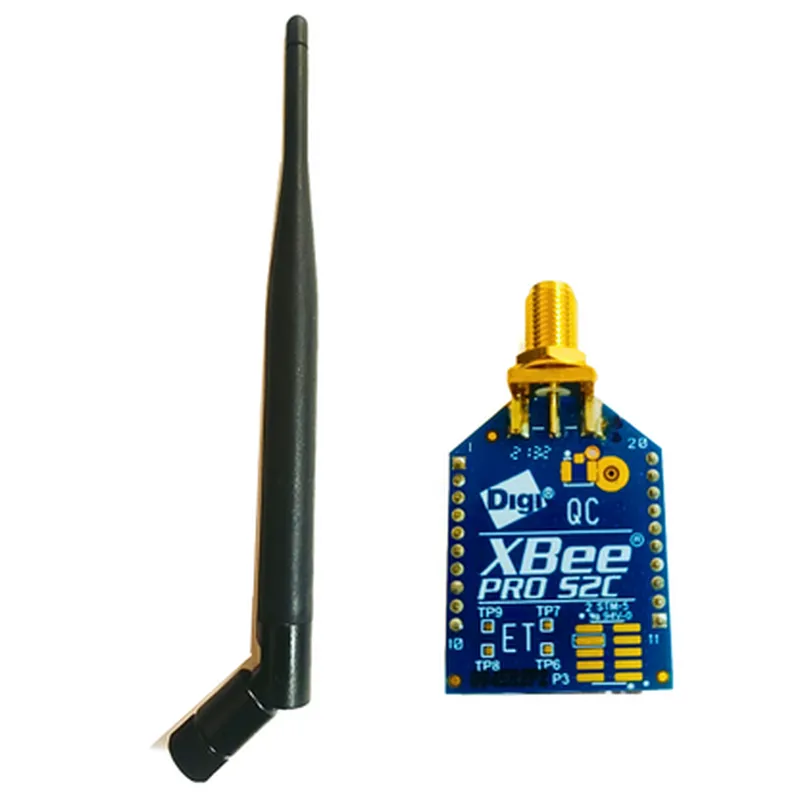
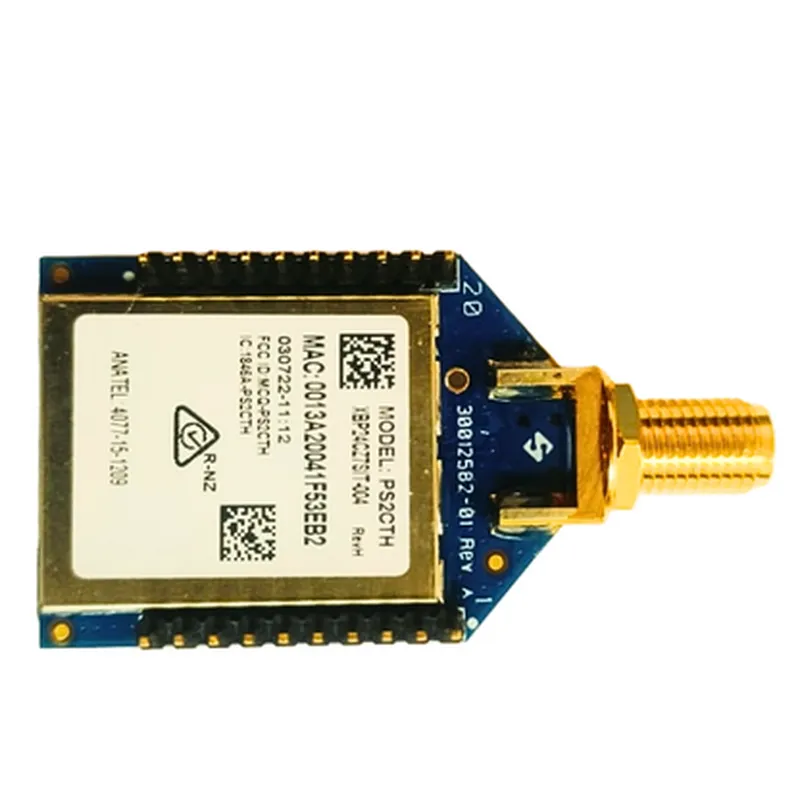
Zigbee XBee Pro S2C 802.15.4 Module 63mW 3Km+ 3.2dBi Antenna

Buy Now on Stufin

Component Name

Zigbee XBee Pro S2C 802.15.4 Module 63mW 3Km+ 3.2dBi Antenna

Overview

The Zigbee XBee Pro S2C 802.15.4 Module is a high-performance, low-power wireless communication module designed for Internet of Things (IoT) applications. This module is based on the 802.15.4 standard and operates on the 2.4 GHz frequency band, providing reliable and secure communication between devices. The module is equipped with a 3.2dBi antenna, which ensures a robust and stable wireless connection over long distances, making it suitable for a wide range of IoT applications.

Functionality

The Zigbee XBee Pro S2C 802.15.4 Module is designed to enable wireless communication between devices in various IoT applications, including

Home automation

Industrial control systems

Wireless sensor networks

Smart energy management

Healthcare devices

This module acts as a wireless modem, allowing devices to communicate with each other using the Zigbee protocol. It provides a reliable and secure data transfer mechanism, ensuring that data is transmitted efficiently and accurately between devices.

Key Features

  • Wireless Communication: The module operates on the 2.4 GHz frequency band, providing a reliable and secure wireless connection between devices.
  • High-Performance: With a transmit power of 63mW, the module ensures a strong and stable signal, allowing for reliable communication over long distances (up to 3 km+).
  • Low Power Consumption: The module is designed for low power consumption, making it suitable for battery-powered devices and reducing the overall power requirements of IoT systems.
  • Zigbee Protocol: The module supports the Zigbee protocol, which provides a standardized and interoperable wireless communication mechanism for IoT devices.
  • On-Board Antenna: The 3.2dBi antenna is integrated into the module, providing a compact and reliable wireless solution.
  • Industrial Operating Temperature: The module operates over an industrial temperature range of -40C to 85C, making it suitable for use in harsh environments.
  • Certifications: The module is compliant with FCC, IC, and ETSI regulatory standards, ensuring reliable and secure operation in various regions.
  • Simple Integration: The module is designed for easy integration into IoT devices, with a compact form factor and a simple-to-use API.

Technical Specifications

Frequency Band

2.4 GHz

Transmit Power

63mW

Receive Sensitivity

-100 dBm

Data Rate

Up to 250 kbps

Range

Up to 3 km+

Antenna Gain

3.2dBi

Operating Temperature

-40C to 85C

Power Consumption

< 200 mA (transmit mode), < 10 mA (receive mode)

Interface

20-pin surface-mount package

Dimensions

22 mm x 34 mm x 3 mm

Applications

The Zigbee XBee Pro S2C 802.15.4 Module is suitable for a wide range of IoT applications, including

Home automation systems

Industrial control systems

Wireless sensor networks

Smart energy management systems

Healthcare devices

Wearable devices

IoT gateways

Conclusion

The Zigbee XBee Pro S2C 802.15.4 Module is a high-performance, low-power wireless communication module designed for IoT applications. Its reliable and secure wireless communication mechanism, combined with its low power consumption and compact form factor, make it an ideal solution for a wide range of IoT applications.

Pin Configuration

  • Zigbee XBee Pro S2C 802.15.4 Module 63mW 3Km+ 3.2dBi Antenna Pinout Guide
  • The Zigbee XBee Pro S2C 802.15.4 Module is a compact, high-power wireless communication module used for IoT applications. It has a 2x10-pin-through-hole interface, with a total of 20 pins. Here's a detailed explanation of each pin:
  • Pins 1-4: Power and Ground
  • Pin 1: VCC (Power Supply): Connect to a 3.3V power source. The module's operating voltage range is 2.4V to 3.6V.
  • Pin 2: GND (Ground): Connect to the ground of your circuit.
  • Pin 3: VREF (Reference Voltage): This pin is used for ADC (Analog-to-Digital Converter) reference voltage. Typically, it's connected to VCC.
  • Pin 4: GND (Ground): Connect to the ground of your circuit.
  • Pins 5-10: Digital I/O
  • Pin 5: DOUT (Digital Output): The module's digital output pin. It's used to transmit data to the host microcontroller.
  • Pin 6: DIN (Digital Input): The module's digital input pin. It's used to receive data from the host microcontroller.
  • Pin 7: RTS (Request to Send): This pin is used for flow control. It's asserted by the XBee module when it's ready to send data.
  • Pin 8: CTS (Clear to Send): This pin is used for flow control. It's asserted by the host microcontroller when it's ready to receive data.
  • Pin 9: SLEEP (Sleep Mode): This pin is used to put the module into sleep mode. It's typically connected to a GPIO pin on the host microcontroller.
  • Pin 10: ON (Power On): This pin is used to turn the module on or off. It's typically connected to a GPIO pin on the host microcontroller or a power switch.
  • Pins 11-14: Analog I/O
  • Pin 11: AD0 (Analog Input 0): One of the two analog input pins. It's used to measure analog signals.
  • Pin 12: AD1 (Analog Input 1): The second analog input pin. It's used to measure analog signals.
  • Pin 13: DIO7 (Digital I/O 7): A digital I/O pin that can be used as an input or output.
  • Pin 14: DIO8 (Digital I/O 8): A digital I/O pin that can be used as an input or output.
  • Pins 15-20: Antenna and Others
  • Pin 15: ANT (Antenna): Connect to the 3.2dBi antenna provided with the module.
  • Pin 16: N.C. (Not Connected): This pin is not connected internally and should be left unconnected.
  • Pin 17: RSSI (Received Signal Strength Indicator): This pin is used to measure the received signal strength.
  • Pin 18: N.C. (Not Connected): This pin is not connected internally and should be left unconnected.
  • Pin 19: N.C. (Not Connected): This pin is not connected internally and should be left unconnected.
  • Pin 20: N.C. (Not Connected): This pin is not connected internally and should be left unconnected.
  • Connection Structure:
  • When connecting the pins, make sure to:
  • Use a 2x10-pin header or socket to connect the module to your circuit.
  • Keep the power and ground pins (1-4) separate from the digital and analog I/O pins (5-14).
  • Use bypass capacitors (e.g., 100nF) between VCC and GND to reduce noise and ensure stable operation.
  • Connect the digital and analog I/O pins to your microcontroller or other components according to your application's requirements.
  • Connect the antenna to Pin 15.
  • Leave the unconnected pins (16, 18-20) unconnected.
  • Important Note:
  • Before connecting the module, ensure that you've read and understood the datasheet and user manual provided by the manufacturer.
  • Use proper soldering techniques and handle the module with care to avoid damage.
  • The module operates at 3.3V, so ensure that your power supply and circuitry can provide a stable 3.3V voltage.

Code Examples

Zigbee XBee Pro S2C 802.15.4 Module 63mW 3Km+ 3.2dBi Antenna
Overview
The Zigbee XBee Pro S2C 802.15.4 Module is a high-power, long-range XBee module that operates on the 802.15.4 wireless personal area network (PAN) protocol. It features a high-gain 3.2dBi antenna, providing a range of over 3 kilometers (line of sight). This module is ideal for IoT applications that require reliable, long-range communication.
Technical Specifications
Frequency Band: 2.4 GHz
 Data Rate: Up to 250 kbps
 Range: Up to 3 kilometers (line of sight)
 Output Power: 63 mW
 Antenna: 3.2 dBi
 Operating Temperature: -40C to 85C
 Interface: 20-pin XBee socket
Code Examples
### Example 1: Basic Communication using Python and XCTU
This example demonstrates how to use the Zigbee XBee Pro S2C module for basic communication between two devices using Python and the XCTU (XBee Configuration and Test Utility) software.
Sender Code (Python)
```python
import serial
# Open the serial connection to the XBee module
ser = serial.Serial('COM3', 9600)  # Replace COM3 with your XBee's serial port
# Set the XBee module to Transparent Mode
ser.write(b'+++')
ser.write(b'ATCN
')
# Send a message to the recipient XBee module
ser.write(b'Hello, XBee!
')
# Close the serial connection
ser.close()
```
Receiver Code (XCTU)
```
+++
ATCN
```
Note: Make sure to configure the XCTU software to connect to the receiving XBee module's serial port and set the baud rate to 9600.
### Example 2: IoT Sensor Network using Arduino and Zigbee
This example demonstrates how to use the Zigbee XBee Pro S2C module to create an IoT sensor network using Arduino and a temperature sensor.
Arduino Code
```c++
#include <XBee.h>
// XBee module connected to digital pins 2 and 3
XBee xbee(2, 3);
// Temperature sensor connected to analog pin 0
int tempSensorPin = A0;
void setup() {
  Serial.begin(9600);
  xbee.begin(9600);
}
void loop() {
  int sensorValue = analogRead(tempSensorPin);
  float temperature = sensorValue  0.48828125; // Convert sensor value to Celsius
// Send the temperature data to the coordinator XBee module
  xbee.print("T:");
  xbee.print(temperature);
  xbee.println("C");
delay(1000);
}
```
Coordinator Code (XCTU)
```
+++
ATCN
// Receive and display the temperature data
ATRD
```
Note: Make sure to configure the XCTU software to connect to the coordinator XBee module's serial port and set the baud rate to 9600.
### Example 3: Mesh Networking using XBee Python Library
This example demonstrates how to use the Zigbee XBee Pro S2C module to create a mesh network using the XBee Python library.
Python Code
```python
import xbee
# Create an XBee device object
device = xbee.Device('/dev/ttyUSB0', 9600)  # Replace /dev/ttyUSB0 with your XBee's serial port
# Create a mesh network object
mesh = xbee.Mesh(device, ' MeshNetwork')
# Add nodes to the mesh network
node1 = mesh.add_node('Node1', '0013A20012345678')
node2 = mesh.add_node('Node2', '0013A20012345679')
# Send a message from Node1 to Node2
node1.send(node2, 'Hello, Node2!')
# Close the XBee device
device.close()
```
Note: Make sure to install the XBee Python library and configure the XBee devices according to the library's documentation.
These code examples demonstrate the versatility of the Zigbee XBee Pro S2C module in various IoT applications. By following these examples, you can create your own IoT projects using this powerful and reliable wireless module.