Stufin
Home Quick Cart Profile

3 Axis FPV Camera Brushless Gimbal with Control Board


Buy Now on Stufin

Component Name

3 Axis FPV Camera Brushless Gimbal with Control Board
Overview

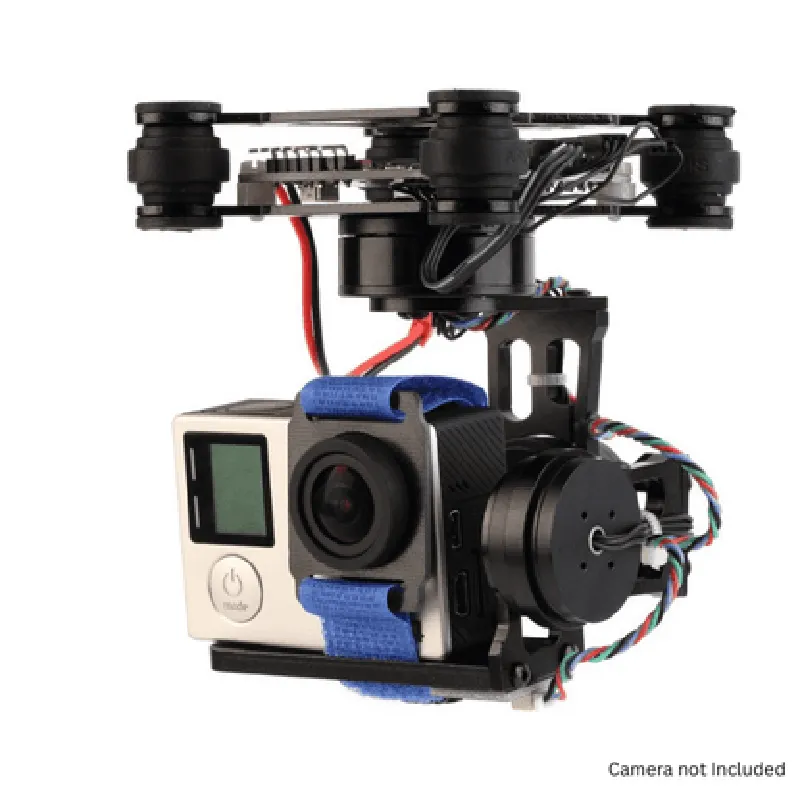
The 3 Axis FPV Camera Brushless Gimbal with Control Board is a comprehensive IoT component designed for First-Person View (FPV) applications, particularly in aerial photography and videography. This component integrates a high-precision brushless gimbal with a control board, enabling stabilization and adjustment of a camera's pitch, roll, and yaw axes in real-time. This results in smooth, stabilized, and high-quality video footage, even in dynamic environments.
Functionality

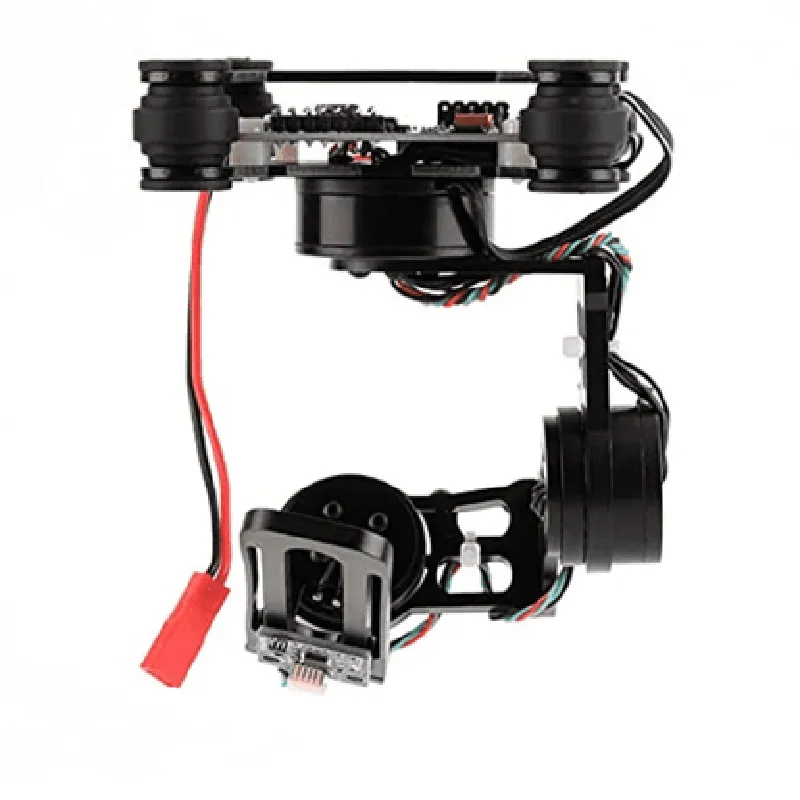
  • Stabilize the camera's pitch, roll, and yaw axes, compensating for platform movements and vibrations.
  • Enable precise control over camera movements, allowing for smooth panning, tilting, and zooming.
  • Provide real-time adjustment of camera settings, such as focus, exposure, and white balance.
The primary function of the 3 Axis FPV Camera Brushless Gimbal with Control Board is to provide stabilized camera movement, ensuring a clear and stable video feed in various aerial platforms, such as drones, quadcopters, and other unmanned aerial vehicles (UAVs). The component's advanced control system and high-precision motors work in tandem to

Key Features

  • Brushless Gimbal: The gimbal features high-precision, brushless motors that provide smooth and precise control over camera movements, reducing vibrations and noise.
  • 3-Axis Stabilization: The component stabilizes the camera's pitch, roll, and yaw axes, ensuring a stable and level video feed, even in turbulent environments.
  • Integrated Control Board: The control board manages the gimbal's motors, receives inputs from external sources (e.g., RC transmitters), and connects to a camera via various interfaces (e.g., HDMI, UART).
  • Multiple Interface Support: The control board supports various interfaces, including HDMI, UART, and I2C, allowing connection to a range of cameras, flight controllers, and other peripherals.
  • Adjustable Settings: The control board allows for real-time adjustment of camera settings, such as focus, exposure, and white balance, via external inputs or through a companion software application.
  • Low Latency: The component's control system is optimized for low latency, ensuring a responsive and synchronized video feed.
  • Compact Design: The gimbal and control board are designed to be compact and lightweight, making them suitable for integration into various aerial platforms.
  • Compatibility: The component is compatible with a range of cameras, including action cameras, HD cameras, and even custom camera solutions.

Gimbal

+ TypeBrushless, 3-axis
+ Motor TypeHigh-precision, brushless
+ Control Range30 (pitch), 30 (roll), 30 (yaw)

Control Board

+ Microcontroller32-bit ARM Cortex-M4
+ InterfaceHDMI, UART, I2C
+ Power Supply5V, 1A
+ Operating Frequency50Hz, 60Hz, 120Hz

Dimensions

+ Length60mm
+ Width40mm
+ Height30mm
+ Weight120g (including motors and control board)

Operating Temperature

-20C to 40C

Storage Temperature

-30C to 50C

Applications

  • Aerial Photography and Videography
  • FPV Racing and Sports
  • Surveillance and Inspection
  • Search and Rescue Operations
  • Scientific Research and Mapping

Pin Configuration

  • Component Documentation: 3 Axis FPV Camera Brushless Gimbal with Control Board
  • Pinout Explanation:
  • The 3 Axis FPV Camera Brushless Gimbal with Control Board has a total of 22 pins, which are divided into several groups to facilitate connection and control of the gimbal's motors, sensors, and other components. Below is a detailed explanation of each pin, grouped by functionality:
  • Power and Motor Connections (Pins 1-6)
  • Pin 1: VCC (Red) - Power supply for the control board (typically 7.4V to 12V)
  • Pin 2: GND (Black) - Ground connection for the control board
  • Pin 3: M1 (Motor 1) - Connection for the Roll axis motor
  • Pin 4: M2 (Motor 2) - Connection for the Pitch axis motor
  • Pin 5: M3 (Motor 3) - Connection for the Yaw axis motor
  • Pin 6: GND (Black) - Ground connection for the motors
  • Sensor Connections (Pins 7-12)
  • Pin 7: SCL (Sensor Clock) - I2C clock signal for sensor communication
  • Pin 8: SDA (Sensor Data) - I2C data signal for sensor communication
  • Pin 9: INT (Interrupt) - Interrupt signal from sensors (e.g., accelerometer, gyroscope)
  • Pin 10: ACC_X (Accelerometer X-axis) - Analog output from accelerometer (X-axis)
  • Pin 11: ACC_Y (Accelerometer Y-axis) - Analog output from accelerometer (Y-axis)
  • Pin 12: ACC_Z (Accelerometer Z-axis) - Analog output from accelerometer (Z-axis)
  • Control Signal Connections (Pins 13-16)
  • Pin 13: RC_R (Roll axis signal) - Receive signal from RC transmitter for Roll axis control
  • Pin 14: RC_P (Pitch axis signal) - Receive signal from RC transmitter for Pitch axis control
  • Pin 15: RC_Y (Yaw axis signal) - Receive signal from RC transmitter for Yaw axis control
  • Pin 16: UART_TX (Serial Transmit) - Serial communication transmit signal (typically for debugging)
  • Additional Connections (Pins 17-22)
  • Pin 17: VCC_O (Output Voltage) - Output voltage for powering external components (e.g., camera)
  • Pin 18: GND_O (Output Ground) - Output ground connection for external components
  • Pin 19: CAM_SHUT (Camera Shutter) - Control signal for camera shutter
  • Pin 20: CAM_AF (Camera Autofocus) - Control signal for camera autofocus
  • Pin 21: NO_USE (Not Used) - Reserved pin (not used in this gimbal)
  • Pin 22: NO_USE (Not Used) - Reserved pin (not used in this gimbal)
  • Connection Structure:
  • When connecting the pins, ensure that the power supply, motor connections, and sensor connections are made securely and correctly. The following structure is recommended:
  • Connect the power supply (VCC and GND) to a reliable power source (e.g., a battery or power module).
  • Connect the motor wires (M1, M2, M3) to the corresponding brushless motors.
  • Connect the sensor wires (SCL, SDA, INT, ACC_X, ACC_Y, ACC_Z) to the corresponding sensors (e.g., accelerometer, gyroscope).
  • Connect the control signal wires (RC_R, RC_P, RC_Y, UART_TX) to the RC transmitter or other control devices.
  • Connect the additional connections (VCC_O, GND_O, CAM_SHUT, CAM_AF) to external components as needed.
  • Notes:
  • Ensure that the power supply voltage is within the recommended range for the control board and motors.
  • Use suitable connectors and wires to minimize electrical noise and interference.
  • Refer to the gimbal's user manual or technical documentation for specific connection diagrams and configuration instructions.

Code Examples

3 Axis FPV Camera Brushless Gimbal with Control Board Documentation
Overview
The 3 Axis FPV Camera Brushless Gimbal with Control Board is a high-performance stabilization system designed for First-Person View (FPV) cameras in aerial vehicles, robots, and other applications. This component integrates a 3-axis brushless gimbal with a dedicated control board, enabling smooth and stable camera movement. The control board features multiple interfaces, including UART, I2C, and PWM, for seamless integration with various microcontrollers and flight controllers.
Technical Specifications
Gimbal:
	+ 3-axis stabilization (pitch, roll, and yaw)
	+ High-torque brushless motors
	+ High-precision bearings for smooth movement
	+ Camera mounting plate with adjustable tilt and roll
 Control Board:
	+ Microcontroller: 32-bit ARM Cortex-M4
	+ Interfaces: UART, I2C, PWM
	+ Power supply: 5V to 12V
	+ Dimensions: 30mm x 30mm x 10mm
Code Examples
### Example 1: Basic Gimbal Control using Arduino
This example demonstrates how to control the gimbal using an Arduino board.
Hardware Requirements:
Arduino Uno or compatible board
 3 Axis FPV Camera Brushless Gimbal with Control Board
 Jumper wires
Software Requirements:
Arduino IDE (version 1.8.x or later)
Code:
```c
#include < Serial.h>
#define GIMBAL_SERIAL_PORT Serial1
void setup() {
  // Initialize serial communication with the gimbal control board
  GIMBAL_SERIAL_PORT.begin(115200);
}
void loop() {
  // Set the gimbal to a specific position (pitch, roll, yaw in degrees)
  GIMBAL_SERIAL_PORT.write(" Pitch: 30 Roll: 20 Yaw: 10
");
  delay(1000);
// Set the gimbal to a new position
  GIMBAL_SERIAL_PORT.write(" Pitch: 0 Roll: 0 Yaw: 0
");
  delay(1000);
}
```
### Example 2: Gimbal Control using Python and RPi (Raspberry Pi)
This example demonstrates how to control the gimbal using a Raspberry Pi and Python.
Hardware Requirements:
Raspberry Pi (RPi) board
 3 Axis FPV Camera Brushless Gimbal with Control Board
 Jumper wires
Software Requirements:
Python 3.x
 RPi.GPIO library
Code:
```python
import serial
import time
# Set up serial communication with the gimbal control board
ser = serial.Serial('/dev/ttyUSB0', 115200, timeout=1)
def set_gimbal_position(pitch, roll, yaw):
  # Construct the command string
  cmd = f"Pitch: {pitch} Roll: {roll} Yaw: {yaw}
"
  ser.write(cmd.encode())
while True:
  # Set the gimbal to a specific position
  set_gimbal_position(30, 20, 10)
  time.sleep(1)
# Set the gimbal to a new position
  set_gimbal_position(0, 0, 0)
  time.sleep(1)
```
### Example 3: Gimbal Control using Pixhawk Flight Controller and CPPM
This example demonstrates how to control the gimbal using a Pixhawk flight controller and CPPM (Carrier Pulse Position Modulation) signals.
Hardware Requirements:
Pixhawk flight controller
 3 Axis FPV Camera Brushless Gimbal with Control Board
 CPPM receiver module
Software Requirements:
Pixhawk flight controller firmware (version 3.x or later)
Code:
In this example, the gimbal control board is configured to receive CPPM signals from the Pixhawk flight controller. The flight controller sends CPPM signals to control the gimbal's movements.
Tips and Variations
Use a joystick or other input device to control the gimbal's movements in real-time.
 Integrate the gimbal with a GPS module and a flight controller to create a fully autonomous aerial vehicle.
 Use the gimbal's I2C interface to connect it to a microcontroller or other devices for advanced control and synchronization.
Troubleshooting
Ensure that the gimbal control board is properly connected to the power source and the microcontroller or flight controller.
 Check the serial communication settings and baud rates to ensure they match the gimbal control board's specifications.
 Consult the gimbal control board's documentation for specific troubleshooting guides and FAQs.