

Stufin
Home Quick Cart Profile

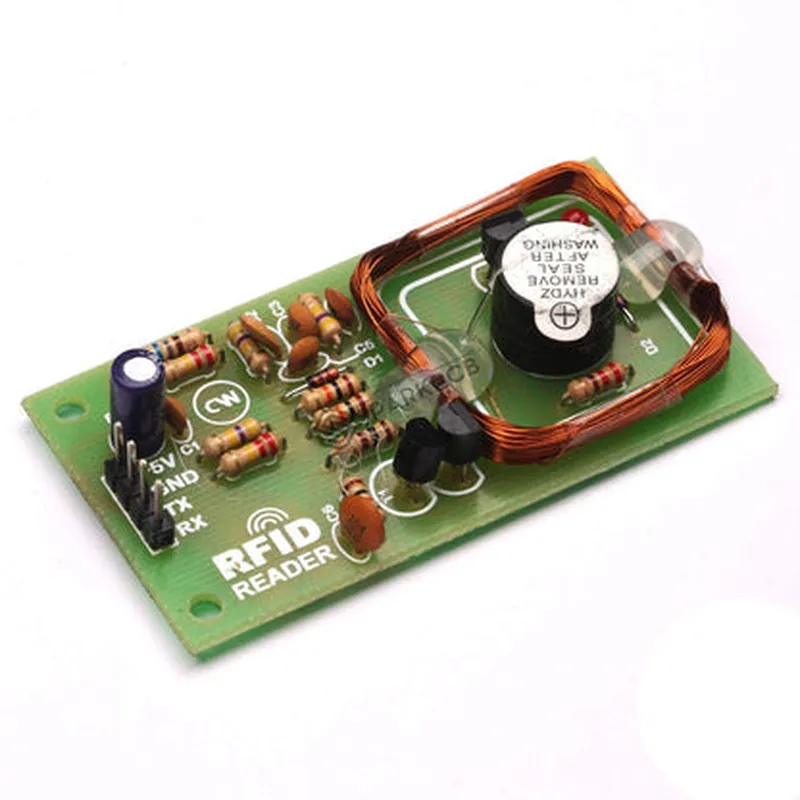
125Khz RFID Reader TTL Module

Buy Now on Stufin

Component Name

125Khz RFID Reader TTL Module

Overview

-----------

The 125Khz RFID Reader TTL Module is a compact, low-power Radio Frequency Identification (RFID) reader module designed to read 125Khz RFID tags. This module is ideal for various applications, including access control, inventory management, and automation systems.

Functionality

---------------

The 125Khz RFID Reader TTL Module is capable of reading 125Khz RFID tags, which are commonly used in various applications. The module communicates with the RFID tag using the TTL (Transistor-Transistor Logic) protocol, making it compatible with most microcontrollers and embedded systems.

When a 125Khz RFID tag is brought within the range of the reader module, it detects the tag's presence and extracts the tag's unique identifier. The module then transmits the tag's ID to the connected microcontroller or host system via the TTL interface.

Key Features

-------------

### 1. Frequency and Range

Operates at a frequency of 125Khz

Reading range of up to 7 cm (2.75 in) depending on the tag type and environment

### 2. Interface

TTL (Transistor-Transistor Logic) interface for communication with microcontrollers and embedded systems

Supports baud rates up to 9600bps

### 3. Power Supply

Operates on a supply voltage of 4.5V to 5.5V

Low power consumption, typically 30mA

### 4. Tag Support

Compatible with 125Khz RFID tags, including EM4100, EM4200, and similar tags

Supports tag types, including cards, keys, and fobs

### 5. Module Dimensions

Compact size

40mm x 25mm x 10mm (1.57in x 0.98in x 0.39in)

Weight

approximately 10 grams (0.35 oz)

### 6. Operating Temperature

Operating temperature range

-20C to 80C (-4F to 176F)

### 7. Certifications

Compliant with CE, FCC, and RoHS standards

Connectivity and Pinout

-------------------------

The 125Khz RFID Reader TTL Module has a 5-pin header for connecting to a microcontroller or host system. The pinout is as follows
VCC (Power Supply)4.5V to 5.5V
GND (Ground)0V
TX (Transmit)TTL output for transmitting data to the microcontroller
RX (Receive)TTL input for receiving data from the microcontroller
ANT (Antenna)Connected to the internal antenna for reading RFID tags

Applications

--------------

The 125Khz RFID Reader TTL Module is suitable for various applications, including

Access control systems

Inventory management systems

Automation systems

Attendance tracking systems

Smart home devices

Internet of Things (IoT) projects

Conclusion

----------

The 125Khz RFID Reader TTL Module is a compact, low-power, and reliable RFID reader solution for various applications. Its TTL interface and compatibility with 125Khz RFID tags make it an ideal choice for developers and engineers working on RFID-based projects.

Pin Configuration

  • 125KHz RFID Reader TTL Module Documentation
  • Pinout Explanation
  • The 125KHz RFID Reader TTL Module has a total of 9 pins, each with a specific function. Below is a detailed explanation of each pin:
  • 1. VCC (Power Supply)
  • Pin Number: 1
  • Description: This pin provides the power supply to the module. Connect it to a 5V DC power source.
  • Recommended voltage range: 4.5V to 5.5V
  • 2. GND (Ground)
  • Pin Number: 2
  • Description: This pin is the ground connection for the module. Connect it to the negative terminal of the power supply or the system ground.
  • 3. TX (Transmit)
  • Pin Number: 3
  • Description: This pin is the serial transmission output of the module. It transmits the data read from the RFID tag to the microcontroller or other devices.
  • Signal: TTL (Transistor-Transistor Logic) level signal
  • 4. RX (Receive)
  • Pin Number: 4
  • Description: This pin is the serial reception input of the module. It receives commands or data from the microcontroller or other devices.
  • Signal: TTL (Transistor-Transistor Logic) level signal
  • 5. Ant (Antenna)
  • Pin Number: 5
  • Description: This pin connects to the RFID antenna, which is used to transmit and receive RFID signals.
  • 6. BZ (Buzzer)
  • Pin Number: 6
  • Description: This pin connects to a buzzer or speaker, which can be used to provide an audible indication when an RFID tag is detected.
  • 7. LED (Light Emitting Diode)
  • Pin Number: 7
  • Description: This pin connects to an LED, which can be used to provide a visual indication when an RFID tag is detected.
  • 8. RST (Reset)
  • Pin Number: 8
  • Description: This pin is used to reset the module. Connecting this pin to ground will reset the module.
  • 9. NC (No Connection)
  • Pin Number: 9
  • Description: This pin is not connected internally and should be left unconnected.
  • Connection Structure:
  • To connect the 125KHz RFID Reader TTL Module to a microcontroller or other devices, follow this structure:
  • VCC (Pin 1) 5V Power Supply
  • GND (Pin 2) System Ground
  • TX (Pin 3) Microcontroller's RX Pin (e.g., Arduino's RX Pin)
  • RX (Pin 4) Microcontroller's TX Pin (e.g., Arduino's TX Pin)
  • Ant (Pin 5) RFID Antenna
  • BZ (Pin 6) Buzzer or Speaker (optional)
  • LED (Pin 7) LED (optional)
  • RST (Pin 8) Pull-up Resistor (10k) to VCC, and a switch to ground for manual reset
  • NC (Pin 9) Leave unconnected
  • Note:
  • Make sure to use a suitable power supply and decoupling capacitors to ensure stable operation.
  • Use a 10k pull-up resistor to connect the RST pin to VCC to avoid unintended resets.
  • The RFID antenna should be designed and tuned for optimal performance at 125KHz frequency.
  • The buzzer and LED connections are optional and can be omitted if not required.

Code Examples

125Khz RFID Reader TTL Module Documentation
Overview
The 125Khz RFID Reader TTL Module is a compact and low-cost module designed for reading 125KHz frequency RFID tags. It features a TTL (Transistor-Transistor Logic) output, making it easy to interface with microcontrollers, Arduino boards, and other digital systems.
Pinout
The module has the following pinout:
VCC: 5V power supply
 GND: Ground
 TXD (TTL output): Serial data output
 RXD (TTL input): Optional serial data input (not used in most cases)
Technical Specifications
Operating frequency: 125KHz
 Reading distance: Up to 10cm (depending on tag size and type)
 TTL output: 0-5V, 9600 bps
 Power consumption: 20-30mA
Code Examples
### Example 1: Arduino Uno with Serial Monitor
In this example, we'll use an Arduino Uno board to read RFID tags and display the tag ID on the serial monitor.
Hardware Requirements
125Khz RFID Reader TTL Module
 Arduino Uno board
 RFID tags (125KHz frequency)
Software Requirements
Arduino IDE (version 1.8.x or later)
Code
```c++
#include <Serial.h>
#define RFID_RX 2 // RX pin on Arduino Uno (connected to TXD on RFID module)
void setup() {
  Serial.begin(9600); // Initialize serial communication at 9600bps
  pinMode(RFID_RX, INPUT); // Set RX pin as input
}
void loop() {
  if (Serial.available() > 0) {
    String tagID = "";
    while (Serial.available() > 0) {
      char c = Serial.read();
      tagID += c;
    }
    Serial.print("Tag ID: ");
    Serial.println(tagID);
    delay(1000); // Wait 1 second before reading next tag
  }
}
```
How it works
1. Connect the RFID module's TXD pin to the Arduino Uno's RX pin (pin 2).
2. Open the serial monitor in the Arduino IDE and set the baud rate to 9600bps.
3. When an RFID tag is brought near the reader, the module will send the tag ID as a serial string to the Arduino board.
4. The Arduino board will receive the string and display it on the serial monitor.
### Example 2: Raspberry Pi with Python
In this example, we'll use a Raspberry Pi board to read RFID tags and store the tag IDs in a Python list.
Hardware Requirements
125Khz RFID Reader TTL Module
 Raspberry Pi board (any model)
 RFID tags (125KHz frequency)
Software Requirements
Raspbian OS (latest version)
 Python 3.x
Code
```python
import serial
import time
# Open the serial port (UART) on the Raspberry Pi
ser = serial.Serial('/dev/ttyS0', 9600, timeout=1)
# Create an empty list to store tag IDs
tag_ids = []
while True:
    # Read data from the serial port
    data = ser.readline().decode('utf-8').strip()
    if data:
        # Extract the tag ID from the serial string
        tag_id = data.split(':')[1].strip()
        # Add the tag ID to the list
        if tag_id not in tag_ids:
            tag_ids.append(tag_id)
            print("Tag ID: ", tag_id)
    time.sleep(0.1) # Wait 100ms before reading next tag
```
How it works
1. Connect the RFID module's TXD pin to the Raspberry Pi's UART TX pin (GPIO 14).
2. Open a terminal on the Raspberry Pi and run the Python script.
3. When an RFID tag is brought near the reader, the module will send the tag ID as a serial string to the Raspberry Pi.
4. The Python script will receive the string, extract the tag ID, and add it to the list.