Stufin
Home Quick Cart Profile

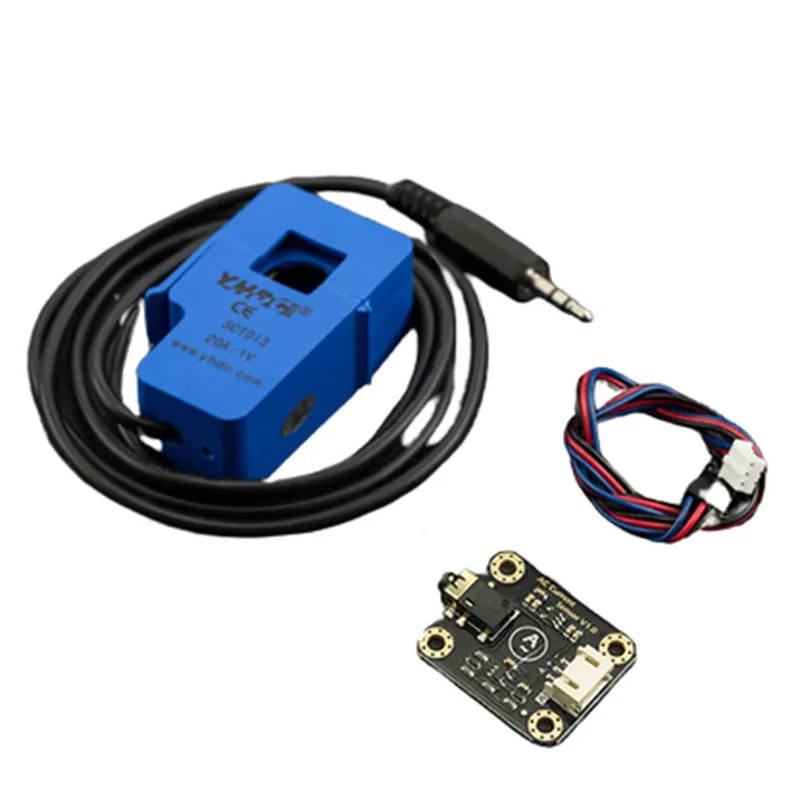
Gravity: Analog AC Current Sensor (20A)

Buy Now on Stufin

Component Name

GravityAnalog AC Current Sensor (20A)

The Gravity

Analog AC Current Sensor (20A) is suitable for a wide range of applications, including

Industrial automation and control systems

Renewable energy systems (solar, wind, hydro)

Building automation and smart home systems

Energy monitoring and metering systems

Electrical engineering and research applications

Key Features

  • High Accuracy: The Gravity: Analog AC Current Sensor (20A) offers high accuracy measurements with a tolerance of 1% of the full scale, ensuring reliable and precise readings.
  • Wide Range: The sensor can measure AC currents from 0 to 20A, making it suitable for a broad range of applications.
  • Analog Output: The sensor provides an analog output signal (0-5V) that is directly proportional to the measured current, allowing for easy integration with microcontrollers, Arduino, or Raspberry Pi platforms.
  • Compact Design: The sensor module features a compact design, making it easy to integrate into tight spaces and reducing the overall footprint of the system.
  • Easy Installation: The sensor comes with a convenient screw terminal block for easy connection and installation.
  • Galvanic Isolation: The sensor features galvanic isolation between the Primary (current sensing) and Secondary (output) circuits, ensuring safe and reliable operation in high-voltage applications.
  • Overcurrent Protection: The sensor is equipped with built-in overcurrent protection, preventing damage to the device in the event of excessive current surges.
  • Operating Temperature: The sensor operates within a temperature range of -25C to 85C, making it suitable for use in a variety of environmental conditions.

Current Range

0-20A AC

Output Signal

Analog (0-5V)

Accuracy

1% of full scale

Response Time

<10ms

Operating Temperature

-25C to 85C

Power Supply

5V DC (typical), 3.5-6V DC (operating range)

Dimensions

45.7mm x 21.5mm x 14.5mm

Weight

20g

Pin Configuration

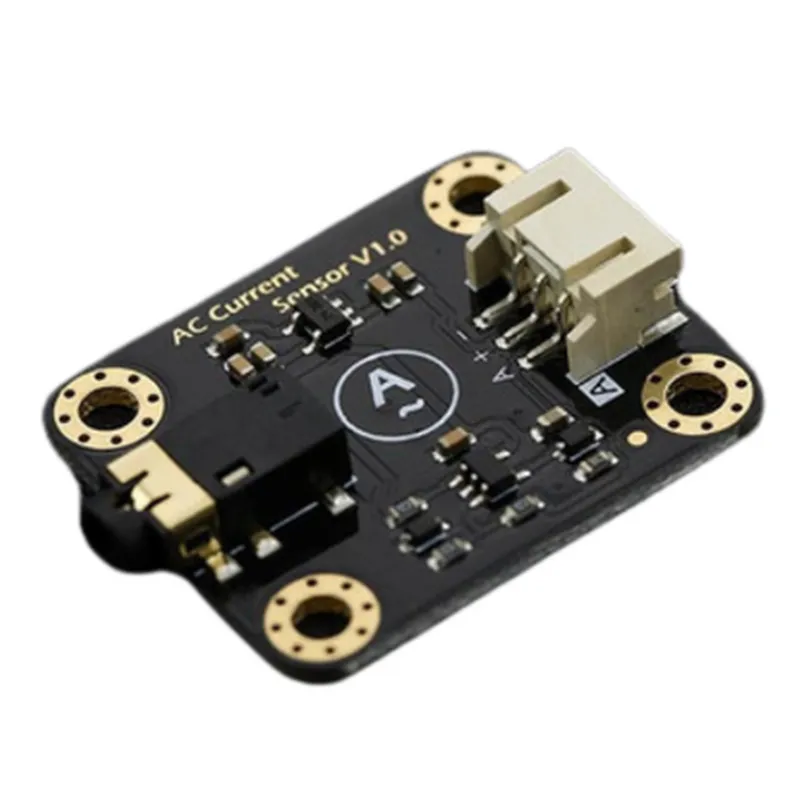
  • Gravity: Analog AC Current Sensor (20A) Pin Description
  • The Gravity: Analog AC Current Sensor (20A) is a popular IoT component used to measure AC currents up to 20A. This sensor provides an analog output proportional to the measured current, making it easy to integrate with microcontrollers, Arduino boards, and other IoT devices. Here is a detailed explanation of the pins and how to connect them:
  • Pin 1: VCC (Power Supply)
  • Description: Power supply pin for the sensor module.
  • Voltage Range: 3.3V to 5V DC.
  • Recommended Voltage: 5V DC.
  • Connection: Connect to the positive terminal of the power supply or a 5V pin on your microcontroller/Arduino board.
  • Pin 2: GND (Ground)
  • Description: Ground pin for the sensor module.
  • Connection: Connect to the negative terminal of the power supply or a GND pin on your microcontroller/Arduino board.
  • Pin 3: OUT (Analog Output)
  • Description: Analog output pin providing a voltage signal proportional to the measured AC current.
  • Output Range: 0V to VCC (dependent on the measured current).
  • Connection: Connect to an analog input pin on your microcontroller/Arduino board or an ADC (Analog-to-Digital Converter) module.
  • Pin 4: CT (Current Transformer Input)
  • Description: Input pin for the current transformer (CT) providing the AC current measurement.
  • Connection: Connect to one end of the current transformer's primary coil.
  • Pin 5: CT (Current Transformer Input)
  • Description: Input pin for the current transformer (CT) providing the AC current measurement.
  • Connection: Connect to the other end of the current transformer's primary coil.
  • Connection Steps:
  • 1. Connect the VCC pin (Pin 1) to a 5V power supply or a 5V pin on your microcontroller/Arduino board.
  • 2. Connect the GND pin (Pin 2) to the negative terminal of the power supply or a GND pin on your microcontroller/Arduino board.
  • 3. Connect the OUT pin (Pin 3) to an analog input pin on your microcontroller/Arduino board or an ADC module.
  • 4. Connect the CT pins (Pins 4 and 5) to the primary coil of the current transformer, ensuring correct polarity.
  • Additional Notes:
  • Make sure to follow the correct polarity when connecting the current transformer to the CT pins.
  • Use a suitable current transformer with a sufficient turns ratio to measure AC currents up to 20A.
  • The sensor module may require calibration before use. Refer to the datasheet or manufacturer's instructions for calibration procedures.
  • Always handle the sensor module and associated components with care to avoid damage or electrical shock.
  • By following these pin connections and guidelines, you can successfully integrate the Gravity: Analog AC Current Sensor (20A) into your IoT project or prototype.

Code Examples

Gravity: Analog AC Current Sensor (20A) Documentation
Overview
The Gravity: Analog AC Current Sensor (20A) is a high-precision, analog current sensor capable of measuring alternating current (AC) up to 20 amps. This sensor is designed for accurate current measurement in a wide range of applications, including industrial automation, IoT projects, and energy monitoring systems.
Pinout and Connection Diagram
The Gravity: Analog AC Current Sensor (20A) has a simple, 3-pin interface:
VCC: Connect to a 5V power supply
 GND: Connect to ground
 OUT: Analog output signal (0-5V)
Code Examples
### Example 1: Basic Analog Current Measurement with Arduino
```c++
const int sensorPin = A0;  // Connect the OUT pin to an analog input on your Arduino
float sensitivity = 0.1;  // Sensitivity of the sensor in V/A
float current = 0;
void setup() {
  Serial.begin(9600);
}
void loop() {
  int sensorValue = analogRead(sensorPin);
  current = (sensorValue  5.0 / 1023.0) / sensitivity;
  Serial.print("Current: ");
  Serial.print(current, 2);
  Serial.println(" A");
  delay(1000);
}
```
In this example, we connect the OUT pin of the sensor to an analog input on an Arduino board. We then read the analog value using `analogRead()` and convert it to a current measurement using the sensitivity of the sensor.
### Example 2: Current Measurement with Raspberry Pi using Python
```python
import RPi.GPIO as GPIO
import time
GPIO.setmode(GPIO.BCM)
sensor_pin = 18  # Connect the OUT pin to a GPIO pin on your Raspberry Pi
GPIO.setup(sensor_pin, GPIO.IN)
def read_current():
    sensor_value = GPIO.input(sensor_pin)
    current = (sensor_value  5.0 / 1023.0) / 0.1  # Adjust sensitivity as needed
    return current
while True:
    current = read_current()
    print("Current: {:.2f} A".format(current))
    time.sleep(1)
```
In this example, we connect the OUT pin of the sensor to a GPIO pin on a Raspberry Pi. We use the `RPi.GPIO` library to read the analog value and convert it to a current measurement using the sensitivity of the sensor.
Important Notes
Make sure to follow proper safety guidelines when working with electrical currents.
 The sensor's maximum current rating is 20A. Do not exceed this limit to avoid damage to the sensor or other components.
 The sensor's output voltage range is 0-5V. Ensure that your microcontroller or processing unit can accurately read this range.
I hope this documentation and the provided code examples help you get started with the Gravity: Analog AC Current Sensor (20A) in your IoT projects!