M5 Stack LoRa Module for ESP32 DIY Development Kit (433MHz)


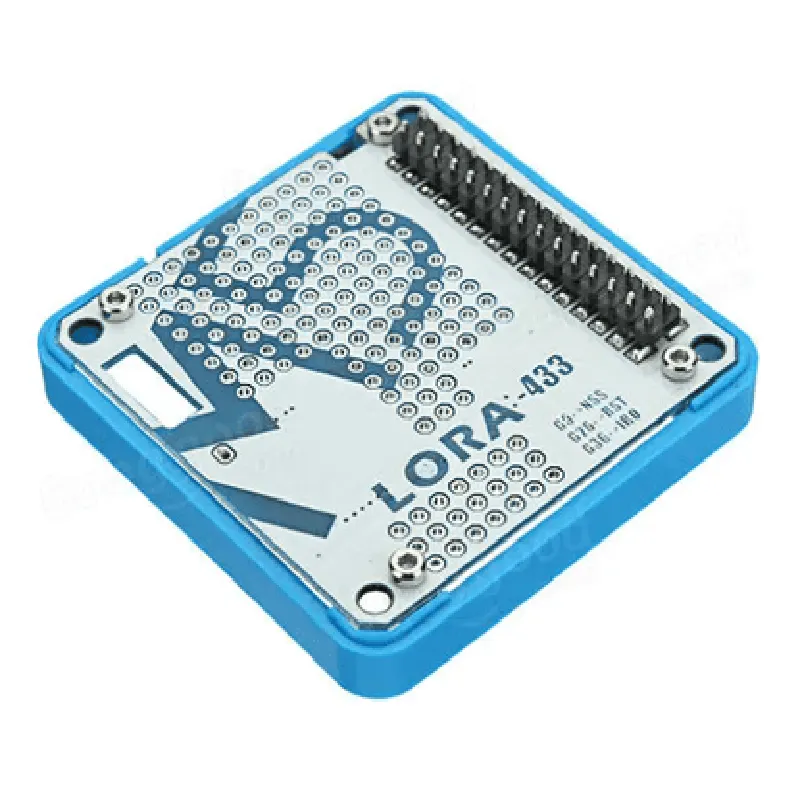
M5 Stack LoRa Module for ESP32 DIY Development Kit (433MHz)
IoT Development Kit, LoRa Module, ESP32 Board
The M5 Stack LoRa Module for ESP32 DIY Development Kit is a versatile and feature-rich Internet of Things (IoT) development kit designed for prototyping and building LoRa-based projects. This kit combines the popular ESP32 microcontroller with a LoRa module, allowing developers to create long-range, low-power wireless communication applications.
| The M5 Stack LoRa Module for ESP32 DIY Development Kit enables users to develop and deploy LoRa-based projects that require wireless communication over long distances (up to 10 km in urban areas and up to 40 km in rural areas). The kit's functionality can be summarized as follows |
The kit uses the LoRa (Long Range) wireless communication protocol, which operates on the 433 MHz frequency band, to enable low-power, long-range communication between devices.
The kit is built around the ESP32 microcontroller, a powerful and feature-rich system-on-chip (SoC) that provides Wi-Fi, Bluetooth, and BLE capabilities.
The kit is designed as a DIY development platform, allowing users to create and test their LoRa-based projects using the ESP32 microcontroller and the LoRa module.
433 MHz
Up to 50 kbps
Up to 20 dBm
Down to -148 dBm
Dual-core 32-bit LX6 microprocessor
Wi-Fi, Bluetooth, and BLE capabilities
520 KB SRAM, 4 MB Flash
Supports I2C, I2S, SPI, UART, and GPIO interfaces
Breadboard-friendly design for easy prototyping
Onboard USB-to-UART bridge for easy programming and debugging
Supports Arduino and MicroPython development environments
Onboard power management system with Li-Ion battery charging capabilities
Supports external power supply (5V, 3.3V)
Onboard reset and boot buttons
LEDs for power, Wi-Fi, and LoRa status indication
Supports external antennas for improved LoRa range and performance
| The M5 Stack LoRa Module for ESP32 DIY Development Kit is suitable for a wide range of IoT applications, including |
Smart Cities and Urban Planning
Industrial Automation and Monitoring
Smart Agriculture and Environmental Monitoring
Home Automation and Security Systems
Wearable Devices and IoT Sensors
The M5 Stack LoRa Module for ESP32 DIY Development Kit is a feature-rich and versatile IoT development kit that enables users to create and deploy LoRa-based projects with ease. Its combination of the ESP32 microcontroller and LoRa module makes it an ideal platform for developing long-range, low-power wireless communication applications.
M5 Stack LoRa Module for ESP32 DIY Development Kit (433MHz) DocumentationOverviewThe M5 Stack LoRa Module for ESP32 DIY Development Kit is a versatile and robust LoRaWAN development board designed for IoT projects. This module is built around the ESP32 microcontroller and integrates a LoRa transceiver, making it an ideal choice for long-range, low-power wireless communication applications. This documentation provides an in-depth guide on using the M5 Stack LoRa Module, along with code examples to demonstrate its capabilities.Hardware SpecificationsMicrocontroller: ESP32
LoRa Transceiver: SX1276 (433MHz)
Flash Memory: 4MB
SRAM: 520KB
Operating Frequency: 433MHz
Range: Up to 15 km (urban) and 40 km (rural)
Power Consumption: 10mA (transmit) and 5mA (receive)Software RequirementsArduino IDE (compatible with ESP32 boards)
M5Stack LoRaWAN library (available on GitHub)Code Examples### Example 1: Simple LoRa Transmitter (Point-to-Point Communication)This example demonstrates how to use the M5 Stack LoRa Module as a transmitter, sending data to a remote LoRa receiver.
```cpp
#include <M5Stack.h>
#include <LoRaWAN.h>// Set up LoRa module
LoRaWAN lorawan;void setup() {
// Initialize M5 Stack
M5.begin();
// Initialize LoRa module
lorawan.begin(433E6, 7, 1, 8, 8, 14);
lorawan.setSpreadingFactor(7);
lorawan.setBandwidth(250E3);
}void loop() {
// Create a LoRa packet
LoRaPacket packet;
packet.addPayload("Hello, LoRa!");
// Send the packet
lorawan.send(packet);
// Wait for 1 second before sending the next packet
delay(1000);
}
```
### Example 2: LoRaWAN Node (OTAA Activation)This example demonstrates how to use the M5 Stack LoRa Module as a LoRaWAN node, utilizing Over-The-Air Activation (OTAA) to join a LoRaWAN network.
```cpp
#include <M5Stack.h>
#include <LoRaWAN.h>// Set up LoRa module
LoRaWAN lorawan;// OTAA parameters
const char appEui = "YOUR_APP_EUI";
const char appKey = "YOUR_APP_KEY";
const char deviceEui = "YOUR_DEVICE_EUI";void setup() {
// Initialize M5 Stack
M5.begin();
// Initialize LoRa module
lorawan.begin(433E6, 7, 1, 8, 8, 14);
// OTAA activation
lorawan.setOtaa(appEui, appKey, deviceEui);
lorawan.join();
}void loop() {
// Check if we've joined the network
if (lorawan.getJoinStatus() == 1) {
Serial.println("Joined the network!");
} else {
Serial.println("Not joined yet...");
}
// Wait for 10 seconds before checking again
delay(10000);
}
```
Note: Replace `YOUR_APP_EUI`, `YOUR_APP_KEY`, and `YOUR_DEVICE_EUI` with your actual LoRaWAN application EUI, application key, and device EUI, respectively.These code examples demonstrate the basic usage of the M5 Stack LoRa Module for ESP32 DIY Development Kit. You can modify and expand upon these examples to create more complex IoT projects, such as sensor monitoring, asset tracking, or smart home automation.