

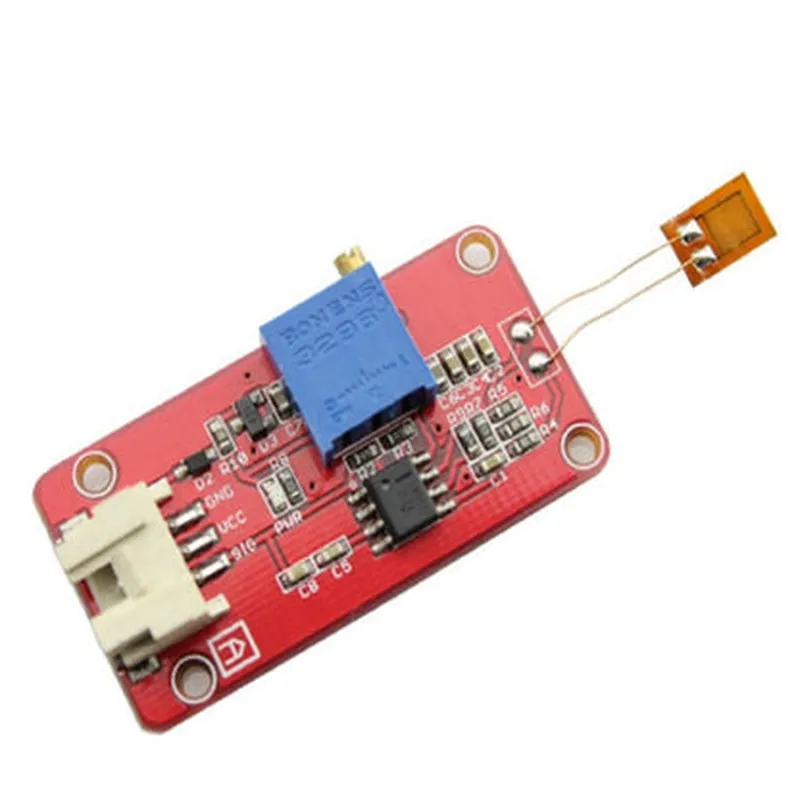
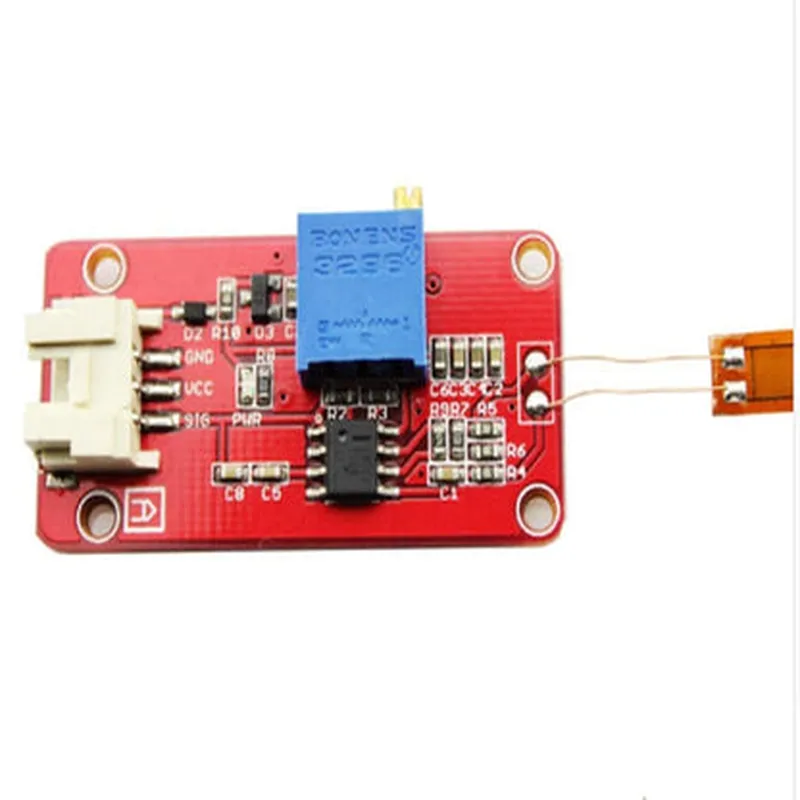
Stufin
Home Quick Cart Profile

Strain Gauge Module

Buy Now on Stufin

Supply Voltage

3.3V or 5V

Current Consumption

10mA (typical)

Measurement Range

1000 (1000 microstrains) to 5000 (5000 microstrains)

Sensitivity

2mV/V (typical)

Output Signal

Analog (0-5V) or Digital (I2C or SPI)

Operating Temperature

-20C to +80C

Dimensions

25mm x 20mm x 10mm (L x W x H)

Applications

  • Structural Health Monitoring: The Strain Gauge Module is used to monitor the structural integrity of buildings, bridges, and other infrastructure.
  • Mechanical Stress Analysis: The module is used to measure the mechanical stress and strain of materials in various applications, such as aerospace, automotive, and biomedical.
  • Robotics: The module is used in robotics to measure the strain and stress of robotic arms, grippers, and other mechanical components.
  • Industrial Automation: The module is used in industrial automation to monitor the strain and stress of machinery, equipment, and structures.

Pinout and Interface

VCC

Power supply (3.3V or 5V)

GND

Ground

OUT

Analog output (0-5V)

SCL

I2C clock (optional)

SDA

I2C data (optional)

CS

Chip select (optional)

INT

Interrupt output (optional)

The module can be interfaced with microcontrollers, Arduino boards, or other digital systems using the I2C or SPI protocol.

Pin Configuration

  • Strain Gauge Module Documentation
  • Overview
  • The Strain Gauge Module is a sensor module designed to measure the deformation or strain of an object. It is commonly used in various applications such as structural health monitoring, robotics, and industrial automation. This module typically consists of a strain gauge sensor, an amplifier, and an analog-to-digital converter (ADC).
  • Pinout Diagram
  • The Strain Gauge Module typically has the following pins:
  • Pin Description
  • 1. VCC (+)
  • Power supply pin for the module (typically 3.3V or 5V)
  • Connect to a power source or a microcontroller's VCC pin
  • 2. GND (-)
  • Ground pin for the module
  • Connect to a power source's GND pin or a microcontroller's GND pin
  • 3. SIGNAL (OUT)
  • Analog output pin carrying the amplified strain gauge signal
  • Connect to an ADC input pin on a microcontroller (e.g., Arduino, Raspberry Pi)
  • 4. EXC+ (EXCITATION+)
  • Excitation voltage pin for the strain gauge sensor (typically 5V or 10V)
  • Connect to a power source or a voltage regulator's output
  • 5. EXC- (EXCITATION-)
  • Excitation voltage pin for the strain gauge sensor (typically 0V or GND)
  • Connect to a power source's GND pin or a voltage regulator's GND
  • 6. SG+ (STRAIN GAUGE+)
  • Positive input pin for the strain gauge sensor
  • Connect to the positive terminal of the strain gauge sensor
  • 7. SG- (STRAIN GAUGE-)
  • Negative input pin for the strain gauge sensor
  • Connect to the negative terminal of the strain gauge sensor
  • Connection Structure
  • To connect the Strain Gauge Module to a microcontroller (e.g., Arduino) and a power source:
  • 1. Connect VCC to the power source's VCC (3.3V or 5V) or the microcontroller's VCC pin.
  • 2. Connect GND to the power source's GND or the microcontroller's GND pin.
  • 3. Connect EXC+ to the power source's VCC (5V or 10V) or a voltage regulator's output.
  • 4. Connect EXC- to the power source's GND or a voltage regulator's GND.
  • 5. Connect SG+ to the positive terminal of the strain gauge sensor.
  • 6. Connect SG- to the negative terminal of the strain gauge sensor.
  • 7. Connect SIGNAL to an ADC input pin on the microcontroller.
  • Important Notes
  • Make sure to handle the strain gauge sensor with care, as it is sensitive to mechanical stress and can be damaged easily.
  • Use a suitable power supply and voltage regulator to ensure stable operation of the module.
  • Follow proper soldering and wiring techniques to avoid damage to the module and the strain gauge sensor.
  • By following these connection guidelines, you can successfully integrate the Strain Gauge Module into your IoT project and measure the deformation or strain of an object with accuracy.

Code Examples

Strain Gauge Module Documentation
Overview
The Strain Gauge Module is a specialized IoT component designed to measure mechanical strain, stress, or pressure in various applications. It typically consists of a Wheatstone bridge circuit and a strain gauge sensor, which converts the mechanical deformation into an electrical signal. This module is commonly used in industrial automation, robotics, and structural health monitoring.
Technical Specifications
Input Voltage: 5V DC
 Output Voltage: 0-5V DC (analog)
 Strain Gauge Sensor: Full-bridge or Half-bridge configuration
 Accuracy: 1% FS (Full Scale)
 Response Time: <10 ms
 Operating Temperature: -20C to 80C
Code Examples
### Example 1: Basic Strain Measurement using Arduino
In this example, we will use the Strain Gauge Module to measure the strain on a mechanical component using an Arduino Uno board.
```c
const int strainPin = A0;  // Analog input pin for strain gauge module
void setup() {
  Serial.begin(9600);
}
void loop() {
  int sensorValue = analogRead(strainPin);
  float voltage = sensorValue  (5.0 / 1023.0);
  float strain = (voltage - 2.5)  1000; // Convert voltage to strain in microstrain ()
Serial.print("Strain: ");
  Serial.print(strain);
  Serial.println(" ");
delay(100);
}
```
In this code, we read the analog output from the Strain Gauge Module using the `analogRead()` function and convert it to a voltage value. We then calculate the strain in microstrain () using the calibration formula provided with the module.
### Example 2: Load Cell-weight Measurement using Raspberry Pi
In this example, we will use the Strain Gauge Module to measure the weight on a load cell using a Raspberry Pi.
```python
import RPi.GPIO as GPIO
import time
GPIO.setmode(GPIO.BCM)
GPIO.setup(17, GPIO.IN, pull_up_down=GPIO.PUD_UP)  # Set up GPIO 17 as input
strains = []
while True:
    voltage = GPIO.input(17)  # Read the digital output from the strain gauge module
    strain = (voltage  5.0 / 1023.0 - 2.5)  1000  # Convert voltage to strain in microstrain ()
    weight = strain  0.1  # Convert strain to weight in grams (calibration dependent)
strains.append(weight)
    time.sleep(0.1)
if len(strains) > 10:
        avg_weight = sum(strains) / len(strains)
        print("Average Weight: %.2f g" % avg_weight)
        strains = []
```
In this code, we use the RPi.GPIO library to read the digital output from the Strain Gauge Module connected to GPIO 17. We convert the digital output to a voltage value, then calculate the strain and finally the weight in grams using the calibration formula.
Note: The calibration formula and constants used in the examples are for illustrative purposes only and may vary depending on the specific Strain Gauge Module and load cell used.
Additional Resources
Strain Gauge Module Datasheet
 Load Cell Datasheet
 Calibration Guide for Strain Gauge Modules
Troubleshooting
Ensure proper connections between the Strain Gauge Module and the microcontroller or single-board computer.
 Verify the calibration formula and constants used in the code.
 Consult the datasheets and troubleshooting guides for the Strain Gauge Module and load cell.