Stufin
Home Quick Cart Profile

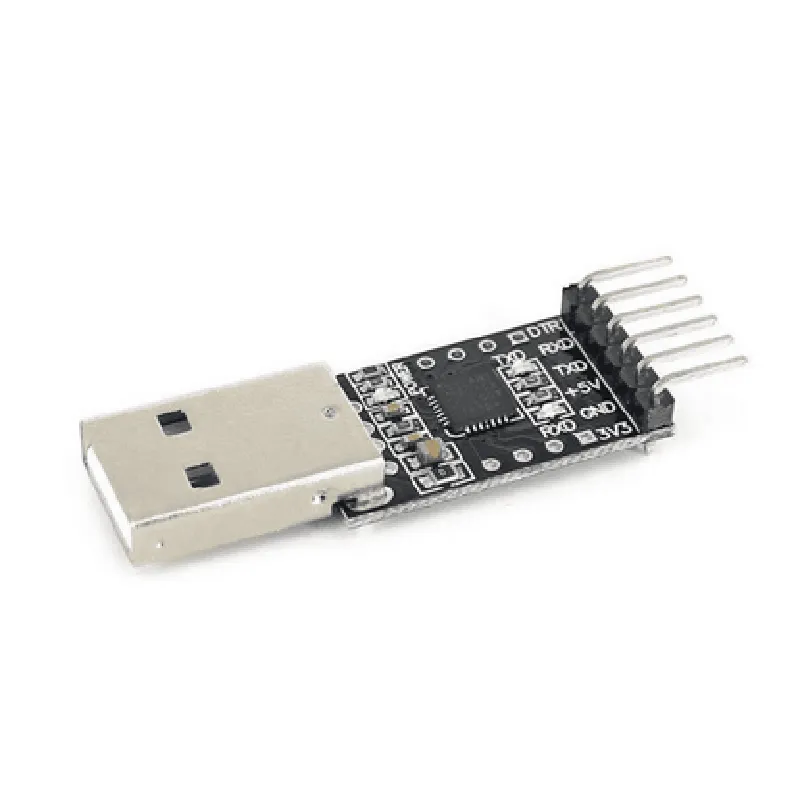
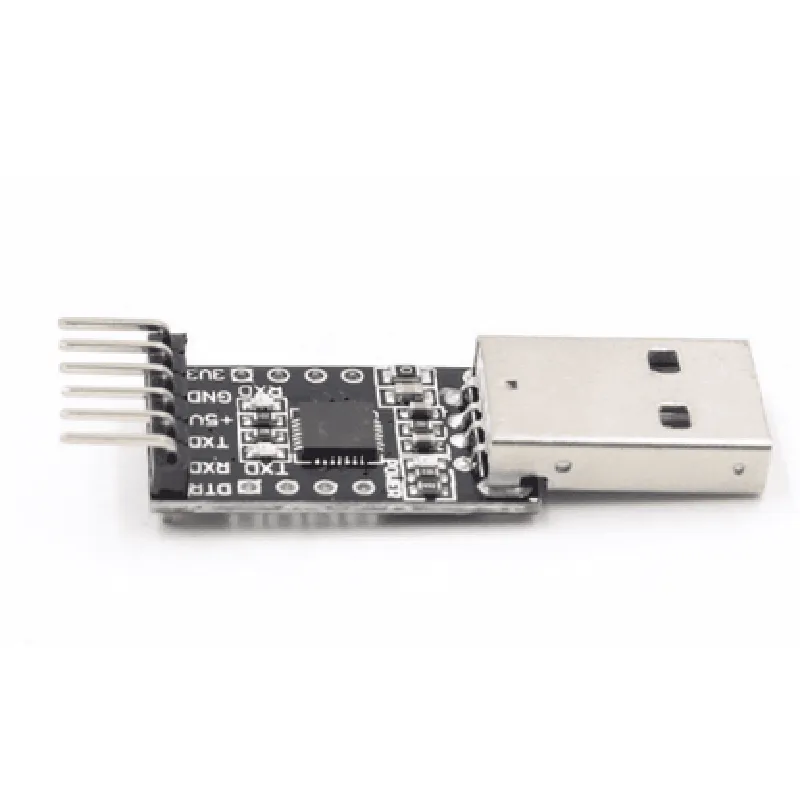
CP2102 USB to TTL Converter

Buy Now on Stufin

Pin Configuration

  • CP2102 USB to TTL Converter Pinout Explanation
  • The CP2102 USB to TTL Converter is a popular module used to convert USB signals to TTL (Transistor-Transistor Logic) signals, allowing devices to communicate with microcontrollers, sensors, and other peripherals. Below is a detailed explanation of each pin on the CP2102 module:
  • Pin 1: VCC (Power Supply)
  • Description: Power supply pin for the CP2102 module.
  • Voltage: Typically 5V, but can operate from 3.3V to 5.5V.
  • Connection: Connect to a power source, such as a USB port or a battery.
  • Pin 2: GND (Ground)
  • Description: Ground pin for the CP2102 module.
  • Connection: Connect to the ground of the power source or the circuit.
  • Pin 3: DTR (Data Terminal Ready)
  • Description: Output pin that indicates when the device is ready to send data.
  • Connection: Typically connected to the reset pin of a microcontroller or left unconnected if not used.
  • Pin 4: RTS (Request to Send)
  • Description: Output pin that requests permission to send data.
  • Connection: Typically connected to the RTS pin of a microcontroller or left unconnected if not used.
  • Pin 5: TX (Transmit)
  • Description: Output pin that transmits data from the USB side to the TTL side.
  • Connection: Connect to the RX (Receive) pin of a microcontroller or peripheral device.
  • Pin 6: RX (Receive)
  • Description: Input pin that receives data from the TTL side and sends it to the USB side.
  • Connection: Connect to the TX (Transmit) pin of a microcontroller or peripheral device.
  • Pin 7: VBUS (USB Power)
  • Description: Power pin for the USB side of the converter.
  • Voltage: Typically 5V, provided by the USB host.
  • Connection: Connect to the USB cable or a USB port.
  • Pin 8: GND (Ground)
  • Description: Ground pin for the USB side of the converter.
  • Connection: Connect to the ground of the USB host or the circuit.
  • Pin 9: RST (Reset)
  • Description: Input pin that resets the CP2102 converter.
  • Connection: Typically connected to a push-button or a microcontroller's reset pin.
  • Pin 10: 3V3 (3.3V Power Output)
  • Description: Power output pin that provides a regulated 3.3V supply.
  • Voltage: 3.3V, regulated output.
  • Connection: Connect to devices that require a 3.3V power supply.
  • Connection Structure:
  • When connecting the CP2102 USB to TTL Converter to a microcontroller or peripheral device, follow this structure:
  • VCC (Pin 1) Power Source (e.g., USB port or battery)
  • GND (Pin 2) Ground of the power source or circuit
  • RX (Pin 6) TX (Transmit) pin of the microcontroller or peripheral device
  • TX (Pin 5) RX (Receive) pin of the microcontroller or peripheral device
  • GND (Pin 8) Ground of the microcontroller or peripheral device
  • Note:
  • Ensure proper voltage levels and signal directions when connecting the CP2102 module to a microcontroller or peripheral device.
  • Refer to the datasheet of the connected device for specific pinout and connection requirements.
  • Use appropriate level shifters or voltage regulators if necessary to ensure compatibility between the CP2102 module and the connected device.

Code Examples

CP2102 USB to TTL Converter Documentation
Overview
The CP2102 is a highly integrated USB-to-TTL serial converter that provides a simple and cost-effective way to add USB connectivity to microcontrollers and other TTL-based serial devices. This documentation provides an overview of the CP2102's features, pinouts, and examples of how to use it in various contexts.
Features
Converts USB signals to TTL serial signals
 Supports data transfer rates up to 921.6 kbps
 Supports USB 2.0 Full-Speed (12 Mbps) and Low-Speed (1.5 Mbps) modes
 Integrated USB interface and signal conditioning circuitry
 3.3V or 5V operation
 Available in a 5x5mm QFN28 package
Pinouts
The CP2102 has a 28-pin QFN package with the following pinouts:
| Pin | Function |
| --- | --- |
| 1-4 | USB Data+/-, VBUS, and GND |
| 5-6 | TX, RX |
| 7-8 | RTS, CTS |
| 9-10 | DTR, DSR |
| 11-12 | DCD, RI |
| 13-14 | VCC, GND |
| 15-28 | NC (no connection) |
Code Examples
### Example 1: Using CP2102 with Arduino
In this example, we'll use the CP2102 to connect an Arduino Uno to a computer via USB. We'll use the Arduino's serial communication capabilities to send and receive data.
Hardware Connection
Connect the CP2102's TX pin to the Arduino's RX pin (Pin 0)
 Connect the CP2102's RX pin to the Arduino's TX pin (Pin 1)
 Connect the CP2102's VCC pin to the Arduino's 5V pin
 Connect the CP2102's GND pin to the Arduino's GND pin
Software Code
```c++
#include <Serial.h>
void setup() {
  Serial.begin(9600); // Set serial communication at 9600 bps
}
void loop() {
  if (Serial.available() > 0) {
    char c = Serial.read();
    Serial.write(c); // Echo back the received character
  }
  delay(10);
}
```
### Example 2: Using CP2102 with Python on Raspberry Pi
In this example, we'll use the CP2102 to connect a Raspberry Pi to a TTL serial device. We'll use Python's `pyserial` library to communicate with the device.
Hardware Connection
Connect the CP2102's TX pin to the TTL serial device's RX pin
 Connect the CP2102's RX pin to the TTL serial device's TX pin
 Connect the CP2102's VCC pin to the Raspberry Pi's 3.3V pin
 Connect the CP2102's GND pin to the Raspberry Pi's GND pin
Software Code
```python
import serial
# Open the serial connection
ser = serial.Serial('/dev/ttyUSB0', 9600, timeout=1)
while True:
    # Read data from the TTL serial device
    data = ser.readline()
    print(data.decode())
# Send data to the TTL serial device
    ser.write(b'Hello from Raspberry Pi!
')
```
### Example 3: Using CP2102 with C# on Windows
In this example, we'll use the CP2102 to connect a Windows PC to a TTL serial device. We'll use C#'s `System.IO.Ports` namespace to communicate with the device.
Hardware Connection
Connect the CP2102's TX pin to the TTL serial device's RX pin
 Connect the CP2102's RX pin to the TTL serial device's TX pin
 Connect the CP2102's VCC pin to the PC's USB port
 Connect the CP2102's GND pin to the PC's USB port
Software Code
```csharp
using System;
using System.IO.Ports;
class CP2102Example {
    static void Main(string[] args) {
        // Open the serial connection
        SerialPort port = new SerialPort("COM3", 9600, Parity.None, 8, StopBits.One);
        port.Open();
while (true) {
            // Read data from the TTL serial device
            string data = port.ReadLine();
            Console.WriteLine(data);
// Send data to the TTL serial device
            port.WriteLine("Hello from Windows!");
        }
    }
}
```