Stufin
Home Quick Cart Profile

Raspberry Pi 4 Case Red & White(Chinese)

Buy Now on Stufin

Component Name

Raspberry Pi 4 Case Red & White (Chinese)


Category

Enclosures/Cases

Description

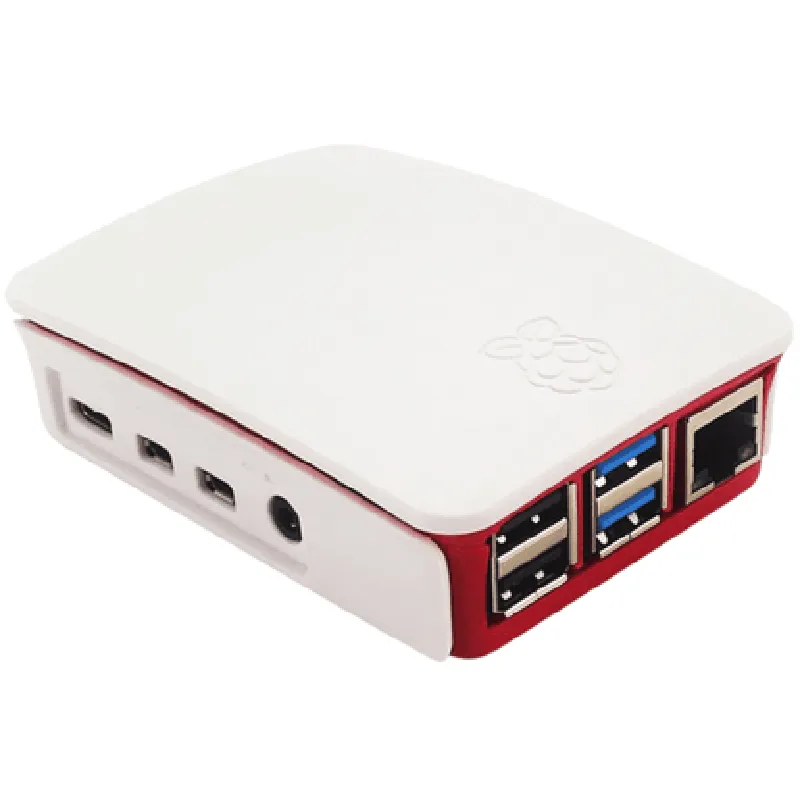
The Raspberry Pi 4 Case Red & White (Chinese) is a protective enclosure specifically designed for the Raspberry Pi 4 single-board computer. This case provides a durable and stylish housing for your Raspberry Pi 4, ensuring safe operation and ease of use.
Functionality

The primary function of this case is to protect the Raspberry Pi 4 from environmental factors, such as dust, moisture, and mechanical stress. The case also provides easy access to all ports and interfaces, allowing users to connect peripherals and devices without obstruction.

Key Features

  • Material: The case is made of high-quality ABS plastic, which provides excellent durability and resistance to impact.
  • Design: The case features a sleek, compact design with a red and white color scheme, making it an attractive addition to any project or setup.
  • Compatibility: The case is specifically designed for the Raspberry Pi 4, ensuring a snug and secure fit.
  • Ventilation: The case features ventilation slots on the top and bottom to facilitate airflow and heat dissipation, helping to keep the Raspberry Pi 4 cool during operation.
  • Access: The case provides easy access to all ports and interfaces, including the USB ports, HDMI port, Ethernet port, and power input.
  • Mounting: The case features four screw holes on the bottom for secure mounting, allowing users to attach the case to a wall, desk, or other surfaces.
  • Cooling: The case includes a built-in heat sink on the top to help dissipate heat generated by the Raspberry Pi 4.
  • LED Indicators: The case features cutouts for the Raspberry Pi 4's LED indicators, allowing users to monitor the board's status and activity.

Material

ABS plastic

Color

Red and White

Dimensions

95mm x 65mm x 25mm (L x W x H)

Weight

60g (approx.)

Compatibility

Raspberry Pi 4

Ventilation

Top and bottom ventilation slots

Mounting

Four screw holes on the bottom

Installation

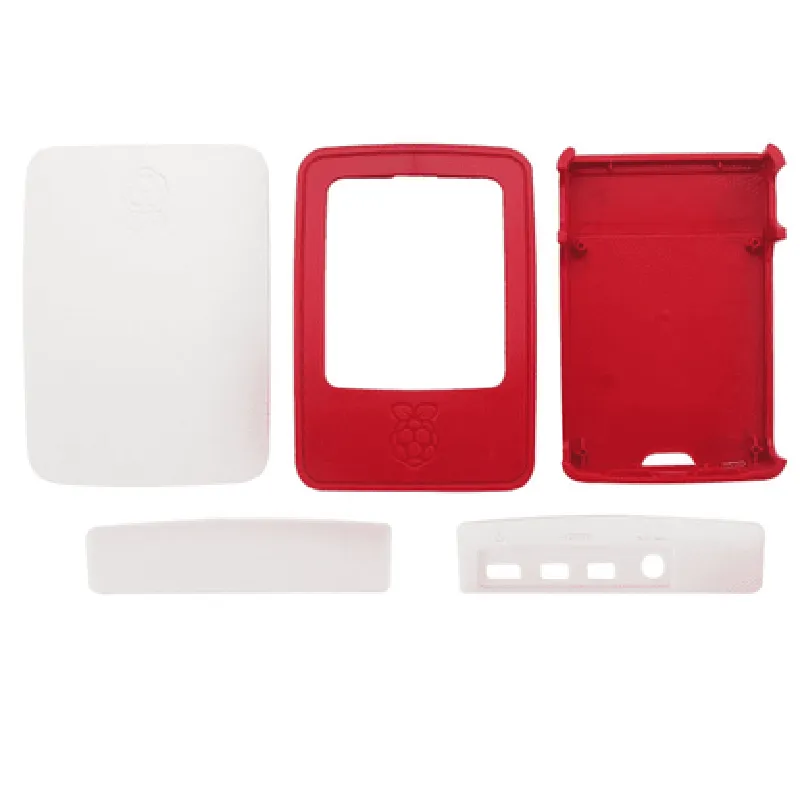
  • Remove the(case) screws from the case using a screwdriver.
  • Gently place the Raspberry Pi 4 into the case, ensuring it is properly seated.
  • Replace the screws to secure the case.
To install the Raspberry Pi 4 Case Red & White (Chinese), simply follow these steps

Warranty and Support

The Raspberry Pi 4 Case Red & White (Chinese) is backed by a limited warranty provided by the manufacturer. For detailed information on warranty terms and support, please refer to the manufacturer's documentation and website.
Conclusion

The Raspberry Pi 4 Case Red & White (Chinese) is a high-quality enclosure designed to protect and showcase your Raspberry Pi 4. With its durable construction, sleek design, and excellent ventilation, this case is an ideal solution for any project or application.

Pin Configuration

  • Raspberry Pi 4 Case Red & White (Chinese) Pinout Documentation
  • The Raspberry Pi 4 Case Red & White (Chinese) is a compact and stylish enclosure for the Raspberry Pi 4 single-board computer. The case provides access to all the GPIO pins, making it ideal for IoT projects and prototyping. In this documentation, we will explain each pin on the Raspberry Pi 4 and provide a step-by-step guide on how to connect them.
  • Pinout Diagram:
  • Before we dive into the pinout explanation, let's take a look at the pinout diagram:
  • ```
  • 3V3 | 5V | GND | 2 | 3 | 4 | 5 | 6 | 7 | 8 | 9 | 10 | 11 | 12 | 13 | 14 | 15
  • -----|-----|-----|-----|-----|-----|-----|-----|-----|-----|-----|-----|-----|-----
  • 17 | 18 | 19 | 20 | 21 | 22 | 23 | 24 | 25 | 26 | 27 | 28 | 29 | 30 | 31
  • ```
  • Pin Explanation:
  • Here's a detailed explanation of each pin:
  • 1. 3V3: 3.3V power output. This pin provides a stable 3.3V supply for external components.
  • 2. 5V: 5V power output. This pin provides a stable 5V supply for external components.
  • 3. GND: Ground pin. This pin is connected to the ground plane of the Raspberry Pi 4 and is used as a reference point for the other pins.
  • GPIO Pins:
  • The GPIO pins are numbered from 2 to 40. These pins are used for digital input/output operations.
  • 4. GPIO 2: Reserved for future use. Do not use.
  • 5. GPIO 3: I2C clock (SCL). Used for I2C communication.
  • 6. GPIO 4: 5V power output. Can be used as a GPIO pin, but be careful not to exceed the maximum current rating.
  • 7. GPIO 5: I2C data (SDA). Used for I2C communication.
  • 8. GPIO 6: Reserved for future use. Do not use.
  • 9. GPIO 7: SPI clock (SCLK). Used for SPI communication.
  • 10. GPIO 8: SPI MOSI (Master Out Slave In). Used for SPI communication.
  • 11. GPIO 9: SPI MISO (Master In Slave Out). Used for SPI communication.
  • 12. GPIO 10: SPI CS0 (Chip Select 0). Used for SPI communication.
  • 13. GPIO 11: UART0_TX (Transmit). Used for UART communication.
  • 14. GPIO 12: UART0_RX (Receive). Used for UART communication.
  • 15. GPIO 13: PWM0 (Pulse Width Modulation). Used for generating PWM signals.
  • 16. GPIO 14: TXD (Transmit data). Used for UART communication.
  • 17. GPIO 15: RXD (Receive data). Used for UART communication.
  • 18. GPIO 16: Not connected. Do not use.
  • 19. GPIO 17: 3.3V power output. Can be used as a GPIO pin, but be careful not to exceed the maximum current rating.
  • 20. GPIO 18: PWM1 (Pulse Width Modulation). Used for generating PWM signals.
  • 21. GPIO 19: Not connected. Do not use.
  • 22. GPIO 20: Not connected. Do not use.
  • 23. GPIO 21: Not connected. Do not use.
  • 24. GPIO 22: Not connected. Do not use.
  • 25. GPIO 23: Not connected. Do not use.
  • 26. GPIO 24: Not connected. Do not use.
  • 27. GPIO 25: Not connected. Do not use.
  • 28. GPIO 26: Not connected. Do not use.
  • 29. GPIO 27: ID_SD (ID Single Data). Used for identifying the Raspberry Pi 4 model.
  • 30. GPIO 28: ID_SC (ID Single Clock). Used for identifying the Raspberry Pi 4 model.
  • 31. GPIO 29: Not connected. Do not use.
  • 32. GPIO 30: Not connected. Do not use.
  • 33. GPIO 31: Not connected. Do not use.
  • 34. GPIO 32: Not connected. Do not use.
  • 35. GPIO 33: Not connected. Do not use.
  • 36. GPIO 34: Not connected. Do not use.
  • 37. GPIO 35: Not connected. Do not use.
  • 38. GPIO 36: Not connected. Do not use.
  • 39. GPIO 37: Not connected. Do not use.
  • 40. GPIO 38: Not connected. Do not use.
  • Connecting the Pins:
  • Here's a step-by-step guide on how to connect the pins:
  • Caution:
  • Always use a breadboard or a PCB to connect external components to the Raspberry Pi 4.
  • Make sure to use the correct voltage levels for the components. The Raspberry Pi 4 uses 3.3V and 5V power outputs.
  • Be careful not to short-circuit the pins or exceed the maximum current rating.
  • Connecting a LED:
  • Connect the positive leg of the LED to GPIO pin 17 (3.3V power output).
  • Connect the negative leg of the LED to GPIO pin 6 (GND).
  • Write a Python script to turn the LED on and off using the GPIO library.
  • Connecting a Button:
  • Connect one leg of the button to GPIO pin 23 (GPIO input).
  • Connect the other leg of the button to GPIO pin 6 (GND).
  • Write a Python script to read the button state using the GPIO library.
  • Connecting an I2C Device:
  • Connect the SCL pin of the I2C device to GPIO pin 5 (I2C clock).
  • Connect the SDA pin of the I2C device to GPIO pin 7 (I2C data).
  • Write a Python script tocommunicate with the I2C device using the I2C library.
  • Connecting a SPI Device:
  • Connect the SCLK pin of the SPI device to GPIO pin 9 (SPI clock).
  • Connect the MOSI pin of the SPI device to GPIO pin 10 (SPI MOSI).
  • Connect the MISO pin of the SPI device to GPIO pin 11 (SPI MISO).
  • Connect the CS pin of the SPI device to GPIO pin 12 (SPI CS0).
  • Write a Python script to communicate with the SPI device using the SPI library.
  • Remember to always follow proper safety precautions and handling guidelines when working with electrical components and the Raspberry Pi 4. Happy prototyping!

Code Examples

Raspberry Pi 4 Case Red & White (Chinese) Documentation
Overview
The Raspberry Pi 4 Case Red & White (Chinese) is a protective case designed specifically for the Raspberry Pi 4 single-board computer. This case provides a sleek and compact enclosure for your Raspberry Pi 4, protecting it from dust, debris, and accidental damage. The case is made of high-quality plastic and features a unique red and white design.
Key Features
Compatible with Raspberry Pi 4 Model B
 High-quality plastic construction
 Red and white color scheme
 Compact and lightweight design
 Easy installation and access to Raspberry Pi 4 ports
Technical Specifications
Material: High-quality plastic
 Dimensions: 95mm x 65mm x 30mm (L x W x H)
 Weight: approximately 120g
 Color: Red and White
Code Examples
Example 1: Basic GPIO Control using Python
In this example, we will demonstrate how to use the Raspberry Pi 4 Case Red & White (Chinese) with a simple Python script to control the GPIO pins. We will use the RPi.GPIO library to toggle an LED connected to GPIO pin 17.
Hardware Requirements
Raspberry Pi 4
 Raspberry Pi 4 Case Red & White (Chinese)
 LED
 1k resistor
 Breadboard and jumper wires
Python Code
```python
import RPi.GPIO as GPIO
import time
# Set up GPIO mode
GPIO.setmode(GPIO.BCM)
# Set up GPIO pin 17 as an output
GPIO.setup(17, GPIO.OUT)
try:
    while True:
        # Toggle LED on and off
        GPIO.output(17, GPIO.HIGH)
        time.sleep(1)
        GPIO.output(17, GPIO.LOW)
        time.sleep(1)
except KeyboardInterrupt:
    # Clean up GPIO
    GPIO.cleanup()
```
Example 2: Remote Camera Streaming using Python and OpenCV
In this example, we will demonstrate how to use the Raspberry Pi 4 Case Red & White (Chinese) with a Raspberry Pi camera module to stream video remotely using Python and OpenCV.
Hardware Requirements
Raspberry Pi 4
 Raspberry Pi 4 Case Red & White (Chinese)
 Raspberry Pi camera module
 Internet connection
Python Code
```python
import cv2
import socket
# Set up camera
cap = cv2.VideoCapture(0)
# Set up socket for streaming
sock = socket.socket(socket.AF_INET, socket.SOCK_STREAM)
server_address = ('localhost', 8080)
sock.bind(server_address)
sock.listen(1)
while True:
    # Capture frame from camera
    ret, frame = cap.read()
    if not ret:
        break
# Encode frame and send over socket
    encoded_frame = cv2.imencode('.jpg', frame)
    sock.sendall(encoded_frame.tobytes())
# Handle client connections
    connection, address = sock.accept()
    print(f"Connected by {address}")
    connection.close()
```
Example 3: Home Automation using Python and Flask
In this example, we will demonstrate how to use the Raspberry Pi 4 Case Red & White (Chinese) with a Raspberry Pi 4 to create a simple home automation system using Python and Flask.
Hardware Requirements
Raspberry Pi 4
 Raspberry Pi 4 Case Red & White (Chinese)
 Relay module
 Breadboard and jumper wires
Python Code
```python
from flask import Flask, request
import RPi.GPIO as GPIO
app = Flask(__name__)
# Set up GPIO mode
GPIO.setmode(GPIO.BCM)
# Set up relay pins
relay_pins = [17, 23, 24, 25]
@app.route('/relays', methods=['GET'])
def get_relays():
    relay_states = []
    for pin in relay_pins:
        relay_states.append(GPIO.input(pin))
    return jsonify(relay_states)
@app.route('/relays/<int:relay_pin>/<int:state>', methods=['POST'])
def set_relay(relay_pin, state):
    GPIO.output(relay_pin, state)
    return jsonify({'message': f'Relay {relay_pin} set to {state}'})
if __name__ == '__main__':
    app.run(host='0.0.0.0', port=5000)
```
These examples demonstrate the versatility of the Raspberry Pi 4 Case Red & White (Chinese) and its compatibility with various programming languages and frameworks.