Stufin
Home Quick Cart Profile

MCP2515 Can Bus Module Board TJA1050 Receiver SPI for 51 MCU Arm Controller

Buy Now on Stufin

Component Description

MCP2515 Can Bus Module Board with TJA1050 Receiver and SPI Interface for 51 MCU Arm Controller

Overview

The MCP2515 Can Bus Module Board with TJA1050 Receiver and SPI Interface is a complete solution for implementing a Controller Area Network (CAN) bus interface in microcontroller-based systems. This module is specifically designed for use with 51-series microcontrollers and ARM controllers, providing a reliable and efficient way to connect to CAN bus networks.

Functionality

The module's primary function is to enable communication between a microcontroller and a CAN bus network. It achieves this by providing a CAN transceiver (TJA1050) and a CAN controller (MCP2515) that work together to transmit and receive data over the CAN bus.

The module's key functionality can be broken down into the following

CAN Bus Communication

The module enables the microcontroller to send and receive data over the CAN bus, allowing it to communicate with other devices on the network.

SPI Interface

The module uses a 4-wire SPI interface (MOSI, MISO, SCK, and CS) to communicate with the microcontroller.

51 MCU and ARM Controller CompatibilityThe module is designed for use with 51-series microcontrollers and ARM controllers, making it a versatile solution for a wide range of applications.
On-Board Voltage RegulatorThe module features an on-board 5V voltage regulator, ensuring stable power supply to the CAN transceiver and controller.

CAN Bus Transceiver

The TJA1050 CAN transceiver provides a physical interface to the CAN bus, ensuring reliable transmission and reception of data.

CAN Controller

The MCP2515 CAN controller manages the CAN bus communication, handling tasks such as bit stuffing, bit monitoring, and error detection.

Key Features

MCP2515 CAN ControllerThe module utilizes a high-performance MCP2515 CAN controller, which supports both Standard and Extended CAN protocols.
TJA1050 CAN TransceiverThe module features a high-speed TJA1050 CAN transceiver, which provides a reliable and robust physical interface to the CAN bus.

CAN Bus Termination

The module provides on-board termination resistors for the CAN bus, eliminating the need for external components.

Compact Design

The module is designed to be compact and lightweight, making it ideal for use in space-constrained applications.

Technical Specifications

Operating Voltage

5V

Operating Temperature

-40C to +125C

CAN Bus Data Rate

Up to 1 Mbps

SPI Clock Frequency

Up to 10 MHz

Package

Module board with TJA1050 and MCP2515 ICs

Dimensions

[Insert dimensions]

Applications

The MCP2515 Can Bus Module Board with TJA1050 Receiver and SPI Interface is suitable for a wide range of applications, including

Automotive systems

Industrial control systems

Medical devices

Aerospace systems

IoT devices

Robotics and autonomous systems

Conclusion

The MCP2515 Can Bus Module Board with TJA1050 Receiver and SPI Interface is a reliable and efficient solution for implementing CAN bus communication in microcontroller-based systems. Its compact design, on-board voltage regulator, and termination resistors make it an ideal choice for a wide range of applications.

Pin Configuration

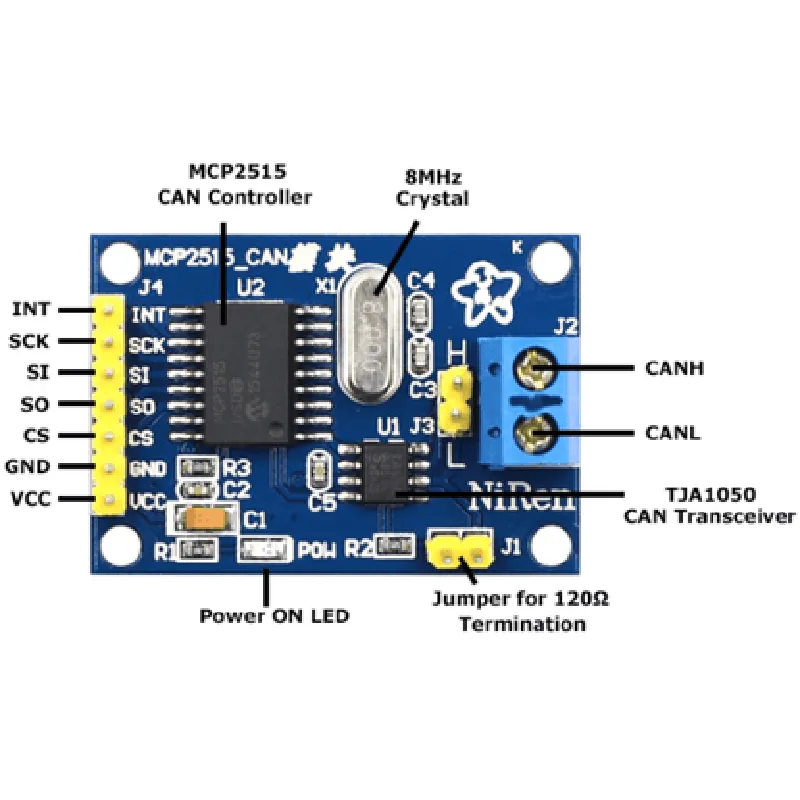
  • MCP2515 Can Bus Module Board TJA1050 Receiver SPI for 51 MCU Arm Controller Pinout Explanation
  • The MCP2515 Can Bus Module Board is a popular IoT component used for implementing CAN (Controller Area Network) bus communication in microcontroller-based projects. Here's a detailed explanation of each pin on the module:
  • Pinout:
  • 1. VCC (Power Supply):
  • Pin description: Power supply pin for the module.
  • Voltage range: 5V (typical)
  • Connection: Connect to a 5V power source or a voltage regulator output.
  • 2. GND (Ground):
  • Pin description: Ground pin for the module.
  • Connection: Connect to the ground pin of the power source or a common ground point.
  • 3. SCK (SPI Clock):
  • Pin description: Serial Clock input for SPI communication.
  • Connection: Connect to the SCK pin of the microcontroller (e.g., 51 MCU Arm Controller).
  • 4. SI (SPI Input):
  • Pin description: Serial Input for SPI communication.
  • Connection: Connect to the MOSI (Master Out Slave In) pin of the microcontroller.
  • 5. SO (SPI Output):
  • Pin description: Serial Output for SPI communication.
  • Connection: Connect to the MISO (Master In Slave Out) pin of the microcontroller.
  • 6. CS (SPI Chip Select):
  • Pin description: Chip Select input for SPI communication.
  • Connection: Connect to a digital output pin of the microcontroller, which should be set low to enable communication with the MCP2515.
  • 7. INT (Interrupt Output):
  • Pin description: Interrupt output pin, which can be used to signal the microcontroller when a CAN bus event occurs.
  • Connection: Connect to a digital input pin of the microcontroller, which can be configured to trigger an interrupt when the INT pin goes low.
  • 8. CANH (CAN Bus High):
  • Pin description: CAN bus high signal pin.
  • Connection: Connect to the CAN bus high wire of the CAN bus network.
  • 9. CANL (CAN Bus Low):
  • Pin description: CAN bus low signal pin.
  • Connection: Connect to the CAN bus low wire of the CAN bus network.
  • TJA1050 Receiver Pins:
  • 10. VCC1 (Power Supply for TJA1050):
  • Pin description: Power supply pin for the TJA1050 receiver.
  • Voltage range: 5V (typical)
  • Connection: Connect to a 5V power source or a voltage regulator output.
  • 11. GND1 (Ground for TJA1050):
  • Pin description: Ground pin for the TJA1050 receiver.
  • Connection: Connect to the ground pin of the power source or a common ground point.
  • Connecting the Pins:
  • To connect the pins, follow these steps:
  • 1. Connect the VCC pin to a 5V power source or a voltage regulator output.
  • 2. Connect the GND pin to the ground pin of the power source or a common ground point.
  • 3. Connect the SCK pin to the SCK pin of the microcontroller.
  • 4. Connect the SI pin to the MOSI pin of the microcontroller.
  • 5. Connect the SO pin to the MISO pin of the microcontroller.
  • 6. Connect the CS pin to a digital output pin of the microcontroller.
  • 7. Connect the INT pin to a digital input pin of the microcontroller.
  • 8. Connect the CANH pin to the CAN bus high wire of the CAN bus network.
  • 9. Connect the CANL pin to the CAN bus low wire of the CAN bus network.
  • 10. Connect the VCC1 pin to a 5V power source or a voltage regulator output.
  • 11. Connect the GND1 pin to the ground pin of the power source or a common ground point.
  • Note:
  • Make sure to use a suitable voltage regulator or power source to power the module.
  • Use a reliable CAN bus transceiver (e.g., TJA1050) to connect the module to the CAN bus network.
  • Consult the datasheets for the MCP2515 and TJA1050 for more detailed information on pin functionalities and connection requirements.
  • Ensure proper decoupling capacitors are used to filter noise and prevent signal distortion.

Code Examples

MCP2515 CAN Bus Module Board TJA1050 Receiver SPI for 51 MCU Arm Controller
Overview
The MCP2515 CAN Bus Module Board is a popular and widely used component in IoT and automotive applications. It is aMicrochip MCP2515 CAN controller with a TJA1050 CAN transceiver, allowing for high-speed (up to 1Mb/s) communication over the CAN bus. The module uses SPI (Serial Peripheral Interface) communication protocol to interact with microcontrollers.
Hardware Specifications
Microchip MCP2515 CAN controller
 TJA1050 CAN transceiver
 SPI communication interface
 5V operating voltage
 Compatible with 51 MCU Arm controllers
Software Interface
The MCP2515 CAN Bus Module Board can be controlled using SPI commands. The module operates in three modes: Normal Mode, Sleep Mode, and Configuration Mode.
SPI Commands
`0x00`: Read RX Buffer (RX FIFO)
 `0x01`: Read Status Register
 `0x02`: Write TX Buffer (TX FIFO)
 `0x03`: Write Control Register
 `0x04`: Write Status Register
 `0x05`: Read Bypass Register
 `0x06`: Write Bypass Register
 `0x07`: Read Mode Register
 `0x08`: Write Mode Register
Code Examples
### Example 1: Basic SPI Communication using Arduino
This example demonstrates basic SPI communication between an Arduino board and the MCP2515 CAN Bus Module Board.
```cpp
#include <SPI.h>
#define MCP2515_CS 10 // Define the Chip Select pin for the MCP2515
void setup() {
  SPI.begin(); // Initialize SPI
  pinMode(MCP2515_CS, OUTPUT); // Set Chip Select as output
}
void loop() {
  digitalWrite(MCP2515_CS, LOW); // Select the MCP2515
  SPI.transfer(0x00); // Send command to read RX Buffer
  uint8_t rxData = SPI.transfer(0x00); // Read RX Buffer
  digitalWrite(MCP2515_CS, HIGH); // Deselect the MCP2515
Serial.print("Received Data: ");
  Serial.println(rxData, HEX);
  delay(1000);
}
```
### Example 2: Sending a CAN Message using a 51 MCU Arm Controller (Keil Vision)
This example demonstrates how to send a CAN message using a 51 MCU Arm controller.
```c
#include <mcp2515.h>
#define MCP2515_CS P1.0 // Define the Chip Select pin for the MCP2515
#define CAN_ID 0x101 // Define the CAN ID for the message
#define CAN_DATA 0x12 0x34 0x56 0x78 // Define the CAN data bytes
void main() {
  MCP2515_Init(MCP2515_CS); // Initialize the MCP2515
  MCP2515_SetMode(MODE_NORMAL); // Set the MCP2515 to Normal Mode
// Create a CAN message structure
  CAN_Msg msg;
  msg.id = CAN_ID;
  msg.header.rtr = 0; // Data frame
  msg.header.ext = 0; // Standard ID
  msg.data[0] = CAN_DATA;
// Send the CAN message
  MCP2515_SendMsg(MCP2515_CS, &msg);
while(1) {}
}
```
### Example 3: Receiving a CAN Message using a 51 MCU Arm Controller (Keil Vision)
This example demonstrates how to receive a CAN message using a 51 MCU Arm controller.
```c
#include <mcp2515.h>
#define MCP2515_CS P1.0 // Define the Chip Select pin for the MCP2515
void main() {
  MCP2515_Init(MCP2515_CS); // Initialize the MCP2515
  MCP2515_SetMode(MODE_NORMAL); // Set the MCP2515 to Normal Mode
while(1) {
    // Check if a message is available in the RX Buffer
    if (MCP2515_GetStatus(MCP2515_CS) & MCP2515_STATUS_RX.BufferFull) {
      CAN_Msg msg;
      MCP2515_ReceiveMsg(MCP2515_CS, &msg); // Receive the CAN message
// Process the received CAN message
      printf("Received CAN ID: 0x%X
", msg.id);
      printf("Received CAN Data: ");
      for (uint8_t i = 0; i < 8; i++) {
        printf("0x%X ", msg.data[i]);
      }
      printf("
");
    }
  }
}
```
Note: The code examples provided are for illustrative purposes only and may require modifications to work with your specific setup and requirements.