

Stufin
Home Quick Cart Profile

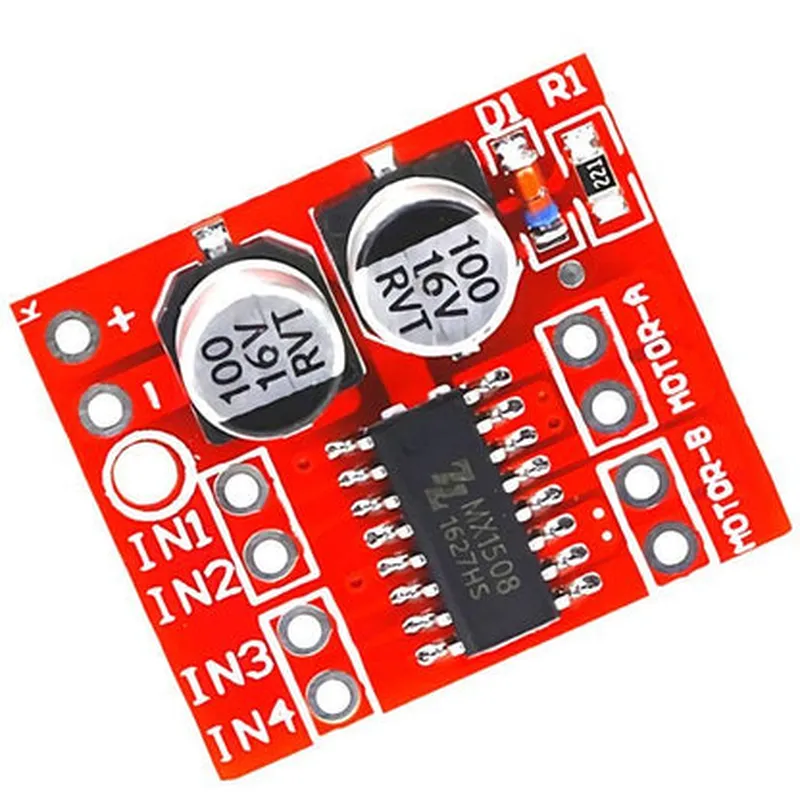
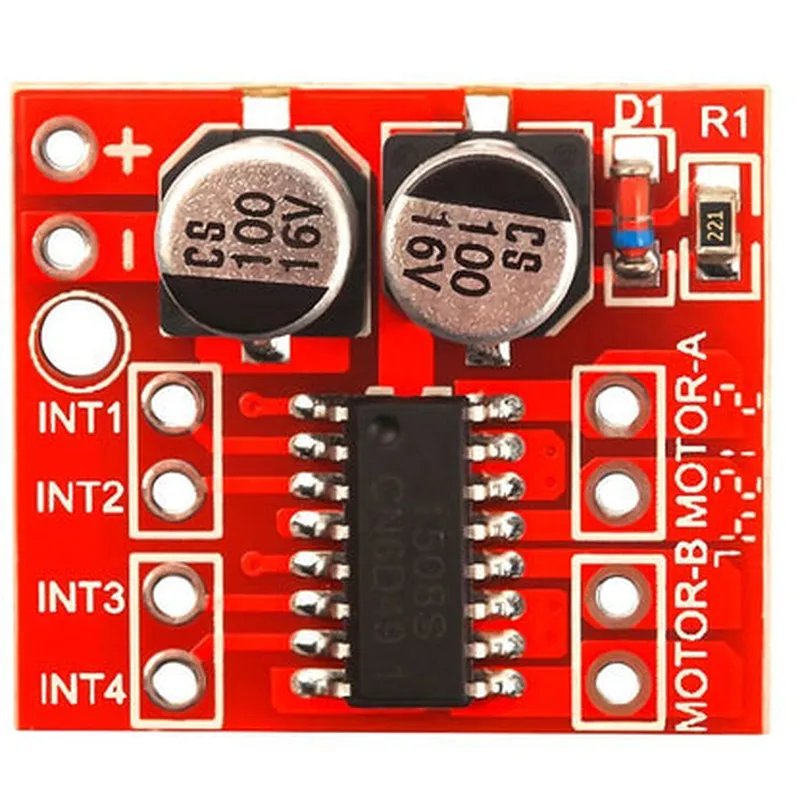
DC Motor Drive Module 2 Channel Reversing PWM Speed Dual H Bridge Stepper Controller

Buy Now on Stufin

Input Voltage

10-24V

Output Current

Up to 2A per channel

PWM Frequency

20-100 kHz

Logic Level

3.3-5V

Operating Temperature

-20C to 80C

Dimensions

43.5 x 29.5 mm (1.71 x 1.16 in)

Pinout

The module features a 10-pin interface with the following pinout

VIN

Input voltage (10-24V)

GND

Ground

ENA

Enable signal for Channel 1

DIR1Direction signal for Channel 1
PWM1PWM signal for Channel 1
ENA2Enable signal for Channel 2
DIR2Direction signal for Channel 2
PWM2PWM signal for Channel 2

VCC

3.3-5V logic level voltage output

Applications

Robotics and robotic arms

CNC machines and milling machines

3D printers and laser engravers

Automation systems and industrial control systems

Smart home and IoT projects

Important Notes

The module requires an external power supply and a microcontroller for operation.

proper heat dissipation and current limiting measures should be taken to prevent overheating and damage to the module.

The module is not suitable for high-torque or high-power motor applications.

Pin Configuration

  • DC Motor Drive Module 2 Channel Reversing PWM Speed Dual H Bridge Stepper Controller
  • Pin Description
  • The DC Motor Drive Module 2 Channel Reversing PWM Speed Dual H Bridge Stepper Controller has a total of 16 pins, which can be categorized into three main groups: Power Supply, Control Signals, and Motor Outputs. Below is a detailed description of each pin:
  • Power Supply (4 pins)
  • 1. VIN (Voltage Input): This pin is used to supply power to the module. It can accept a DC voltage between 5V to 36V. Make sure to connect a capacitor (e.g., 10uF) between VIN and GND to filter out noise.
  • 2. GND (Ground): This is the ground terminal of the module. It should be connected to the negative terminal of the power supply and the GND of the microcontroller (if used).
  • 3. VCC (Voltage Regulator Output): This pin provides a regulated 5V output, which can be used to power external devices such as sensors, microcontrollers, or other modules. The maximum current output is 100mA.
  • 4. EN (Enable): This pin is used to enable or disable the motor drive module. When EN is set to HIGH (logical 1), the module is enabled, and when set to LOW (logical 0), the module is disabled.
  • Control Signals (6 pins)
  • 1. DIRA (Direction A): This pin controls the direction of Motor A. A HIGH signal (logical 1) sets the motor to rotate clockwise, while a LOW signal (logical 0) sets it to rotate counterclockwise.
  • 2. PWMA (Pulse Width Modulation A): This pin receives the PWM signal to control the speed of Motor A. The PWM frequency should be between 1 kHz to 100 kHz.
  • 3. DIRB (Direction B): This pin controls the direction of Motor B. A HIGH signal (logical 1) sets the motor to rotate clockwise, while a LOW signal (logical 0) sets it to rotate counterclockwise.
  • 4. PWMB (Pulse Width Modulation B): This pin receives the PWM signal to control the speed of Motor B. The PWM frequency should be between 1 kHz to 100 kHz.
  • 5. FAULT (Fault Detection): This pin is an open-drain output that indicates a fault condition, such as overcurrent or overheating, in the motor drive module. It should be connected to a pull-up resistor (e.g., 10k) and then to the microcontroller's input pin.
  • 6. BRK (Brake): This pin is used to brake the motor. When BRK is set to HIGH (logical 1), the motor will brake. When set to LOW (logical 0), the motor will coast to a stop.
  • Motor Outputs (6 pins)
  • 1. MOTA+ (Motor A Positive): This pin is the positive output terminal for Motor A.
  • 2. MOTA- (Motor A Negative): This pin is the negative output terminal for Motor A.
  • 3. MOTB+ (Motor B Positive): This pin is the positive output terminal for Motor B.
  • 4. MOTB- (Motor B Negative): This pin is the negative output terminal for Motor B.
  • Connection Diagram
  • Here is a suggested connection diagram for the DC Motor Drive Module:
  • ```
  • +-----------+
  • | Power |
  • | Supply |
  • +-----------+
  • |
  • |
  • v
  • +-----------+
  • | VIN | GND |
  • | (5-36V) | |
  • +-----------+
  • |
  • |
  • v
  • +-----------+
  • | VCC | EN |
  • | (5V) | |
  • +-----------+
  • |
  • |
  • v
  • +-----------+
  • | DIRA | PWMA | DIRB | PWMB |
  • | | | | |
  • +-----------+
  • |
  • |
  • v
  • +-----------+
  • | FAULT | BRK |
  • | | |
  • +-----------+
  • |
  • |
  • v
  • +-----------+
  • | MOTA+ | MOTA- | MOTB+ | MOTB- |
  • | | | | |
  • +-----------+
  • ```
  • Notes
  • When using the module, make sure to connect the motor outputs (MOTA+/MOTA-, MOTB+/MOTB-) to the corresponding motor terminals.
  • Always use a suitable heatsink for the module, especially when driving high-current motors.
  • The module can handle up to 2A per channel, but it's recommended to use a current limiter or a fuse to prevent overheating.
  • The module's input pins (DIRA, PWMA, DIRB, PWMB, EN, BRK) should be connected to the microcontroller's output pins or other compatible control signals.
  • The module's output pins (MOTA+, MOTA-, MOTB+, MOTB-) should be connected to the motor terminals.
  • By following this documentation, you should be able to connect the DC Motor Drive Module 2 Channel Reversing PWM Speed Dual H Bridge Stepper Controller correctly and start experimenting with motor control projects.

Code Examples

DC Motor Drive Module 2 Channel Reversing PWM Speed Dual H Bridge Stepper Controller Documentation
Component Overview
The DC Motor Drive Module 2 Channel Reversing PWM Speed Dual H Bridge Stepper Controller is a versatile module designed to control the speed and direction of two DC motors or one stepper motor. The module features two-channel H-bridge drivers, enabling bi-directional motor control with PWM (Pulse-Width Modulation) speed regulation.
Pinout and Connections
| Pin | Function |
| --- | --- |
| VCC | Power supply (5V to 24V) |
| GND | Ground |
| ENA | Enable pin for motor channel A |
| IN1 | Input pin for motor channel A |
| IN2 | Input pin for motor channel A |
| ENB | Enable pin for motor channel B |
| IN3 | Input pin for motor channel B |
| IN4 | Input pin for motor channel B |
| VOUTA | Motor channel A output |
| VOUTB | Motor channel B output |
Programming Examples
### Example 1: Controlling Two DC Motors with Arduino
In this example, we'll demonstrate how to control two DC motors using an Arduino board.
Hardware Requirements:
Arduino Board (e.g., Arduino Uno)
 DC Motor Drive Module 2 Channel Reversing PWM Speed Dual H Bridge Stepper Controller
 Two DC motors
Arduino Code:
```c++
const int enA = 2;  // Enable pin for motor channel A
const int in1 = 3;  // Input pin for motor channel A
const int in2 = 4;  // Input pin for motor channel A
const int enB = 5;  // Enable pin for motor channel B
const int in3 = 6;  // Input pin for motor channel B
const int in4 = 7;  // Input pin for motor channel B
void setup() {
  pinMode(enA, OUTPUT);
  pinMode(in1, OUTPUT);
  pinMode(in2, OUTPUT);
  pinMode(enB, OUTPUT);
  pinMode(in3, OUTPUT);
  pinMode(in4, OUTPUT);
}
void loop() {
  // Set motor channel A to move forward at 50% speed
  digitalWrite(enA, HIGH);
  digitalWrite(in1, HIGH);
  digitalWrite(in2, LOW);
  analogWrite(enA, 128);  // 50% speed (0-255)
// Set motor channel B to move backward at 75% speed
  digitalWrite(enB, HIGH);
  digitalWrite(in3, LOW);
  digitalWrite(in4, HIGH);
  analogWrite(enB, 191);  // 75% speed (0-255)
delay(2000);
// Stop both motors
  digitalWrite(enA, LOW);
  digitalWrite(enB, LOW);
  delay(1000);
}
```
### Example 2: Controlling a Stepper Motor with Raspberry Pi (Python)
In this example, we'll demonstrate how to control a stepper motor using a Raspberry Pi board with Python.
Hardware Requirements:
Raspberry Pi Board
 DC Motor Drive Module 2 Channel Reversing PWM Speed Dual H Bridge Stepper Controller
 Stepper motor
Python Code:
```python
import RPi.GPIO as GPIO
import time
# Set up GPIO library
GPIO.setmode(GPIO.BCM)
# Define pins for stepper motor control
ena = 17  # Enable pin for stepper motor
in1 = 23  # Input pin for stepper motor
in2 = 24  # Input pin for stepper motor
# Set up GPIO pins as outputs
GPIO.setup(ena, GPIO.OUT)
GPIO.setup(in1, GPIO.OUT)
GPIO.setup(in2, GPIO.OUT)
try:
    while True:
        # Set stepper motor to move clockwise at 50% speed
        GPIO.output(ena, GPIO.HIGH)
        GPIO.output(in1, GPIO.HIGH)
        GPIO.output(in2, GPIO.LOW)
        time.sleep(0.01)  # 50% speed (adjust for desired speed)
# Set stepper motor to move counterclockwise at 75% speed
        GPIO.output(ena, GPIO.HIGH)
        GPIO.output(in1, GPIO.LOW)
        GPIO.output(in2, GPIO.HIGH)
        time.sleep(0.005)  # 75% speed (adjust for desired speed)
# Stop stepper motor
        GPIO.output(ena, GPIO.LOW)
        time.sleep(1)
except KeyboardInterrupt:
    # Clean up GPIO pins
    GPIO.cleanup()
```
Note: In this example, we're using the RPi.GPIO library for Python. Make sure to install it before running the script.