Stufin
Home Quick Cart Profile

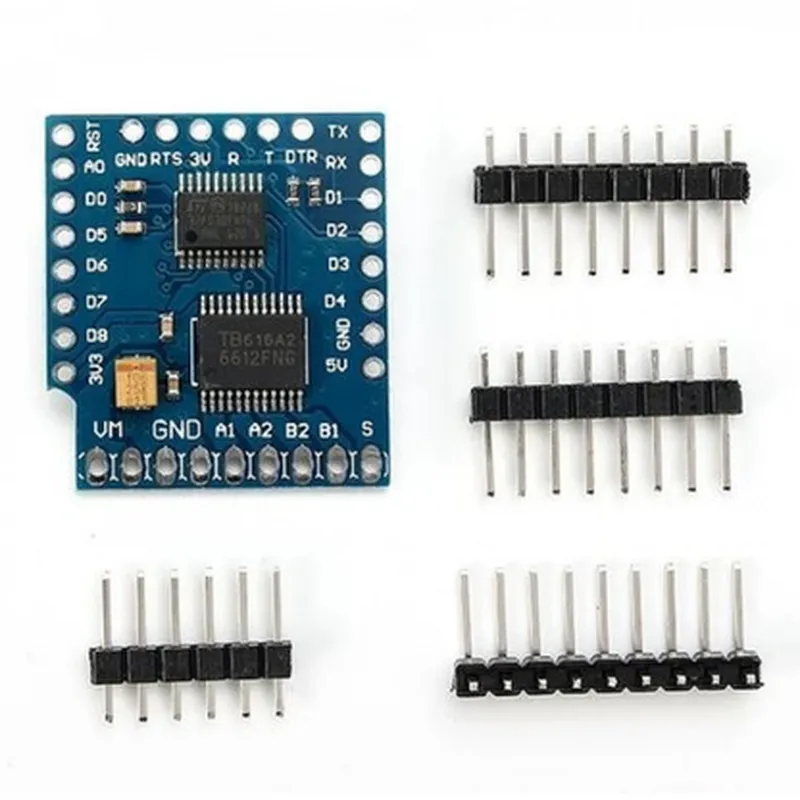
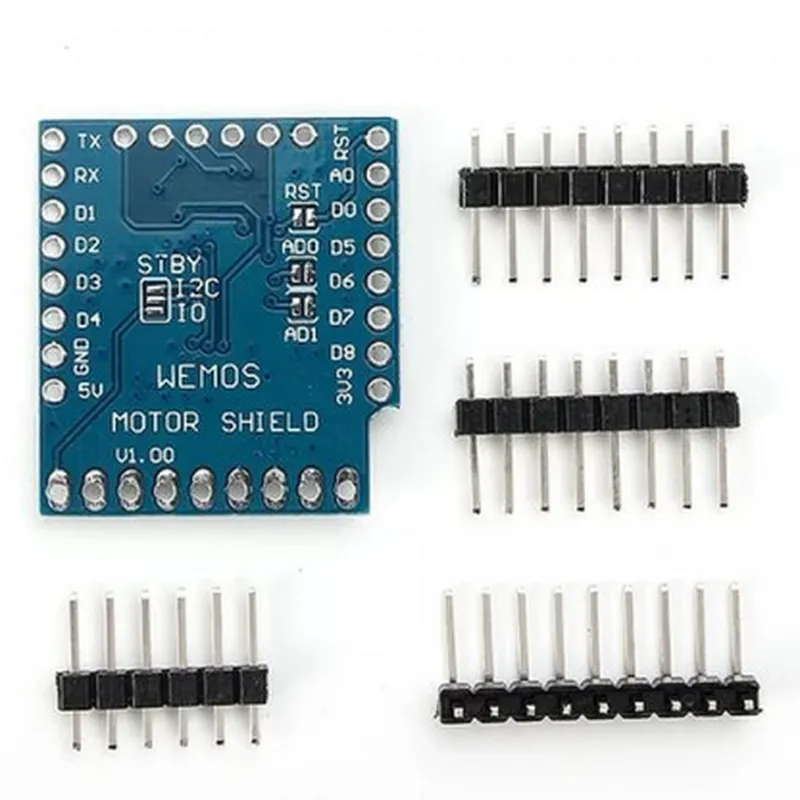
Wemos D1 Mini I2C Dual Motor Driver Shield

Buy Now on Stufin

The shield can operate in two primary modes

  • Independent Mode: Each motor can be controlled independently, allowing for precise speed and direction control.
  • Synchronous Mode: Both motors can be controlled simultaneously, enabling the shield to perform synchronized movements, such as wheelchair or robotic movements.

Key Features

  • Dual Motor Support: The shield can control two DC motors simultaneously, with a maximum current rating of 2A per motor.
  • I2C Interface: The shield uses the I2C communication protocol, providing a simple and efficient interface for communicating with the motor driver.
  • Pulse-Width Modulation (PWM): The shield supports PWM, allowing for precise speed control of the motors.
  • Direction Control: The shield provides direction control for each motor, enabling forward, reverse, and stop movements.
  • Overcurrent Protection: The shield features overcurrent protection, which prevents damage to the motors and the shield in case of excessive current draw.
  • Voltage Range: The shield operates within a voltage range of 5V to 15V, making it compatible with a wide range of power sources.
  • Compact Design: The shield is designed to be compact and lightweight, making it ideal for space-constrained projects.
  • Easy Installation: The shield is designed to be easily installed on top of the Wemos D1 Mini microcontroller board, with no soldering required.

Technical Specifications

Operating Voltage

5V to 15V

Maximum Current per Motor

2A

I2C Clock Frequency100 kHz to 400 kHz

PWM Frequency

20 kHz to 100 kHz

Motor Control Interface

I2C

Dimensions

35mm x 25mm x 15mm

Weight

10g

Application Ideas

  • Robotics: Use the Wemos D1 Mini I2C Dual Motor Driver Shield to control robotic movements, such as wheel movements or robotic arms.
  • Automation: Utilize the shield to automate machinery or equipment that require motorized movements.
  • IoT Projects: Integrate the shield into IoT projects that require motorized movements, such as smart home automation or industrial control systems.

Conclusion

The Wemos D1 Mini I2C Dual Motor Driver Shield is a versatile and compact motor driver shield that provides a convenient and easy-to-use interface for controlling two DC motors. With its I2C interface, PWM, and direction control, this shield is an ideal component for a wide range of robotics, automation, and IoT projects.

Pin Configuration

  • Wemos D1 Mini I2C Dual Motor Driver Shield Pinout Guide
  • The Wemos D1 Mini I2C Dual Motor Driver Shield is a compact and versatile motor driver shield designed specifically for the Wemos D1 Mini board. It allows users to control two DC motors or one stepper motor using the I2C communication protocol. Here's a detailed explanation of each pin on the shield, along with their connections and functionalities:
  • Pinout:
  • 1. VIN (Pin 1)
  • Function: Power input for the motor driver shield
  • Description: Connect an external power source (e.g., a battery or a wall adapter) to this pin.
  • Notes: The voltage range for VIN is 5V to 24V.
  • 2. GND (Pin 2)
  • Function: Ground connection for the motor driver shield
  • Description: Connect the negative terminal of the power source to this pin.
  • 3. SCL (Pin 3)
  • Function: I2C clock signal
  • Description: Connect to the SCL pin on the Wemos D1 Mini board.
  • 4. SDA (Pin 4)
  • Function: I2C data signal
  • Description: Connect to the SDA pin on the Wemos D1 Mini board.
  • 5. M1A (Pin 5)
  • Function: Motor 1 output A
  • Description: Connect to one terminal of Motor 1 (e.g., the positive terminal).
  • 6. M1B (Pin 6)
  • Function: Motor 1 output B
  • Description: Connect to the other terminal of Motor 1 (e.g., the negative terminal).
  • 7. M2A (Pin 7)
  • Function: Motor 2 output A
  • Description: Connect to one terminal of Motor 2 (e.g., the positive terminal).
  • 8. M2B (Pin 8)
  • Function: Motor 2 output B
  • Description: Connect to the other terminal of Motor 2 (e.g., the negative terminal).
  • 9. VCC (Pin 9)
  • Function: Power output for the Wemos D1 Mini board
  • Description: Connect to the VCC pin on the Wemos D1 Mini board.
  • 10. GND (Pin 10)
  • Function: Ground connection for the Wemos D1 Mini board
  • Description: Connect to the GND pin on the Wemos D1 Mini board.
  • Connection Structure:
  • To use the Wemos D1 Mini I2C Dual Motor Driver Shield, follow these steps:
  • 1. Connect the VIN pin to an external power source (e.g., a battery or a wall adapter).
  • 2. Connect the GND pin to the negative terminal of the power source.
  • 3. Connect the SCL and SDA pins to the corresponding pins on the Wemos D1 Mini board.
  • 4. Connect the M1A and M1B pins to the terminals of Motor 1.
  • 5. Connect the M2A and M2B pins to the terminals of Motor 2 (if using two motors) or to the stepper motor connections (if using a single stepper motor).
  • 6. Connect the VCC and GND pins to the corresponding pins on the Wemos D1 Mini board.
  • Notes:
  • Ensure that the power source is within the recommended voltage range (5V to 24V) for the motor driver shield.
  • Use the correct polarity when connecting the motors to the MxA and MxB pins.
  • Consult the datasheet for the specific motor you are using to ensure correct connections and configurations.
  • By following these guidelines, you can successfully integrate the Wemos D1 Mini I2C Dual Motor Driver Shield into your IoT project and control your motors with ease.

Code Examples

Wemos D1 Mini I2C Dual Motor Driver Shield Documentation
Overview
The Wemos D1 Mini I2C Dual Motor Driver Shield is a compact and versatile motor control solution designed specifically for the Wemos D1 Mini development board. This shield allows users to control two DC motors simultaneously, making it an ideal choice for robotics, automation, and IoT projects. The shield utilizes the I2C communication protocol, ensuring efficient and reliable motor control.
Features
Dual DC motor control: Supports two DC motors with a maximum current of 1.5A each
 I2C communication protocol: Simplifies motor control and reduces wiring complexity
 Compatible with Wemos D1 Mini development board
 Compact design: Easy to integrate into robotic and automation projects
 5V operating voltage: Compatible with most motor applications
Pinout
The Wemos D1 Mini I2C Dual Motor Driver Shield has the following pinout:
VCC: 5V power input
 GND: Ground
 SCL: I2C clock signal
 SDA: I2C data signal
 M1A, M1B: Motor 1 output terminals
 M2A, M2B: Motor 2 output terminals
Code Examples
### Example 1: Basic Motor Control using Arduino
This example demonstrates how to control a single motor using the Wemos D1 Mini I2C Dual Motor Driver Shield. The motor will rotate in both clockwise and counterclockwise directions.
```c++
#include <Wire.h> // Include I2C library
#define MOTOR_DRIVER_ADDRESS 0x60 // I2C address of the motor driver shield
void setup() {
  Wire.begin(); // Initialize I2C
}
void loop() {
  // Set motor 1 to rotate clockwise
  Wire.beginTransmission(MOTOR_DRIVER_ADDRESS);
  Wire.write(0x00); // Command to set motor 1 direction
  Wire.write(0x01); // Set motor 1 to rotate clockwise
  Wire.endTransmission();
delay(1000); // Wait 1 second
// Set motor 1 to rotate counterclockwise
  Wire.beginTransmission(MOTOR_DRIVER_ADDRESS);
  Wire.write(0x00); // Command to set motor 1 direction
  Wire.write(0x02); // Set motor 1 to rotate counterclockwise
  Wire.endTransmission();
delay(1000); // Wait 1 second
}
```
### Example 2: Controlling Two Motors using Python (MicroPython)
This example demonstrates how to control two motors simultaneously using the Wemos D1 Mini I2C Dual Motor Driver Shield and MicroPython.
```python
import machine
import utime
# Initialize I2C
i2c = machine.I2C(scl=machine.Pin(5), sda=machine.Pin(4))
# I2C address of the motor driver shield
motor_driver_address = 0x60
def set_motor(motor, direction):
  # Set motor direction (1 for clockwise, 2 for counterclockwise)
  i2c.writeto(motor_driver_address, bytearray([0x00, direction]))
while True:
  # Set motor 1 to rotate clockwise
  set_motor(1, 1)
  # Set motor 2 to rotate counterclockwise
  set_motor(2, 2)
  utime.sleep(1) # Wait 1 second
# Set motor 1 to rotate counterclockwise
  set_motor(1, 2)
  # Set motor 2 to rotate clockwise
  set_motor(2, 1)
  utime.sleep(1) # Wait 1 second
```
### Example 3: Motor Speed Control using Lua (NodeMCU)
This example demonstrates how to control the speed of a single motor using the Wemos D1 Mini I2C Dual Motor Driver Shield and NodeMCU Lua.
```lua
i2c.setup(0, 5, 4) -- Initialize I2C on pins 5 and 4
local motor_driver_address = 0x60
function set_motor_speed(motor, speed)
  -- Set motor speed (0-255)
  i2c.start(0)
  i2c.address(motor_driver_address, i2c.TRANSMITTER)
  i2c.write(string.char(0x01, speed)) -- Command to set motor speed
  i2c.stop()
end
while true do
  -- Set motor 1 speed to 128 (half speed)
  set_motor_speed(1, 128)
  tmr.delay(1000000) -- Wait 1 second
-- Set motor 1 speed to 255 (full speed)
  set_motor_speed(1, 255)
  tmr.delay(1000000) -- Wait 1 second
end
```
Notes
In the above examples, the I2C address of the motor driver shield is assumed to be 0x60. Please check the specific address of your shield and update the code accordingly.
 The motor driver shield uses a 5V operating voltage, so ensure that your power supply matches this requirement.
 When using the motor driver shield, ensure that the motor connections are secure and properly insulated to prevent electrical shock or short circuits.