Stufin
Home Quick Cart Profile

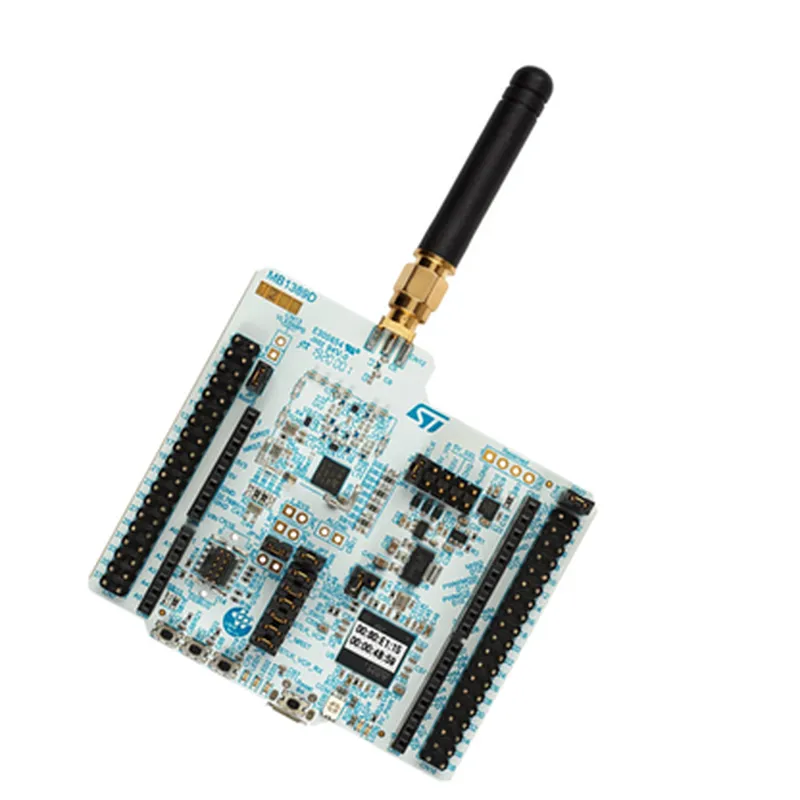
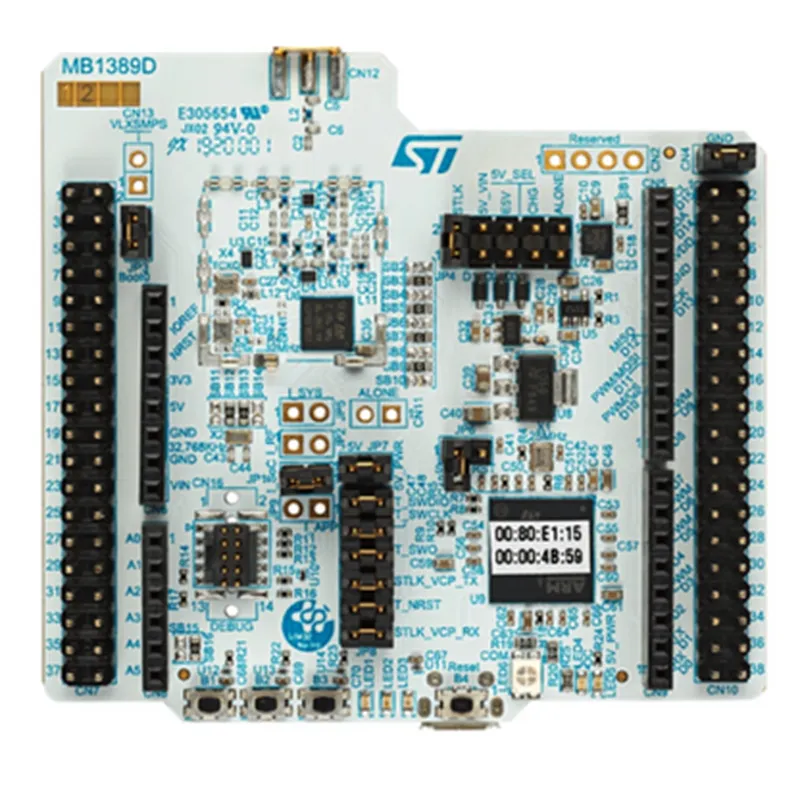
STMicroelectronics NUCLEO-WL55JC1

Buy Now on Stufin

Power supply options

USB, battery, or external power source

On-board PCB antenna for Wi-Fi and BLE

Functionality

The NUCLEO-WL55JC1 is designed to facilitate the development of IoT applications requiring wireless connectivity, low power consumption, and a high degree of integration. The board's Wi-Fi and Bluetooth capabilities make it suitable for a wide range of applications, including

IoT devices (e.g., smart sensors, wearable devices)

Industrial control and automation systems

Medical devices

Smart home devices

Wireless sensor networks

The board's microcontroller and peripherals provide a high degree of flexibility and customization, allowing developers to tailor their applications to specific requirements. The development board is supported by a comprehensive set of software tools, including the STM32CubeMX initialization code generator, STM32CubeWL MCU package, and Keil Vision development environment.

Overall, the NUCLEO-WL55JC1 provides a powerful and flexible platform for the development of wireless IoT applications, offering a unique combination of wireless connectivity, low power consumption, and high-performance processing.

Pin Configuration

  • STMicroelectronics NUCLEO-WL55JC1 Documentation
  • Pinout Description
  • The STMicroelectronics NUCLEO-WL55JC1 is a development board for IoT and wireless applications, featuring the STM32WL55JC microcontroller. The board has a total of 104 pins, including power supply, communication interfaces, and GPIOs. Here is a detailed description of each pin:
  • Power Supply Pins
  • 1. VIN (Pin 1): Input voltage pin for the board's power supply (range: 2V to 5.5V).
  • 2. VDD (Pin 2): Power supply pin for the microcontroller (3.3V).
  • 3. GND (Pins 3, 4, 5, and 6): Ground pins for the board.
  • 4. VBAT (Pin 7): Battery voltage pin for the microcontroller's backup power domain.
  • Communication Interfaces
  • 1. USB_D+ (Pin 13): USB data plus signal.
  • 2. USB_D- (Pin 14): USB data minus signal.
  • 3. UART1_TX (Pin 15): UART1 transmit pin.
  • 4. UART1_RX (Pin 16): UART1 receive pin.
  • 5. UART2_TX (Pin 23): UART2 transmit pin.
  • 6. UART2_RX (Pin 24): UART2 receive pin.
  • 7. SPI1_SCK (Pin 25): SPI1 clock pin.
  • 8. SPI1_MISO (Pin 26): SPI1 master in slave out pin.
  • 9. SPI1_MOSI (Pin 27): SPI1 master out slave in pin.
  • 10. SPI1_NSS (Pin 28): SPI1 slave select pin.
  • 11. I2C1_SCL (Pin 29): I2C1 clock pin.
  • 12. I2C1_SDA (Pin 30): I2C1 data pin.
  • 13. I2C2_SCL (Pin 31): I2C2 clock pin.
  • 14. I2C2_SDA (Pin 32): I2C2 data pin.
  • 15. LPUART1_TX (Pin 33): LPUART1 transmit pin.
  • 16. LPUART1_RX (Pin 34): LPUART1 receive pin.
  • General-Purpose Input/Output (GPIO) Pins
  • 1. PA0 (Pin 35): GPIO port A, pin 0.
  • 2. PA1 (Pin 36): GPIO port A, pin 1.
  • ...
  • 34. PJ15 (Pin 68): GPIO port J, pin 15.
  • Analog Pins
  • 1. ADC1_IN0 (Pin 69): ADC1 input channel 0.
  • 2. ADC1_IN1 (Pin 70): ADC1 input channel 1.
  • ...
  • 5. ADC1_IN4 (Pin 73): ADC1 input channel 4.
  • Reset and Boot Pins
  • 1. NRST (Pin 74): Active-low reset pin.
  • 2. BOOT0 (Pin 75): Boot configuration pin 0.
  • 3. BOOT1 (Pin 76): Boot configuration pin 1.
  • Debug and Test Pins
  • 1. SWDIO (Pin 77): Serial Wire Debug (SWD) I/O pin.
  • 2. SWCLK (Pin 78): SWD clock pin.
  • 3. TMS (Pin 79): Test mode select pin.
  • 4. TCK (Pin 80): Test clock pin.
  • Wireless Module Pins
  • 1. WL_SPI_SCK (Pin 81): Wireless SPI clock pin.
  • 2. WL_SPI_MISO (Pin 82): Wireless SPI master in slave out pin.
  • 3. WL_SPI_MOSI (Pin 83): Wireless SPI master out slave in pin.
  • 4. WL_SPI_NSS (Pin 84): Wireless SPI slave select pin.
  • 5. WL_UART_TX (Pin 85): Wireless UART transmit pin.
  • 6. WL_UART_RX (Pin 86): Wireless UART receive pin.
  • Other Pins
  • 1. EXT smr (Pin 87): External smile (flash) pin.
  • 2. EXT_REQ (Pin 88): External request pin.
  • 3. EXT_IRQ (Pin 89): External interrupt request pin.
  • Pin Connection Structure
  • When connecting the pins, follow these guidelines:
  • Use a breadboard or a PCB with a compatible pinout to ensure correct connections.
  • Connect power supply pins (VIN, VDD, and GND) to a suitable power source and decoupling capacitors.
  • Connect communication interface pins (USB, UART, SPI, I2C, etc.) to the corresponding peripherals or modules.
  • Connect GPIO pins to sensors, actuators, or other devices according to your application's requirements.
  • Connect analog pins to analog-to-digital converters or sensors.
  • Connect reset and boot pins to the corresponding buttons or configuration pins.
  • Connect debug and test pins to the debug interface (e.g., ST-Link) or test equipment.
  • Connect wireless module pins to the wireless module or antenna.
  • Ensure correct signal routing and avoid signal conflicts when connecting multiple devices.
  • Note: Always refer to the datasheet and user manual for the specific component or module you are connecting to ensure compatibility and correct usage.

Code Examples

Component Documentation: STMicroelectronics NUCLEO-WL55JC1
The STMicroelectronics NUCLEO-WL55JC1 is a development board featuring the WL55JC microcontroller, a dual-core Arm Cortex-M4 and Cortex-M0+ processor. This board is part of the STM32 Nucleo family and provides a comprehensive set of peripherals, making it an ideal choice for IoT, wireless, and battery-powered applications.
Key Features:
Dual-core Arm Cortex-M4 and Cortex-M0+ processor
 1 MB Flash memory and 256 KB SRAM
 Wi-Fi and Bluetooth 5.0 connectivity
 On-board sensors: accelerometer, gyroscope, and magnetometer
 Arduino Uno V3 and ST Zio expansion connectors
 USB Type-C port for power, programming, and debugging
 Power supply options: USB, battery, or external power source
Code Examples:
### Example 1: Wi-Fi Connection and Simple Web Server
This example demonstrates how to connect to a Wi-Fi network and create a simple web server using the NUCLEO-WL55JC1 board.
```c
#include <WiFi.h>
#include <WiFiClient.h>
const char ssid = "your_wifi_ssid"; // Replace with your Wi-Fi SSID
const char password = "your_wifi_password"; // Replace with your Wi-Fi password
WiFiServer server(80); // Create a server on port 80
void setup() {
  Serial.begin(115200);
// Connect to Wi-Fi
  WiFi.begin(ssid, password);
  while (WiFi.status() != WL_CONNECTED) {
    delay(1000);
    Serial.println("Connecting to WiFi...");
  }
Serial.println("Connected to WiFi");
  Serial.println("Starting web server");
server.begin();
}
void loop() {
  WiFiClient client = server.available();
if (client) {
    Serial.println("New client connected");
client.println("HTTP/1.1 200 OK");
    client.println("Content-type:text/html");
    client.println();
    client.println("<html><body><h1>Hello from NUCLEO-WL55JC1!</h1></body></html>");
    client.stop();
  }
}
```
### Example 2: Accelerometer Data Read and Serial Output
This example demonstrates how to read data from the on-board accelerometer (LSM6DSO) and print it to the serial console.
```c
#include <Wire.h>
#include <LSM6DSO.h>
LSM6DSO accelerometer;
void setup() {
  Serial.begin(115200);
  Wire.begin();
if (!accelerometer.begin()) {
    Serial.println("Failed to initialize accelerometer");
    while (1);
  }
}
void loop() {
  int16_t x, y, z;
accelerometer.readAcceleration(x, y, z);
Serial.print("Accelerometer data: ");
  Serial.print("X: ");
  Serial.print(x);
  Serial.print(" Y: ");
  Serial.print(y);
  Serial.print(" Z: ");
  Serial.println(z);
delay(50);
}
```
### Example 3: Bluetooth Low Energy (BLE) Peripheral Mode
This example demonstrates how to use the NUCLEO-WL55JC1 board as a BLE peripheral, advertising a simple service and characteristic.
```c
#include <BLE.h>
BLEService service("YOUR_SERVICE_UUID"); // Replace with your service UUID
BLECharacteristic characteristic("YOUR_CHARACTERISTIC_UUID", BLECharacteristic::PROPERTY_NOTIFY); // Replace with your characteristic UUID
void setup() {
  Serial.begin(115200);
// Initialize BLE
  BLE.begin();
// Set advertisement data
  BLE.setDeviceName("NUCLEO-WL55JC1");
  BLE.setLocalName("NUCLEO-WL55JC1");
  BLE.setAdvertisementData("Nuclo-WL55JC1");
// Add service and characteristic
  BLE.addService(service);
  service.addCharacteristic(characteristic);
// Start advertising
  BLE.advertise();
}
void loop() {
  // Nothing to do here, BLE is handled in the background
  delay(50);
}
```
These examples demonstrate the versatility of the NUCLEO-WL55JC1 board and its potential applications in IoT, wireless, and battery-powered projects.